User manual wM-Bus Dongle SW Tool
The dongle can also be used for non-Kamstrup meters. See appendices for alternative configuration
possibilities. Note that Kamstrup does not offer support if the dongle is used for non-Kamstrup
meters.
3.3
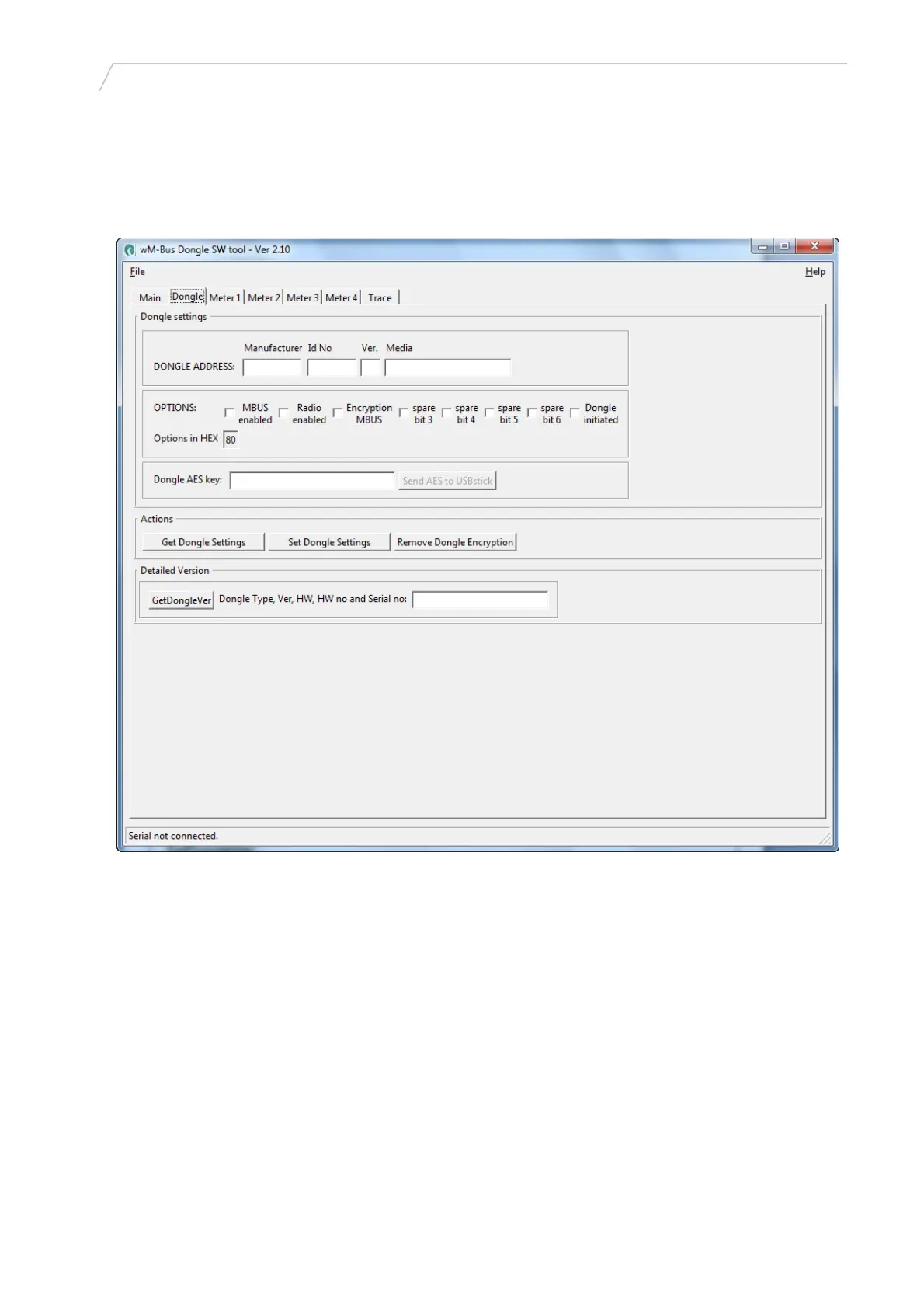
Dongle tab (normally not used for this application)
5512-1057 GB / 12.2011 / A1
Figure 4
[Get Dongle Settings]: Click this button to read the Dongle set-up data and display it in this window.
OPTIONS:
M-Bus enabled: Tick this checkbox for enabling wired M-Bus
Radio enabled: Tick this checkbox for enabling set-up via wireless M-Bus
Encryption M-Bus: Tick this checkbox for enabling encryption via the wired M-Bus
Spare bit 3: Not used
Spare bit 4: Not used
Spare bit 5: Not used
Spare bit 6: Not used
Dongle initiated: Untick this checkbox, and click the [Set Dongle Settings] button under Actions to
reset all data in the Dongle to factory defaults. Click the button again for new use.
Dongle AES key: Not used for this application.
7

 To Next Page
 Loading...