© 2008 D 540e - 02/08 6 of 12
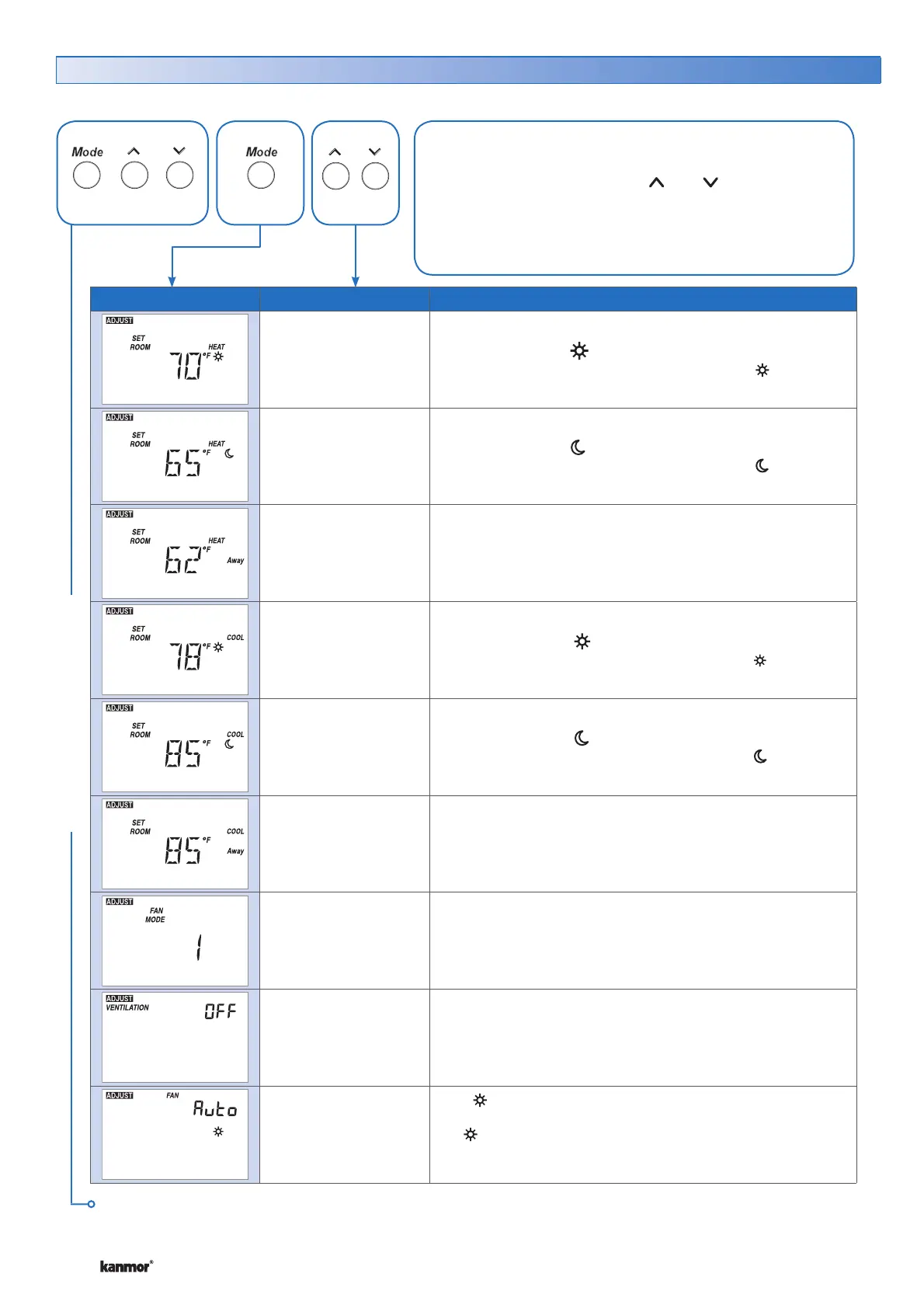
Display Range Description
40 to 85°F
(4.5 to 29.5°C)
Default = 70°F
(21.0°C)
SET ROOM HEAT
Set the room heating temperature while in the event.
40 to 85°F
(4.5 to 29.5°C)
Default = 65°F
(18.5°C)
SET ROOM HEAT
Set the room heating temperature while in the event.
40 to 85°F
(4.5 to 29.5°C)
Default = 62°F
(16.5°C)
SET ROOM HEAT AWAY
Set the room heating temperature while in the Away scene.
40 to 85°F
(4.5 to 29.5°C)
Default = 78°F
(25.5°C)
SET ROOM COOL
Set the room cooling temperature while in the event.
40 to 85°F
(4.5 to 29.5°C)
Default = 85°F
(29.5°C)
SET ROOM COOL
Set the room cooling temperature while in the event.
40 to 85°F
(4.5 to 29.5°C)
Default = 85°F
(29.5°C)
SET ROOM COOL AWAY
Set the room cooling temperature while in the Away scene.
1 or 2
Default = 1
FAN MODE
Select if the fan should operate with cooling (Fan Mode 1), or
with the heating and cooling (Fan Mode 2).
OFF, On
Default = OFF
VENTILATION
Select whether or not ventilation is required.
Auto, 10 to 90%,
On
Default = Auto
FAN
Set the minimum percentage the fan should operate while in
the event. This provides ventilation for the building.
Available when:
• Ventilation is set to On.
Adjust Menu (1 of 2) *for installer use only
These settings are intended for use by the installer only and are
not required for use by average users of the thermostat.
• Press and release the Mode, , and buttons together.
• Press and release the Mode button to go to the next
setting.
• Once all settings are complete, wait 20 seconds for the
thermostat to return to normal operation.
ADJUST MENU
Continued on next page.
Press
+ +
Together


 To Next Page