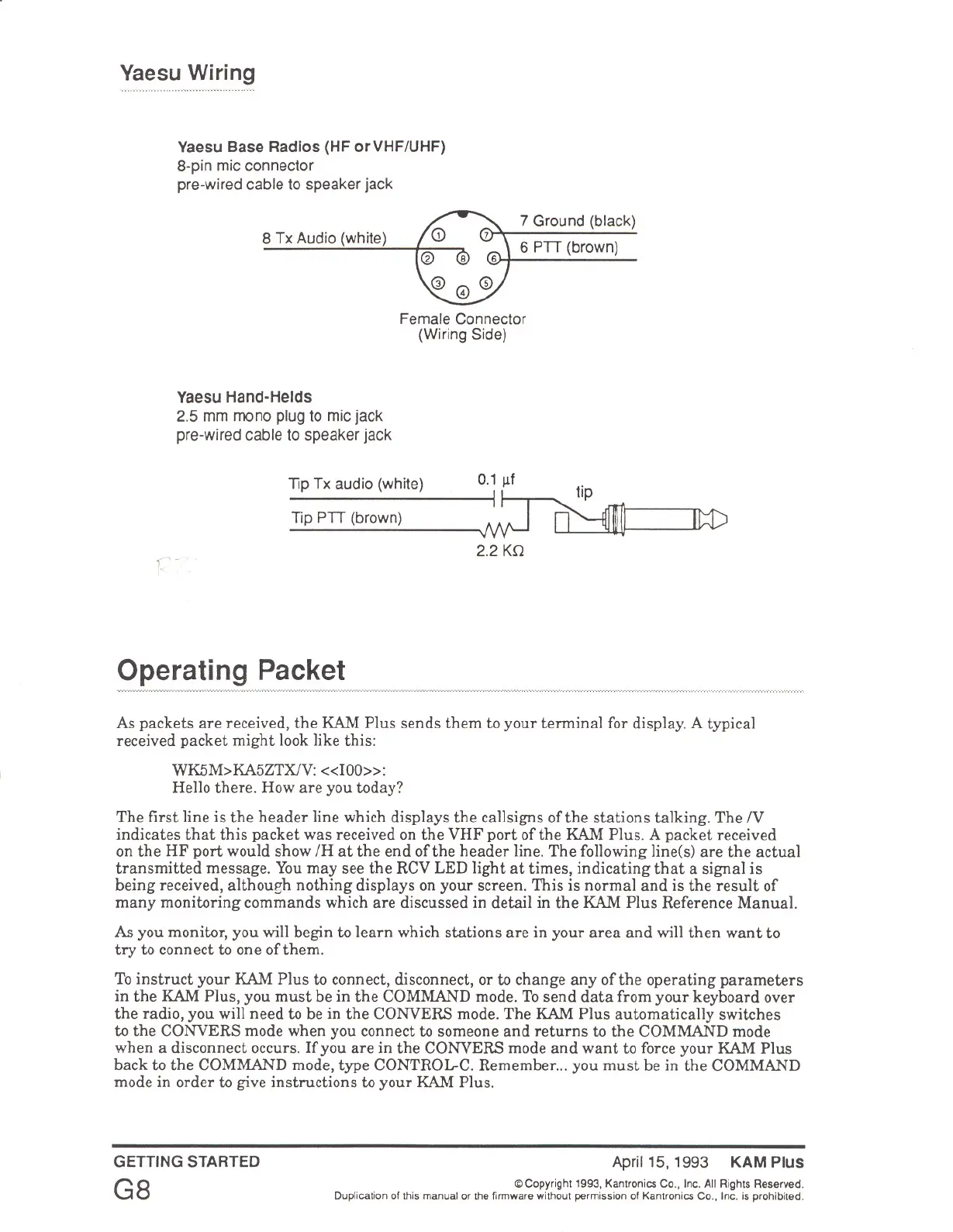
Yaesu Wiring
Yaesu Base Radios (HF orVHF/UHF)
a-pin mic connector
pre-wired cable to speaker jack
a Tx Audio (white)
7 Ground (black)
6 PTT (brown)
Female Connector
(Wiring Side)
Yaesu Hand-Herds
2.5 mm mono plug to mic jack
pre-wired cable to speaker jack
Tip Tx audio (white) 0.111f t'
1~IPmTip PTT (brown) ~ ~ _
2.2 Kn
c·
Operating Packet
As packets are received, the KAM Plus sends them to your terminal for display. A typical
received packet might look like this:
WK5M>KA5ZTXlV: <<l00»:
Hello there. How are you today?
The first line is the header line which displays the callsigns ofthe stations talking. The
N
indicates that this packet was received on the VHF port of the KAM Plus. A packet received
on the HF port would show /H at the end of the header line. The following line(s) are the actual
transmitted message. You may see the RCV LED light at times, indicating that a signal is
being received, althoueh nothing displays on your screen. This is normal and is the result of
many monitoring commands which are discussed in detail in the KAM Plus Reference Manual.
As you monitor, you will begin to learn which stations are in your area and will then want to
try to connect to one of them.
To instruct your KAM Plus to connect, disconnect, or to change any of the operating parameters
in the KAM Plus, you must be in the COMMAND mode. To send data from your keyboard over
the radio, you will need to be in the CONVERS mode. The KAM Plus automatically switches
to the CONVERS mode when you connect to someone and returns to the COMMAND mode
when a disconnect occurs. If you are in the CONVERS mode and want to force your KAM Plus
back to the COMMAND mode, type CONTROL-C. Remember ... you must be in the COMMAND
mode in order to give instructions to your KAM Plus.
GETTING STARTED
G8
April 15. 1993 KAM Plus
© Copyright 1993. Kantronics Co., Inc. All Rights Reserved.
Duplication of this manual or the firmware without permission of Kantronics Co., Inc. is prohibited.



 To Next Page