VHF Section Indicators
XMIT - This LED lights when the RAM is keying the PTI' line on your VHF radio.
RCV - This LED lights when you are receiving a signal on the VHF port.
CON - This LED lights when you have a VHF packet connection on the current stream. In
addition, when operating with a standard terminal program and operating a non-packet HF
mode, this LED will blink ON/OFF for approximately 10 seconds if the RAM receives a VHF
packet connect request.
STA -This LED lights when you have unacknowledged VHF packets.
MAIL - This LED stays lit when someone is connected to your PBBS and will flash anytime
there is unread mail in the PBBS that is addressed to you.
Power Indicator
POWER - The single LED on the right side ofthe front panel illuminates when power is
applied to the RAM Plus.
Switches
ON/OFF - Provides power control for the RAM.
AM/FM - Switches the limiters in or out ofthe demodulator circuits. The KAM Plus may
function better with your specific station in either mode - use the position that provides the
best operation for you. Depending on your specific station and mode of operation, the RAM
Plus may function better with this switch in either position.
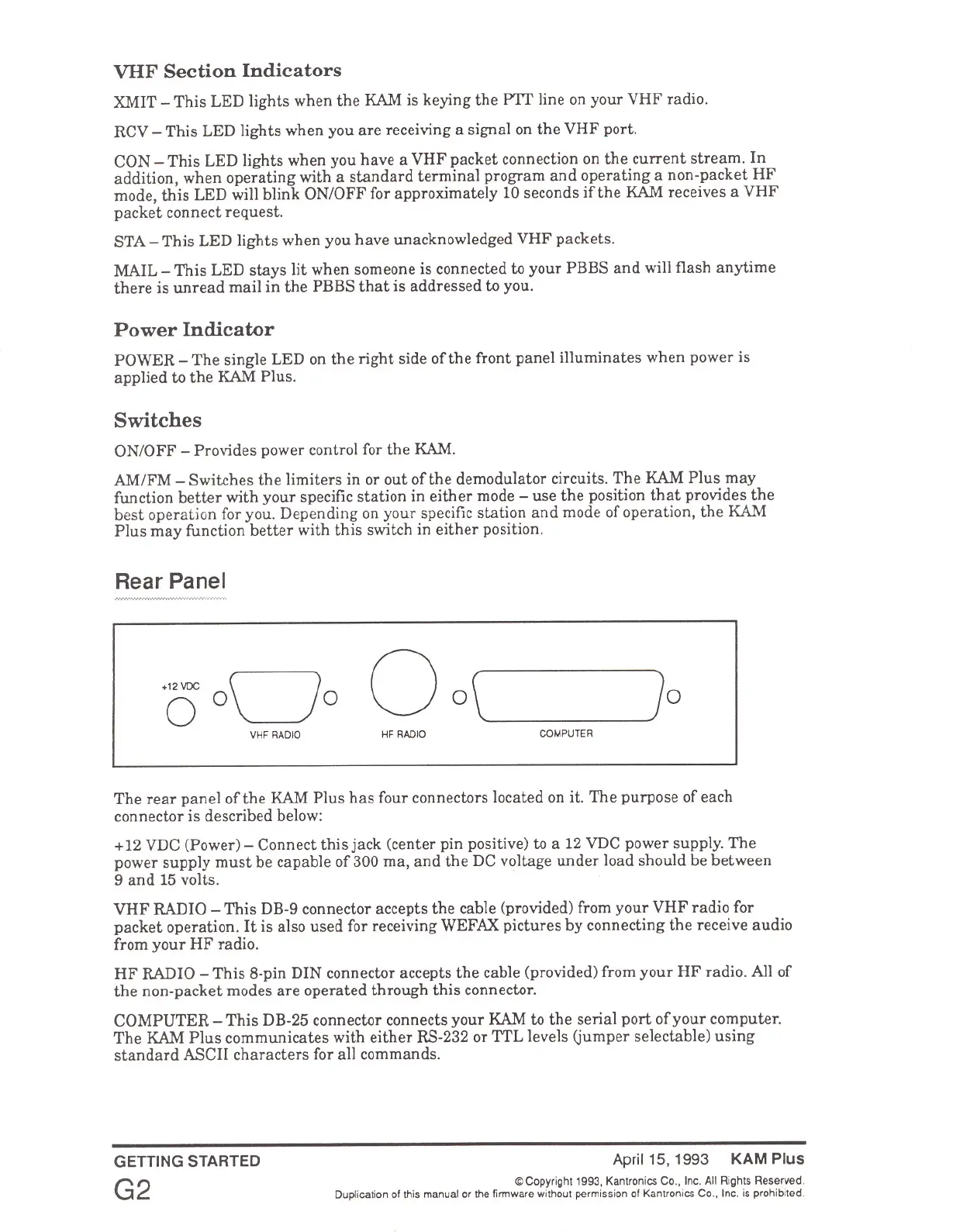
Rear Panel
VHF RADIO HF RADIO
COMPUTER
The rear panel of the RAM Plus has four connectors located on it. The purpose of each
connector is described below:
+12 VDC (Power) - Connect this jack (center pin positive) to a 12 VDC power supply. The
power supply must be capable of 300 ma, and the DC voltage under load should be between
9 and 15 volts.
VHF RADIO - This DB-9 connector accepts the cable (provided) from your VHF radio for
packet operation. It is also used for receiving WEFAX pictures by connecting the receive audio
from your HF radio.
HF RADIO - This 8-pin DIN connector accepts the cable (provided) from your HF radio. All of
the non-packet modes are operated through this connector.
COMPUTER - This DB-25 connector connects your RAM to the serial port of your computer.
The RAM Plus communicates with either RS-232 or TTL levels (jumper selectable) using
standard ASCII characters for all commands.
GETTING STARTED
G2
April 15, 1993 KAM Plus
© Copyright' 993, Kantronics Co., Inc. All Rights Reserved.
Duplication of this manual or the firmware without permission of Kantronics Co., Inc. is prohibited.



 To Next Page