EasyManua.ls Logo

Kantronics KPC-4 - Page 62

Default Icon
72 pages
Print Icon
To Next Page IconTo Next Page
To Previous Page IconTo Previous Page
Loading...
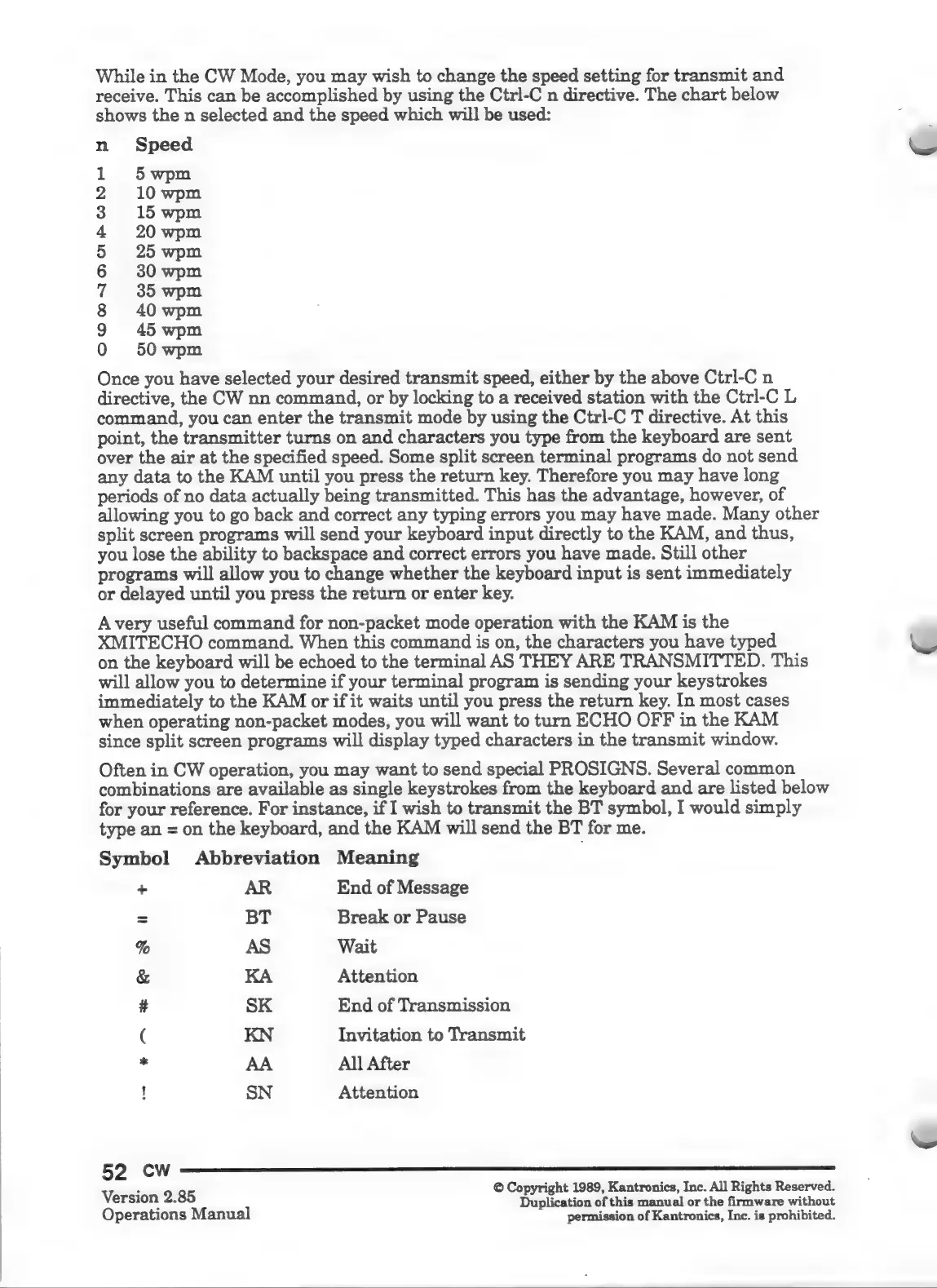
While
in
the
CW
Mode,
you
may
wish
to
change
the
speed
setting
for
transmit
and
receive.
This
can
be
accomplished
by
using
the
Ctrl-C
n
directive.
The
chart
below
shows
the
n
selected
and
the
speed
which
will
be
used:
Speed
5
wpm
10
wpm
15
wpm
20
wpm
25
wpm
30
wpm
35
wpm
40
wpm
45
wpm
50
wpm
COMDIBDNAPRWNH
y
Once
you
have
selected
your
desired
transmit
speed,
either
by
the
above
Ctrl-C
n
directive,
the
CW
nn
command,
or
by
locking
to
a
received
station
with
the
Ctrl-C
L
command,
you
can
enter
the
transmit
mode
by
using
the
Ctrl-C
T
directive.
At
this
point,
the
transmitter
turns
on
and
characters
you
type
from
the
keyboard
are
sent
over
the
air
at
the
specified
speed.
Some
split
screen
terminal
programs
do
not
send
any
data
to
the
KAM
until
you
press
the
return
key.
Therefore
you
may
have
long
periods
of
no
data
actually
being
transmitted.
This
has
the
advantage,
however,
of
allowing
you
to
go
back
and
correct
any
typing
errors
you
may
have
made.
Many
other
split
screen
programs
will
send
your
keyboard
input
directly
to
the
KAM,
and
thus,
you
lose
the
ability
to
backspace
and
correct
errors
you
have
made.
Still
other
programs
will
allow
you
to
change
whether
the
keyboard
input
is
sent
immediately
or
delayed
until
you
press
the
return
or
enter
key.
Avery
useful
command
for
non-packet
mode
operation
with
the
KAM
is
the
XMITECHO
command.
When
this
command
is
on,
the
characters
you
have
typed
on
the
keyboard
will
be
echoed
to
the
terminal
AS
THEY
ARE
TRANSMITTED.
This
will
allow
you
to
determine
if
your
terminal
program
is
sending
your
keystrokes
immediately
to
the
KAM
or
if
it
waits
until
you
press
the
return
key.
In
most
cases
when
operating
non-packet
modes,
you
will
want
to
turn
ECHO
OFF
in
the
KAM
since
split
screen
programs
will
display
typed
characters
in
the
transmit
window.
Often
in
CW
operation,
you
may
want
to
send
special
PROSIGNS.
Several
common
combinations
are
available
as
single
keystrokes
from
the
keyboard
and
are
listed
below
for
your
reference.
For
instance,
if
I
wish
to
transmit
the
BT
symbol,
I
would
simply
type
an
=
on
the
keyboard,
and
the
KAM
will
send
the
BT
for
me.
Symbol
Abbreviation
Meaning
-+
AR
End
of
Message
=
BT
Break
or
Pause
%
AS
Wait
&
KA
Attention
#
SK
End
of
Transmission
(
KN
Invitation
to
Transmit
la
AA
All
After
SN
Attention
52
cw
Version
2:85
O
Copyright
1989,
Kantronics,
Inc.
All
Rights
Reserved.
E
Duplication
of
this
manual
or
the
firmware
without
Operations
Manual
permission
of
Kantronics,
Inc.
is
prohibited.

Related product manuals