26 Kaonmedia Proprietary and Condential. Copyright 2017 KAON MEDIA CO., LTD. All Rights Reserved.
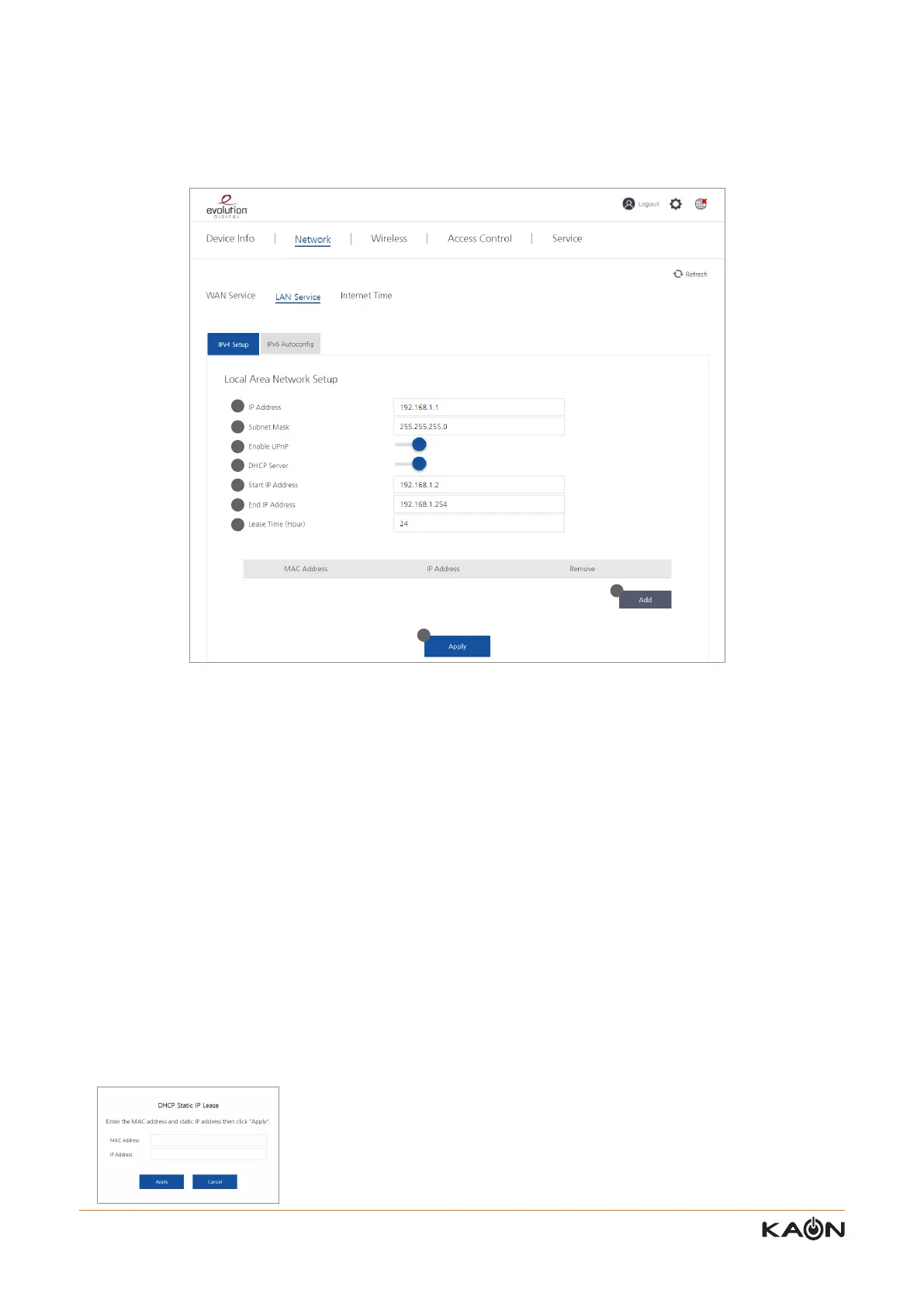
1) IP Address
It shows the IP address of the AR2146 the user congured. This IP address become the gateway IP address to the
connected devices of the AR2146.
2) Subnet Mask
It shows the subnet mask of the AR2146 the user congured.
3) Enable UPnP
User can enable or disable the UPnP function of the AR2146. UPnP oers compatibility with networking equipment,
software, and peripherals
.
4) DHCP Server
User can enable or disable the DHCP server
.
5) Start IP Address
User can congure the rst IP address of the DHCP IP range which can be provided to the connected devices.
6) End IP Address
User can congure the last IP address of the DHCP IP range which can be provided to the connected devices.
7) Lease Time (hour)
User can congure the lease time of the DHCP IP address.
8) ADD
When user click “Add” button, the pop-up screen for “DHCP Static IP Lease” will be displayed. Refer to the below image.
In the LAN Service sub-menu, you can manage the IP addresses of LAN interface.
8.2.1 LAN Service – IPv4 Setup
1
2
3
4
5
6
7
8
9



 To Next Page