13
Video Menu - (Unless specified, menu items are for forward facing camera only)
Video
Menu Select Settings Remark
Resolution
FHD 1920 x 1080P
720P 1280x720P
WVGA 848x480
VGA 640x480
Higher resolution gives your
footage more detail but uses
more storage space. Lower
resolution saves storage space.
Dual Record Off / On
Turn On/Off the Rear View
Camera
Loop recording Off / 3 Mins / 5 Mins
Loop Recording’ defines the
length of time the KPT-722
records before creating a new
file. Using the Off setting will
record the longest possible
loops that the Micro SD Card
will allow (around 30 mins at
1080P).
1
2
3
4
5
6
7
8
9
11
10
12
13
14
15
17
16
18 19
20
21
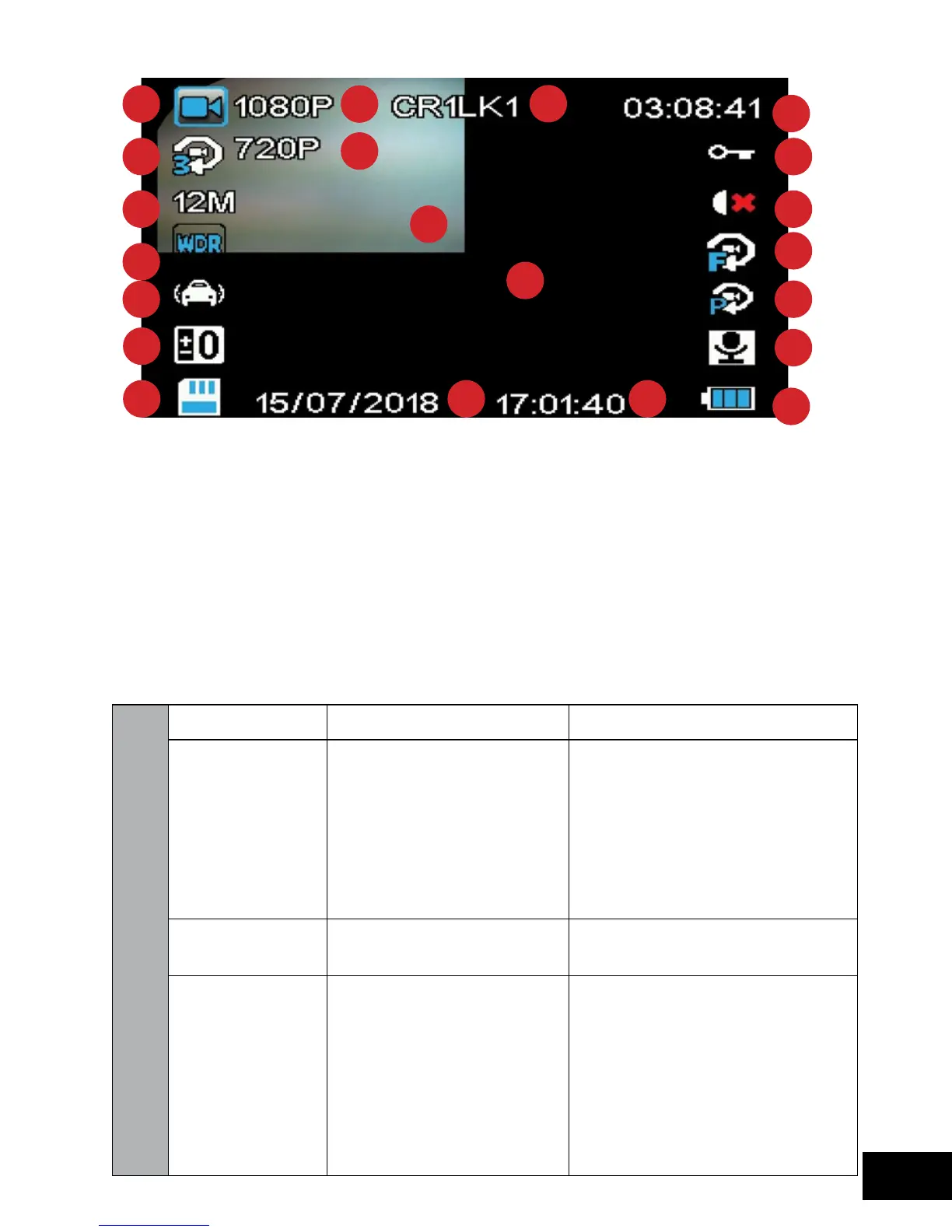
1. Record indicator
2. Loop length
3. Photo Resolution
4. WDR
5. G-Sensor Sensitivity
6. Exposure
7. SD Card
8. Front Camera
Resolution
9. Rear Camera
Resolution
10. Number Plate
11. Recording Duration
12. Footage Protected
13. Lamp Mode
14. Motion Detection
15. Park Mode
16. Microphone/Mute
17. Power
18. Date
19. Time
20. Front Camera View
21. Rear Camera
View



 To Next Page