30
Line Access Code
With this facility, if there is an incoming call that includes the Caller ID information and
the “Area Code”, which has been defined before, only the Line Access Code is
displayed instead of the Area Code on the screen. In order to realize it, firstly, the line
access code need to be entered to the phone and saved into the memory. In this way,
the number information of the call will come with the information of the line access
code.
When the facility is selected, there is a cursor which supplies maximum 6 digits to be
entered displayed on the screen. With this cursor the desired “line access code” is
entered and then it is confirmed in order to be saved into the memory of the phone. If
any number, within the defined home area code, is dialled the number with the line
access code is displayed on the screen.
The existing line access code (DD) will be shown on the right side of the display when
the “Line Access Code” menu is entered.
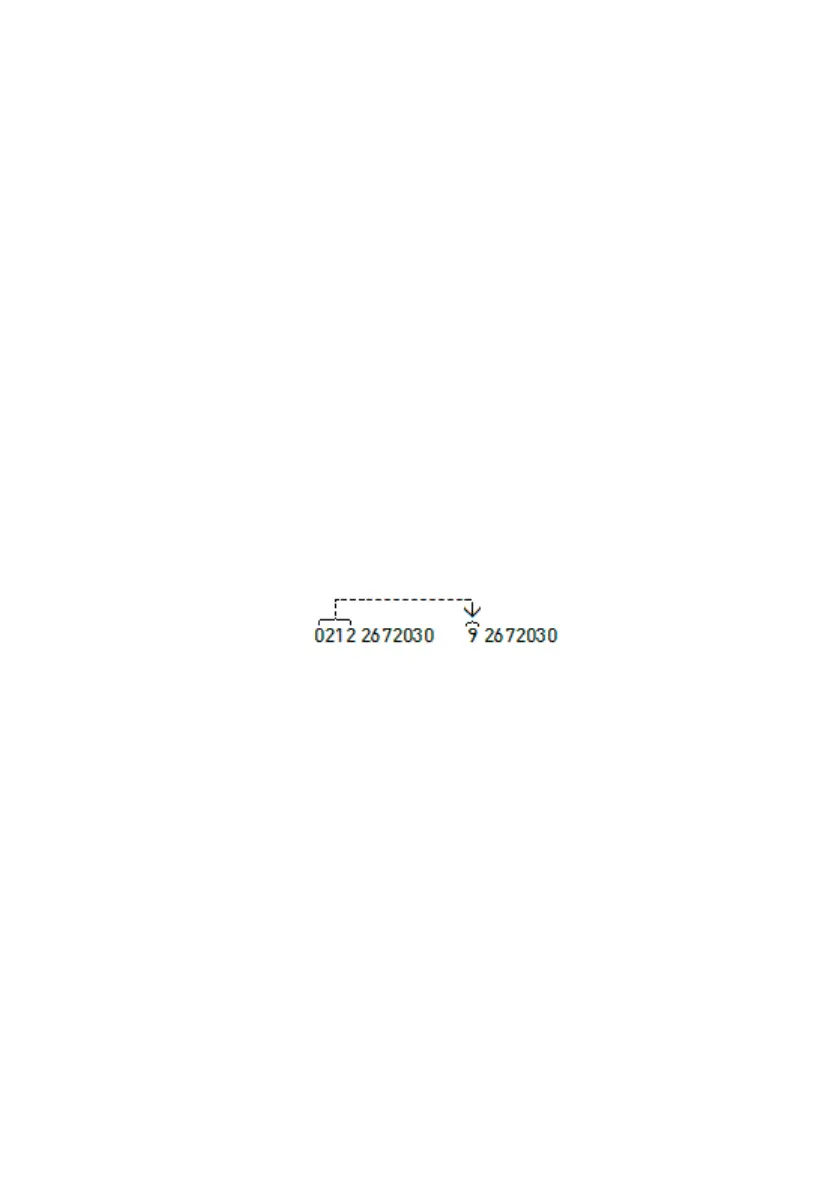
Example:
Suppose that “Home Area Code” and “Line Access Code“ have been defined
successively as “0212” and “9”. If there is an incoming call numbered with “0212
2672030” to the phone, since the first three digits of the incoming Caller ID information
has been defined before on to the phone, the defined code “0212” will be erased and
the line access code “9” will be added instead of home area code.
The user will see the number “92672030” through the screen as a call source. When
this calling is got as a missed call by the phone, the user can call this number by
pressing the single “OK” key. The main purpose of this facility is providing to redial
such a missed call within the defined line access code with a single key
Home Area Code
With this facility, the city code is entered to the phone memory and the number without
the city code is seen on the called extension phone display when the calling is long
distance or unanswered.
When the facility is selected, there is a cursor which supplies maximum 6 digits to be
entered displayed on the screen. With this cursor the desired “home area code” is
entered and then it is confirmed in order to be saved into the memory of the phone. If
any number, within the defined home area code, is dialled only the number without the
area code is displayed on the screen.
The existing area code (AAA) will be shown on the right side of the display when the
“Home Area Code” menu is entered.



 To Next Page