26
VEHICLE INFORMATION
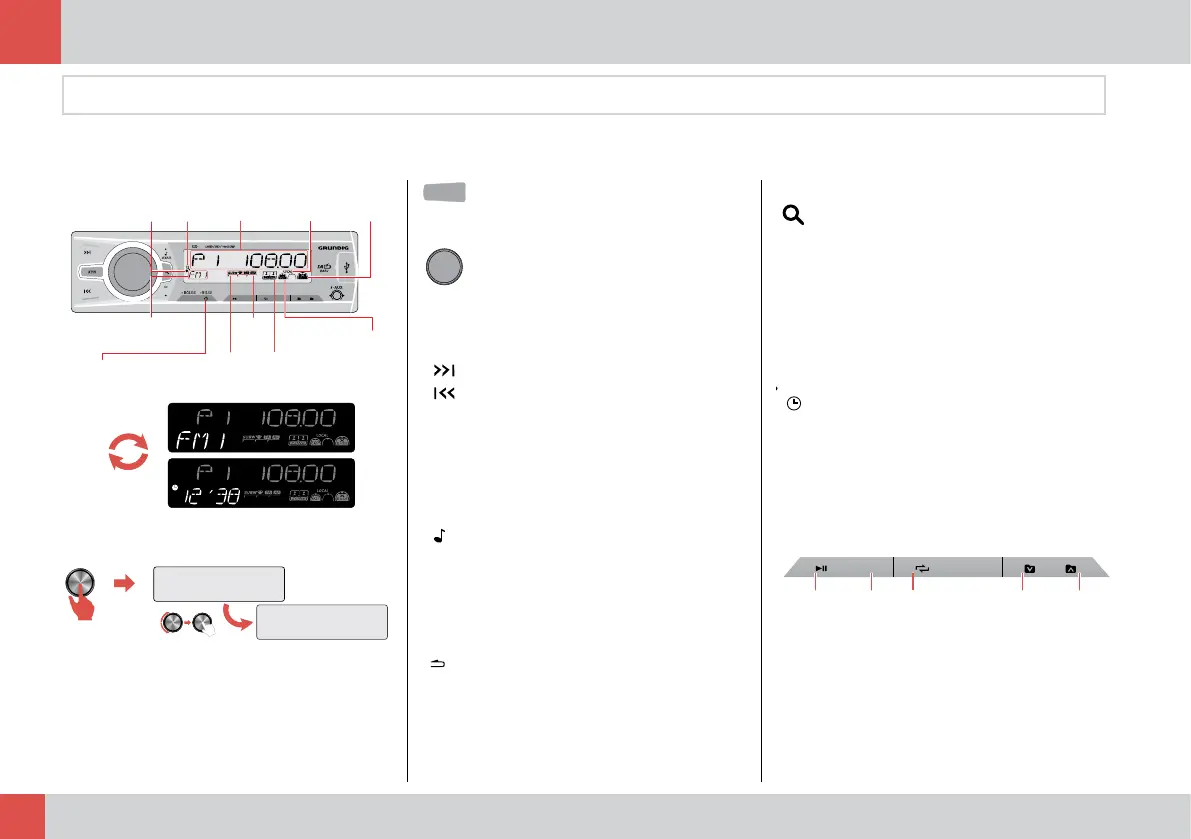
Radio - Mp3 Player
Start / Region Selection
Buttons
Entertainment Systems
BAND
XBS
6
5
4
3
1
INT
2
Clock
Search
Music
Main
Screen
Local
Sign
High
Bass
Source Name RDS
Sign
SUB-W
Sign
Information Menu
Music
Region
7 Step
equalizer
30
Select your region to run the player correctly.
EUROPE (West & East Europe ) // RUSSIA //
JAPAN // LATIN AMERICA // MIDDLE EAST //
AUSTRALIA// USA // ASIA
REGION SEL.
EUROPE
SETT.
BAND
INFO
REGION
XBS
Number
Keys
SRC
Selects source of audio
SETT.
BAND
INFO
REGION
XBS
Number
Keys
SRC
•
MUTE function activates, if
pressed shortly.
• OPEN / CLOSE, if pressed.
• ENTER function
• Volume UP / DOWN, if rotated.
SETT.
BAND
INFO
REGION
XBS
Number
Keys
SRC
•
Radio Mode: AUTO SEARCH
function
•
Media Play Mode: SKIP or
FORWARD functions
•
iAux Mode: Up / Down track
selection
SETT.
BAND
INFO
REGION
XBS
Number
Keys
SRC
•
Pre-Tuning: EQ7(FLAT/POP/
USER/TECHNO/ROCK /CLASSIC
/JAZZ/VOCAL)
-> BASS (Level:-07 to +07) ->TREBLE
(Level:-07 to +07)
-> BALANCE (LEFT12 to RIGHT12)
-> FRONT/REAR (R12 to F12)
• Press and hold to enter setting
menu.
SETT.
BAND
INFO
REGION
XBS
Number
Keys
SRC
• Returns previous menu
•
Radio Mode : Selects FM - AM
Band.
SETT.
BAND
INFO
REGION
XBS
Number
Keys
SRC
•
Radio Mode: Press and hold to
save station automatically. FM1,
FM2, FM3(1-6), AM1, AM2.
•
Media Player Mode : File/Song
search.
XBS
• ON / OFF Xbass bass function.
• Selects REGION
INFO
• Displays clock - source
•
Radio Mode : Displays RDS
information on the screen.
• Media Play Mode : Displays ID3
information.
SETT.
BAND
INFO
REGION
XBS
Number
Keys
•
Radio Mode : Press shortly to
select a station, press and hold
the button to save a station.
6
5
4
3
2
1
INT
Play/Stop
Intro
Repeat
File Down
File Up



 To Next Page