KW55293 Wireless Router User Manual
12
5.1.2 Network (WANSettings)
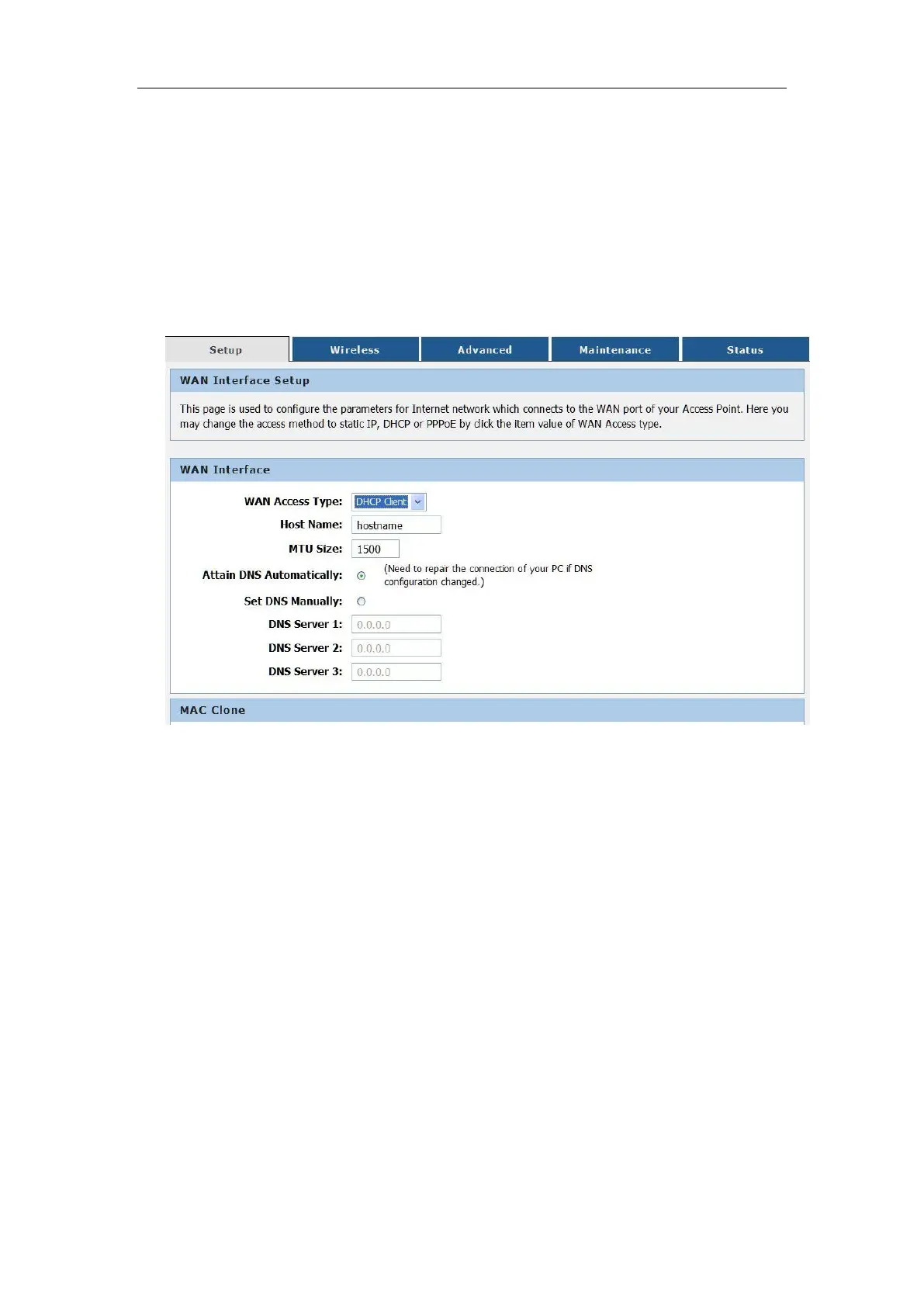
KW55293 supports three types WAN connection.they are DHCP,Static
IP,PPPOE, Select any of them you will be able to configure the corresponding
connection of WAN. Choose menu “Setup →Internet Setup”, you can
configure the IP WAN parameters
5.1.3 DHCP
If your ISP provides the DHCP service, please choose Dynamic IP type, and the
Router will automatically get IP parameters from your ISP. You can see the page
as follows . This page displays the WAN IP parameters assigned dynamically by
your ISP, including IP address, Subnet Mask, Default Gateway,
Host Name - This option specifies the Host Name of the Router.
Domain Name -
If your ISP gives you one or two DNS addresses,enter the
addresses into the correct fields. Otherwise, the DNS servers will be assigned
dynamically from your ISP.
MTU Size - The normal MTU (Maximum Transmission Unit) value for most Ethernet
networks is 1500 Bytes. It is not recommended that you change the default MTU Size
unless required by your ISP.
Click the Apply Changes button to save your settings.



 To Next Page