12
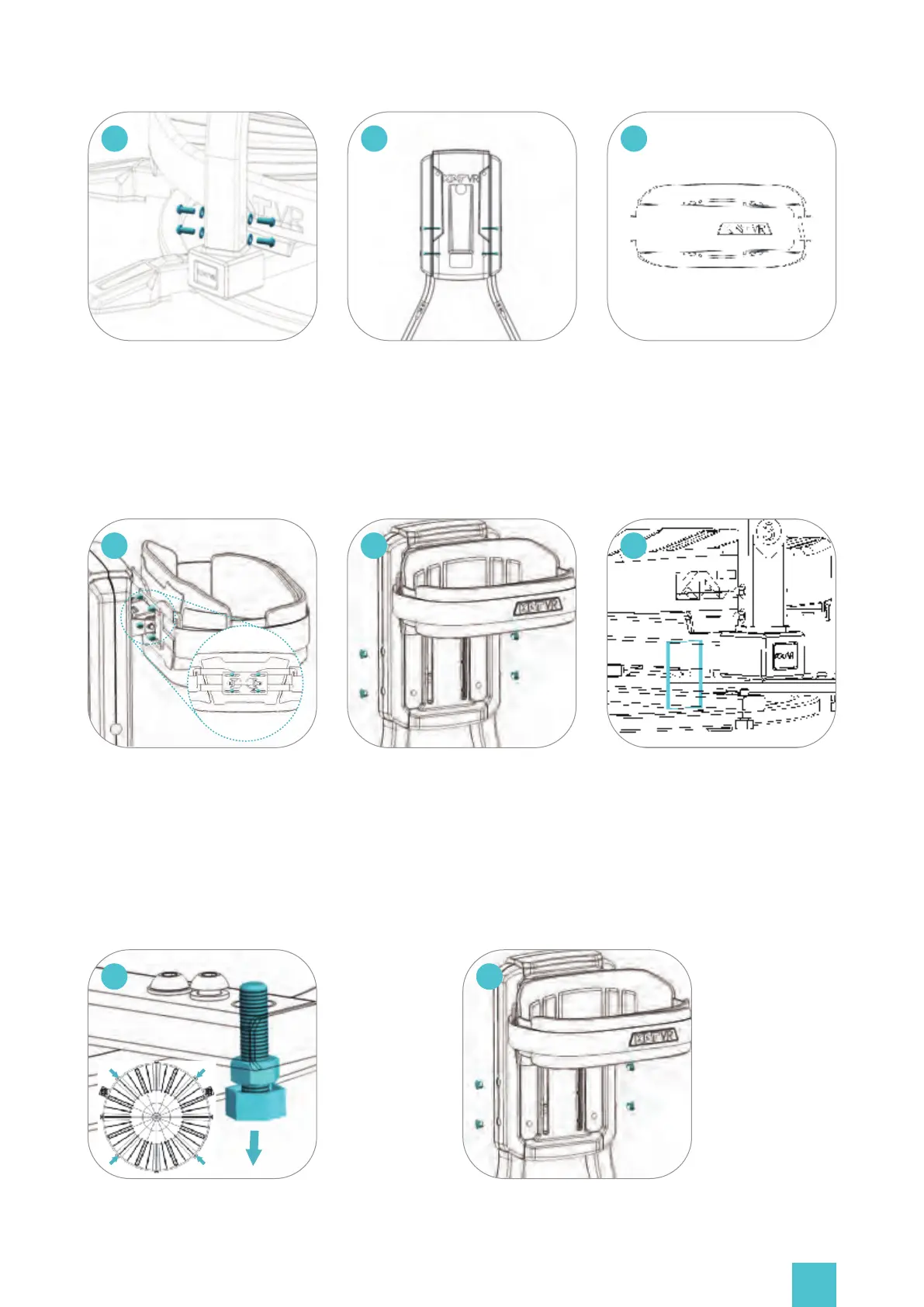
Install the screws and gaskets at
the bottom of the rods(Items
No.14 and 15). Note:Tighten
them well to avoid safety hazards.
07
Now, tighten the back-support
screws. Note: Tighten them well
to avoid safety hazards.
Install the waist harness. Make
sure the KAT VR logo faces up
and align the screw holes with
the center of the long slot on
the back plate.
0908
Install the screws. Note: Misaligned
or loosen screws will affect the
operation of the device. For more
information about the installa-
tion method, please refer to the
complete user's manual.
10
Insert the plugs into the open-
ings on the sides of the device.
Cut the wire tie on the bottom
of the base.
1211
13
14
Level the rotation-
al beam through
adjustment of 4
screws at the edge
of the structure.
Tighten or loosen
them until the
beam rotates
smoothly without
deviations.
If the beam contin-
ues to return to the
same position,
lower the opposite
side of the platform
by adjusting the
corresponding
screw (turn it right).
Once leveled, tighten
the upper nuts.


 To Next Page