11
Place the device in a reasonable distance from your PC to ensure that the USB cable can
reach it.
It is not advised to place the device on smooth surfaces that are easily scratched by metal, e.g
wooden or tiled floor.
Place the device on a flat surface at a ground level to ensure the structure stability.
Ensure there is no furniture or other household items that can be easily knocked within the
device vicinity.
Finding a suitable place
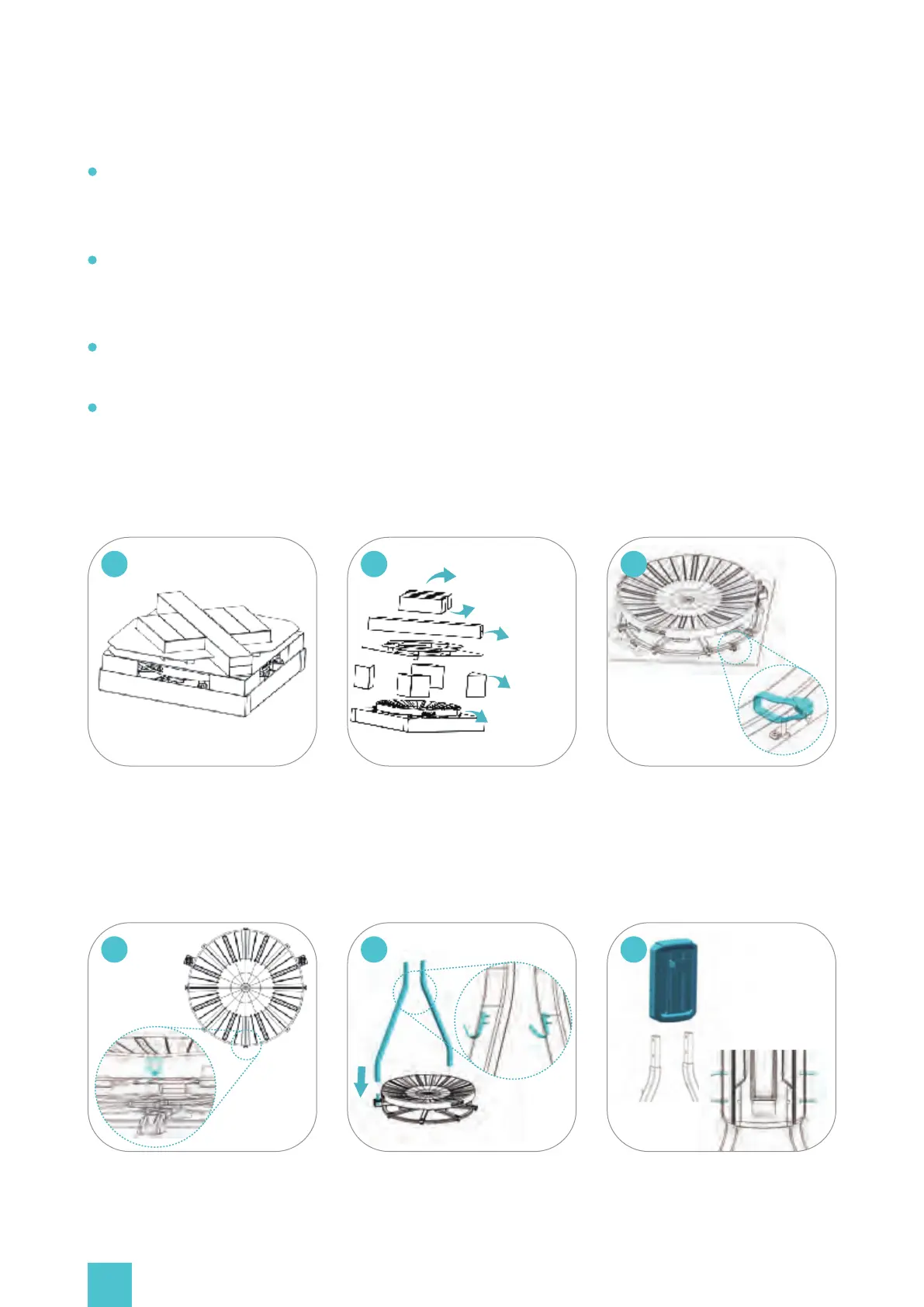
Unpacking method
Remove the cover. Items in the
box should be organized as
shown in the picture.
01
Take out the item boxes in the
same order as presented in the
picture. Refer to the packing list
for details.
Cut the cable tie holding the
base.
03
Back support box
Waist harness box
Rods box
Triangular boxes
Base plate
02
Make sure that you face the
sticker No. 1 and take out the
base (approximately 38KG / 84 lbs).
04
Align the support rod with the
rod opening at the side of the
platform and insert it.
Place the back-support plate on top
of the rods. Fix it with the screws and
gaskets(Items No. 12 and 13). Tempo-
rarily do not tighten them completely
- only turn each of them 3 times.
0605


 To Next Page