68
A
A
A
p
p
p
p
p
p
e
e
e
n
n
n
d
d
d
i
i
i
x
x
x
A
A
A
F
F
F
A
A
A
Q
Q
Q
a
a
a
n
n
n
d
d
d
T
T
T
r
r
r
o
o
o
u
u
u
b
b
b
l
l
l
e
e
e
s
s
s
h
h
h
o
o
o
o
o
o
t
t
t
i
i
i
n
n
n
g
g
g
What can I do when I have some trouble at the first time?
1. Why can I not configure the router even if the cable is plugged in the
ports of Router and the led is also light?
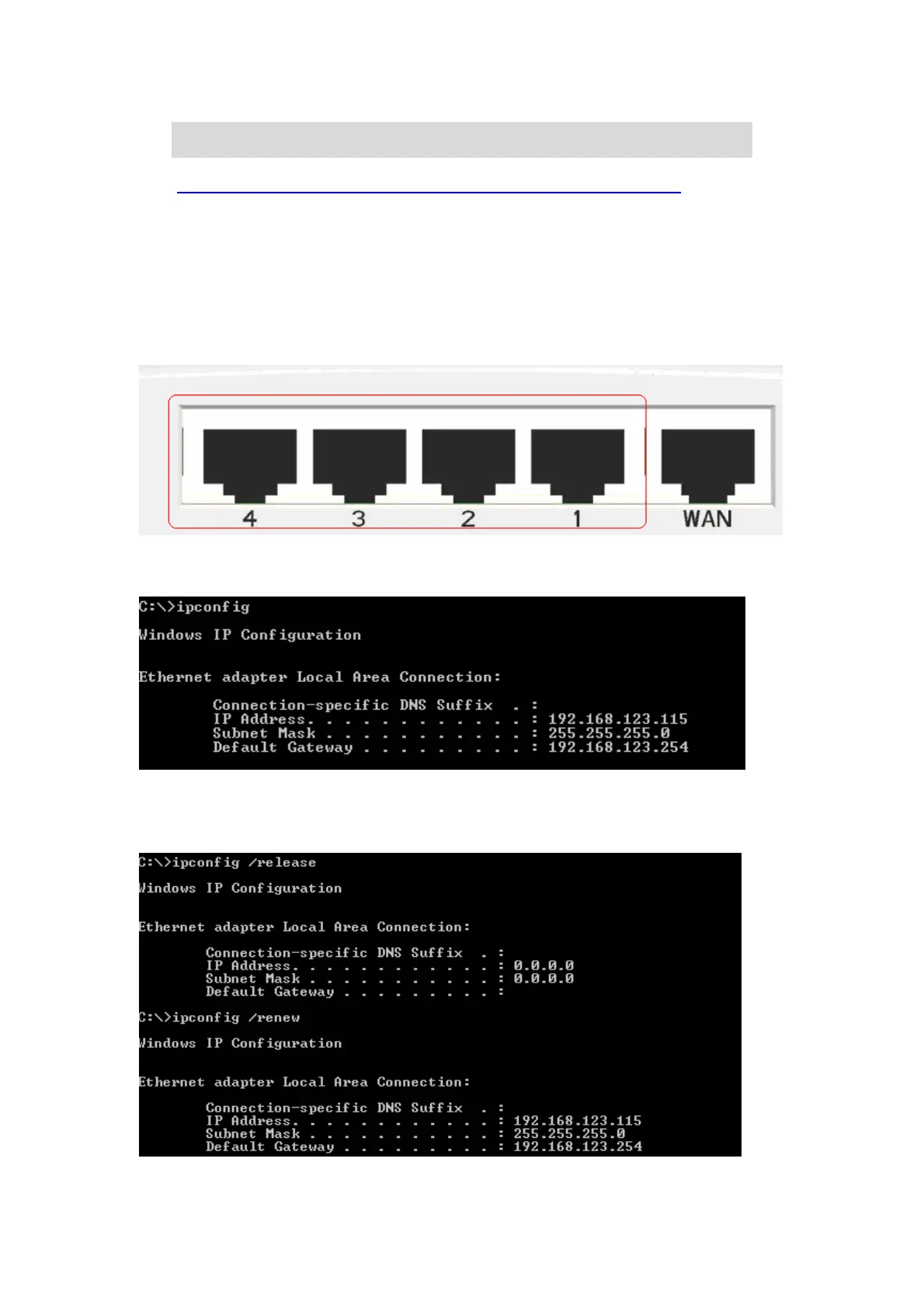
A: First, make sure that which port is plugged. If the cable is in the Wan port, please change
to plug in Lan port 1 or Lan port 4:
Then, please check if the Pc gets ip address from Router. Use command mode as below:
If yes, please execute Browser, like Mozilla and key 192.168.123.254 in address.
If not, please ipconfig /release, then ipconfig /renew.
Whatever I setup, the pc can not get ip. Please check Status Led and refer to the Q2:



 To Next Page
 Loading...
