• Verify that the corresponding Port Status Indicators are green for each disposable garment attached to the controller.
successfully detected, the Controller begins the process of applying intermittent compression alternating from on
the other if two garments are attached. Otherwise, the controller applies compression to only one port when one garment is attac
On successive cycles, the controller automatically adjusts its operating parameters to maintain set pressure.
The Controller features microprocessor-controlled automatic pressure adj
The pressure setting depends on the type of garment: 45 mmHg for Leg Sleeves; 130 mmHg for Foot Cuffs.
Vascular Refill Detection
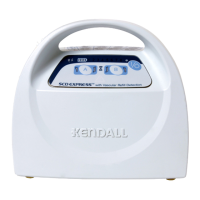
The SCD EXPRESS Compression System incorporates Tyco Healthcare’s patented “Vascular Refill Detection” method to customize the therapy for each
patient’s physiology. This system measures the time it takes for the veins in the limb to refill after having been compressed
by the system. The time is
then used in subsequent cycles as the time between compressions.
• The vascular refill detection method is used when first powering on the System after it reaches set pressure and every thirty minutes thereafter.
• The hourglass-shaped Vascular Refill Indicator on the front display will be illuminated during a measurement cycle.
• The method works best when the patient is still, however it will accommodate movement.
• If an error is detected during any measurement or if the compression is not within the System pressure specifications, the refill time measurement
be repeated after the next compression cycle.
• The time between compressions on the same limb will never be shorter than twenty seconds or longer than sixty seconds.
• If both Controller ports are being used, then the longer of the two measurements will
be used to adjust the time between cycles.
The SCD EXPRESS Compression System is designed for use with KENDALL garment Reorder Codes:
(Small Thigh Length Tear-Away)
(Medium Thigh Length Tear-Away)
5897 Foot Cuff (Regular Foot)
5898 Foot Cuff (Large Foot)
Further instructions for garment application and use are included with the Leg Sleeve and Foot Cuff packaging.
The garments connect to the Controller via the Tubing Sets provided with the Controller. Additional or replacement Tubing Sets are available as Reorder
Code 9528. The Extension Tubing Sets are also available as Reorder Code 9595.
Portable Controller Configuration
The SCD EXPRESS Compression System Controller can be configured without the bed hook for easier portability. The System can also be used
the cord cover door so that the power cord can be disconnected at the Controller instead of at the AC power wall outlet.
• An optional Shoulder Strap for the SCD EXPRESS Compression System is available as Reorder Code 9527.
Removal of the bed hook and the cord cover door is described in Section VI – Disassembly and Reassembly.
The SCD EXPRESS Compression System is designed to operate normally on AC line power or DC battery power without interruption. If the Controller
is equipped with the optional battery pack there are three Battery Status Indicator LED’s used to represent the charge level of the battery. Once the
Controller is powered on, it may take the system a few seconds to establish communication with the battery and display the charge level. If the
Controller is not connected to a battery then the indicator lights will remain off.


 To Next Page