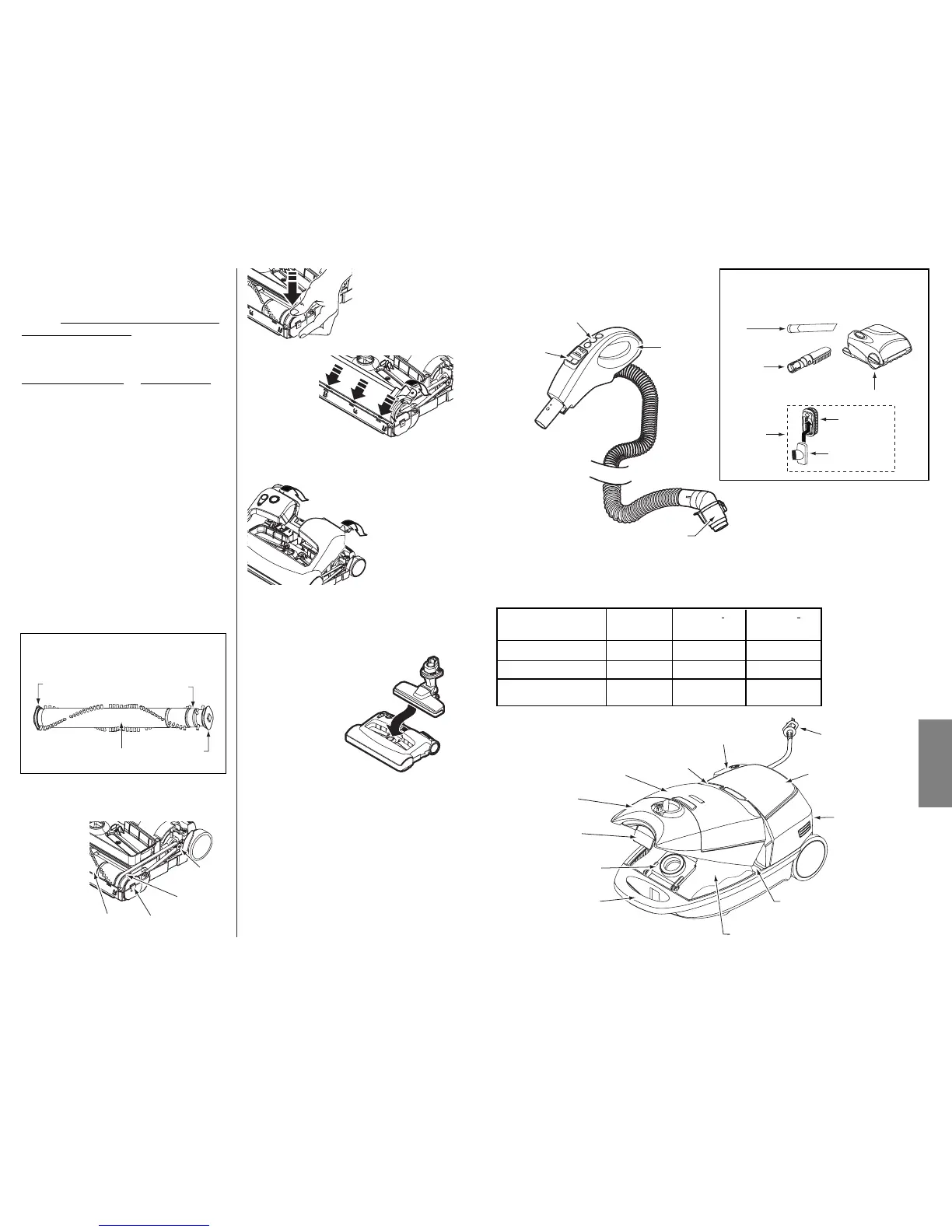
5. Rotate cover
back. Press
cover firmly until
side latches
snap into place.
Make sure there is no gap between the
cover and base.
6. Turn PowerMate upside down and
replace five (5) cover screws.
7. Insert floor
brush into
PowerMate until
floor brush locks
into place.
2. Place agitator
assembly back into
PowerMate.
TO REPLACE BELT
1. Install new
belt over
motor drive,
then over
belt path.
NOTE: See PARTS AND FEATURES for
Belt number.
4. Line up front of cover and base. Rest
cover on front edge of base as shown.
TO CLEAN AGITATOR:
NOTE: In order to keep cleaning efficiency
high and to prevent damage to your vacuum
cleaner, the agitator m
ust be cleaned every
time the belt is changed.
The agitator must also be cleaned accord-
ing to the following schedule:
V
acuum Cleaner Use Clean Agitator
HEAVY - every week
(used daily)
MODERATE - every month
(used 2-3 times/week)
LIGHT - every 2 months
(used 1 time/week)
IMPORTANT
Turn off and unplug vacuum cleaner from
electrical outlet. Check and remove hair,
string and lint build-up frequently in the
PowerMate agitator and end cap areas.
Remove any dirt or debris in the belt path
area or in the brush roller area.
Carefully remove any string or debris
located on the agitator or end caps.
AGITATOR ASSEMBLY
20



 To Next Page