EasyManua.ls Logo

Kenmore 158.1813 - Buttonhole Making

Kenmore 158.1813
61 pages
Print Icon
To Next Page IconTo Next Page
To Previous Page IconTo Previous Page
Loading...
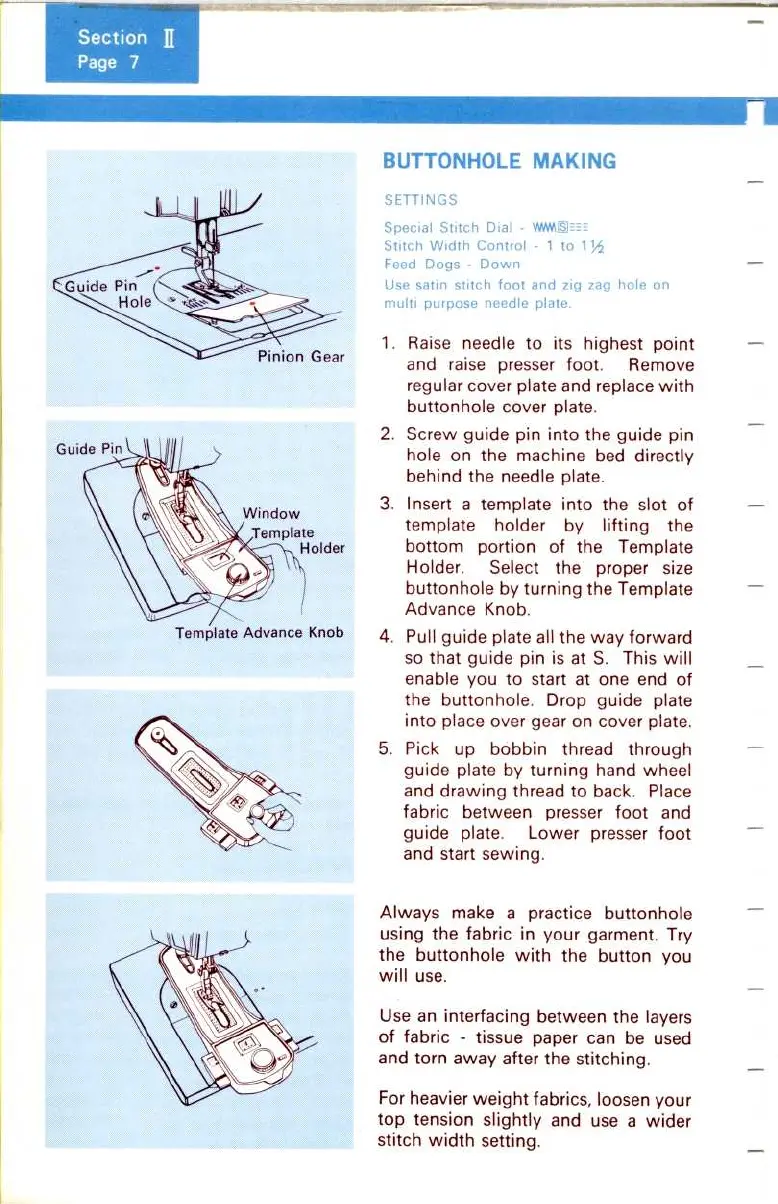
BUTTONHOLE
MAKING
SETTINGS
Special
Stitch
Dial
-
WPMpSI--==
Stitch
Width
Control
- 1
to
1
Feed
Dogs
-
Down
Use
satin
stitch
foot
and
zig
zag
hole
on
multi
purpose
needle
plate
.
1
.
Raise
needle
to
its
highest
point
and
raise
presser
foot
.
Remove
regular
cover
plate
and
replace
with
buttonhole cover
plate
.
2
.
Screw
guide
pin
into
the
guide
pin
hole
on
the
machine
bed
directly
behind
the
needle
plate
.
3
.
Insert
a
template
into
the
slot
of
template
holder
by
lifting
the
bottom
portion
of
the
Template
Holder
.
Select the proper
size
buttonhole
by
turning
the
Template
Advance
Knob
.
4
.
Pull
guide
plate
all
the
way
forward
so
that
guide
pin
is
at
S
.
This
will
enable
you
to
start
at
one end
of
the
buttonhole
.
Drop
guide
plate
into
place
over gear
on
cover
plate
.
5
.
Pick
up bobbin
thread
through
guide
plate
by
turning
hand
wheel
and
drawing
thread
to
back
.
Place
fabric
between
presser
foot
and
guide
plate
.
Lower
presser
foot
and
start
sewing
.
Always
make
a
practice
buttonhole
using
the
fabric
in
your
garment
.
Try
the
buttonhole
with
the
button
you
will
use
.
Use
an
interfacing
between
the
layers
of
fabric
-
tissue
paper can be used
and
torn
away
after
the
stitching
.
For
heavier
weight
fabrics,
loosen
your
top
tension
slightly
and
use a
wider
stitch
width
setting
.