FEATURES
9 1
8
10
6
USING THE AIR CONDITIONER
_To reduce the riskof fire, electric
shock, or injuryto persons, read the important
SAFETY instructionssectionbefore operating this
appliance.
To begin operating the air conditioner after
installation, follow these steps:
1. Plug in the air conditioner.(To prevent electrical
hazards, do not use an extension cordor an
adapter plug.)
2. Set the TEMP Control to the coolest setting.
3. Set the MODE control at the highest COOL level.
4. Adjustthe louversfor comfortable air flow.
5. Once the roomhas cooled,adjust the TEMP
Control to the setting you find mostcomfortable.
NOTE : If the air conditioner is turned off, wait 3
minutes before restarting. This allows pressure
inside the compressorto equalize. Failureto wait 3
minutes before restarting may cause inefficient
operation.
Review the AIR CONDITIONER FEATURES
section for other settings.(See page 10)
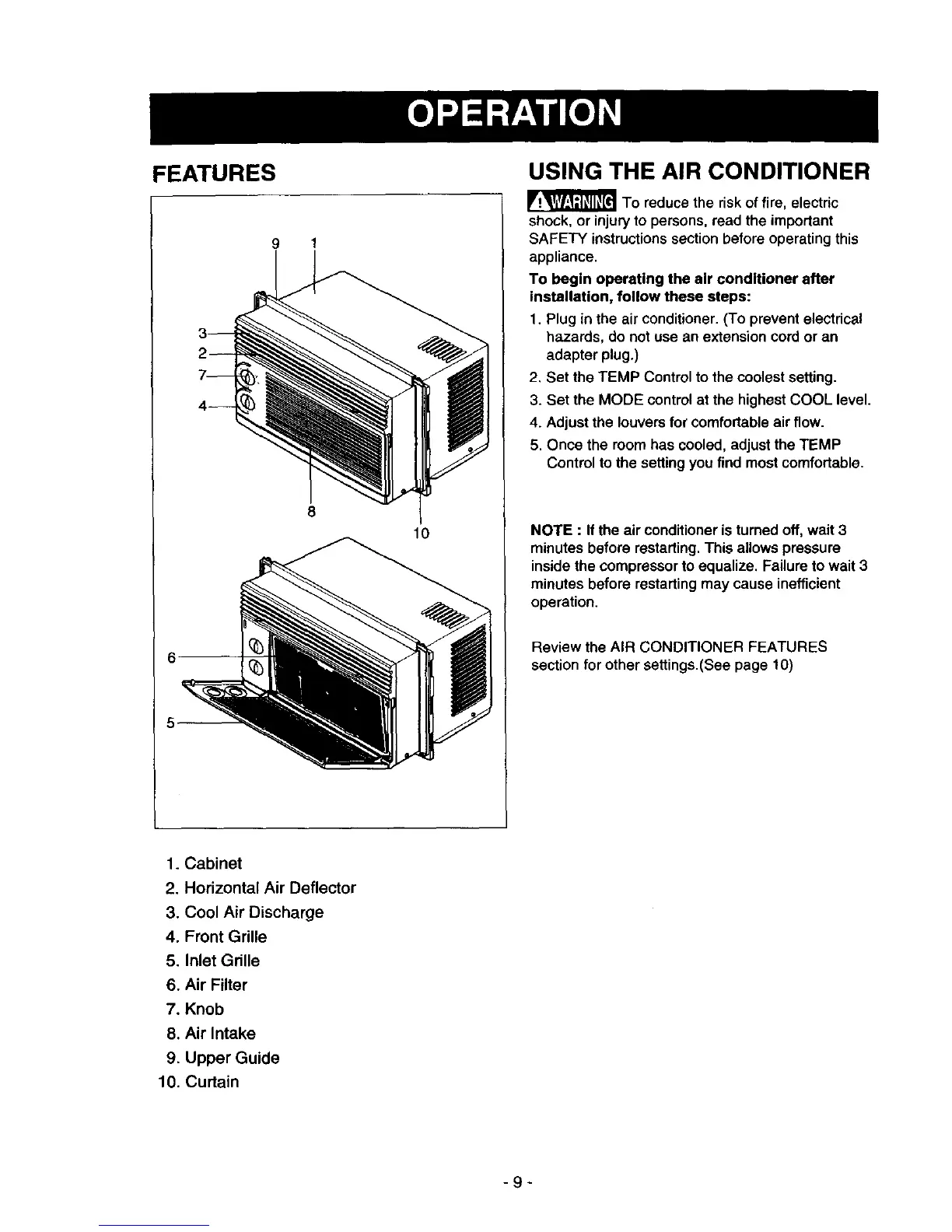
1. Cabinet
2. Horizontal Air Deflector
3. Cool Air Discharge
4. Front Grille
5. Inlet Grille
6. Air Filter
7. Knob
8. Air Intake
9. Upper Guide
10. Curtain
-9-



 To Next Page