25
CleaningtheWaterInletFilters
If the washer does not ll properly, an error message will
show on the display. The inlet valve lter screens could
be plugged by hard water scale, sediment in the water
supply, or other debris.
NOTE: The inlet screens protect the delicate parts of the
inlet valve from being damaged by particles that could
enter the valves with the water supply. Operating the
washer with these lters removed could cause a valve to
stick open resulting in ooding and/or property damage.
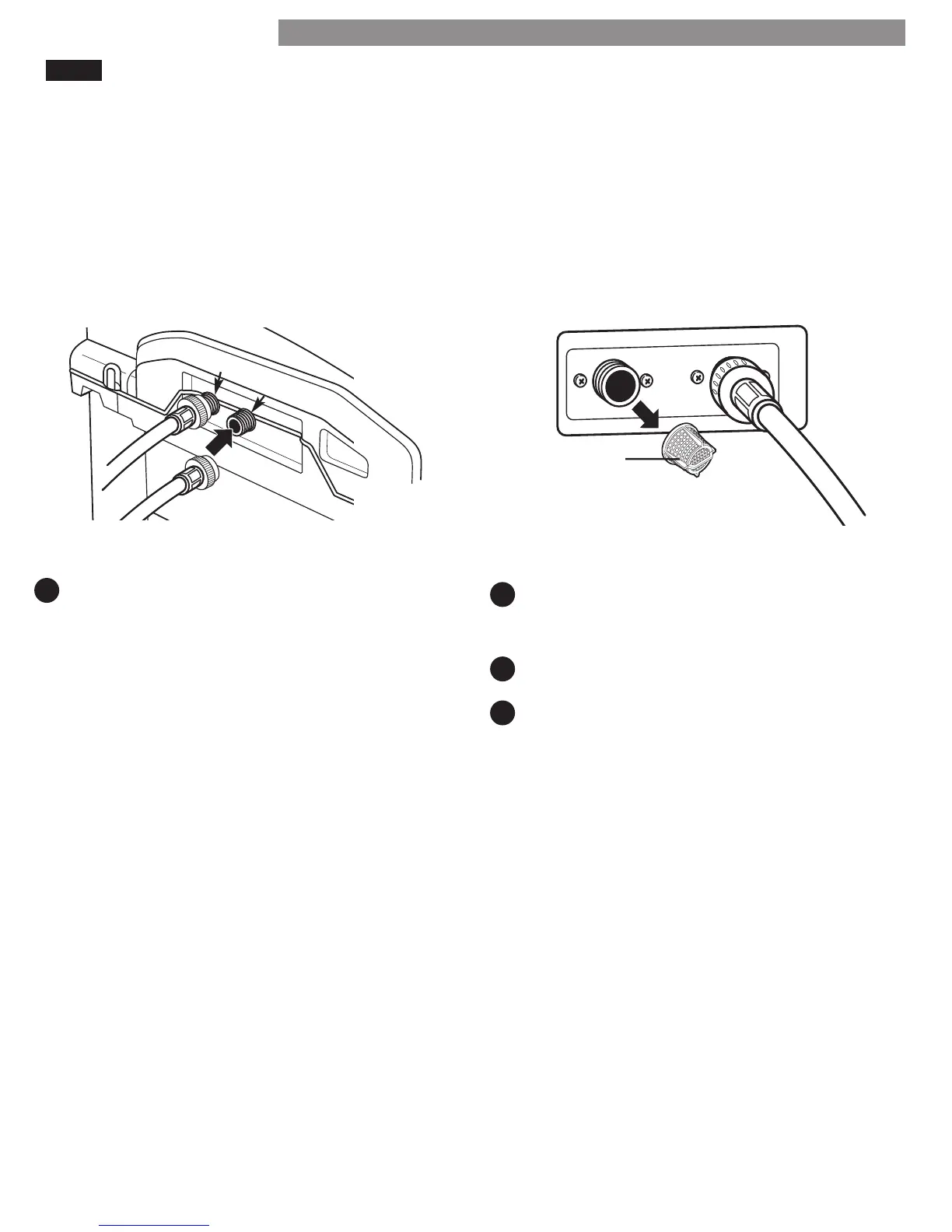
1. Turn OFF both water faucets completely. Unscrew the
hot and cold water lines from the back of the washer.
IMPORTANT: Only use inlet hoses provided by KENMORE.
Aftermarket hoses are not guaranteed to t or func-
tion correctly. Other hoses may not tighten correctly
and could cause leaks. Subsequent damage to prod-
uct or property will not be covered under the terms of
the product warranty. Hoses can be ordered by calling
1-800-4-MY-HOME
®
.
Carefully remove the lters from the water valves
and soak them in white vinegar or a lime scale
remover, following the manufacturer’s instructions. Be
careful not to damage the lters while cleaning.
Rinse thoroughly before reinstalling. Press the lters
back into place.
Before reattaching the hoses, ush the hoses and
water lines by running several gallons of water into a
bucket or drain.
MAINTENANCE
1
2
3
4
CARE AND CLEANING
Hot
Cold
Inlet Filter



 To Next Page