Unpacking Washer
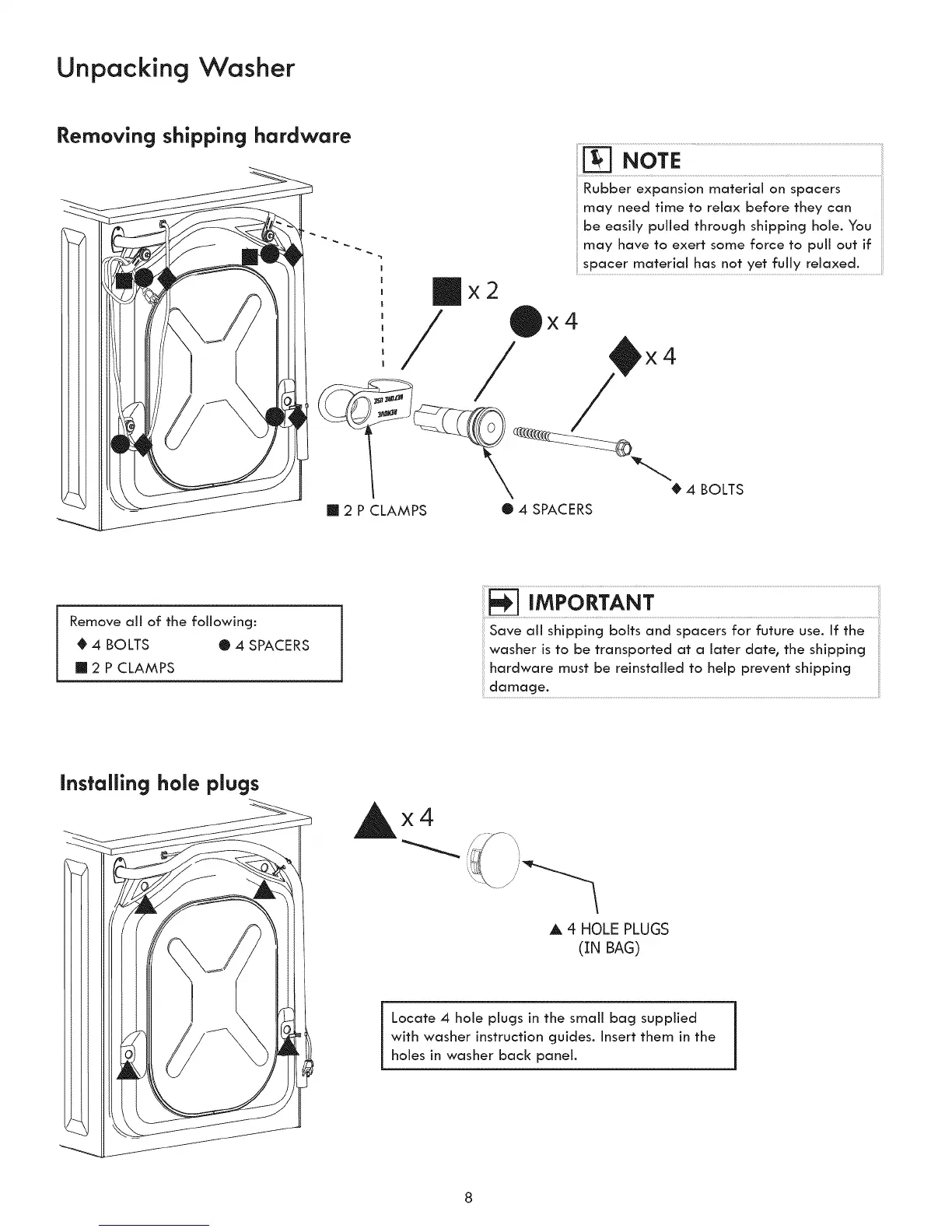
Removing shipping hardware
m 2 P CLAMPS
NOTE............................................................................................................................
Rubber expansion material on spacers
may need time to relax before they can
be easily pulled through shipping hole. You
may have to exert some force to pull out if
spacer material has not yet fully relaxed.
/ x4 _x4
• 4 SPACERS
Remove all of the following:
0 4 BOLTS • 4 SPACERS
2 P CLAMPS
Save all shipping bolts and spacers for future use. If the
washer is to be transported at a later date, the shipping
hardware must be reinstalled to help prevent shipping
installing hole plugs
Ax4
,& 4-HOLE PLUGS
(IN BAG)
Locate 4 hole plugs in the small bag supplied
with washer instruction guides. Insert them in the
holes in washer back panel.



 To Next Page