5 / 15
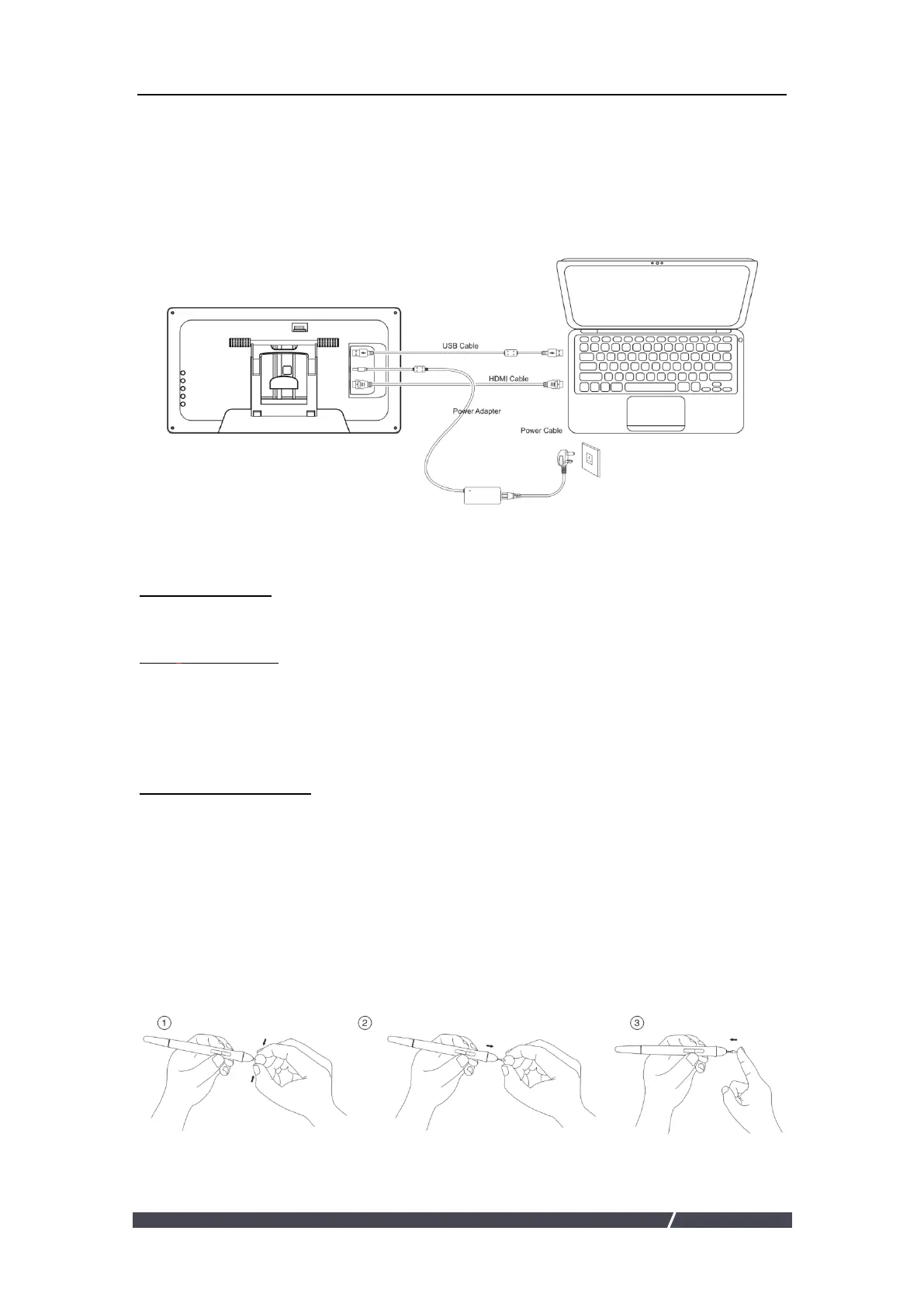
1.3 Setting up Display
1. As shown on the below, connect the pen display to your computer with
attached power adapter, HDMI cable and USB Cable.
2. Press the power button on the bottom of the display to power on the
display
1.4 Installing the Driver
1.4.1 OS Support
Windows 7 or later,macOS 10.12 or later
1.4.2 Install Driver
1.Before installing the driver, please close all graphic software and antivirus programs.
2.If you have installed other tablet driver, please uninstall it before you install this driver.
3.Please make sure your computer OS are as following: Windows 7 or later, macOS 10.08 or later.
4.Please download the pen tablet driver and user manual from our website:
www.kentingtablet.com
5.Run the tablet driver program and complete the installation according to the instruction.
6.For more information, please refer to the electronic user manual. If you have any questions,
please email us: service@kentingtablet.com
1.5 Pen Nib Replacement
The nib will be wear out after using for a long time, then you need to replace a new
nib.


 To Next Page