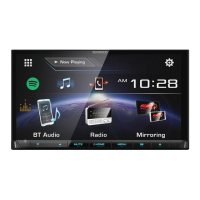
Need help?
Do you have a question about the Kenwood DDX9017DABS and is the answer not in the manual?
Safety warnings for preventing injury or fire.
Explanation of front panel button functions for various models.
Guide for performing initial setup of language, clock, display, and camera.
Step-by-step guide for inserting and playing a disc.
Steps for connecting a USB device to the unit.
Basic operations for playing files from a USB device.
Instructions for wired and Bluetooth connection of iPod/iPhone.
Guide to using Apple CarPlay for iPhone integration.
Guide to using Android Auto for Android device integration.
Basic controls for tuning and operating the radio.
Basic controls for operating digital radio and selecting services.
Steps for registering Bluetooth audio players or cell-phones.
Steps to connect the Bluetooth unit and select profiles.
Steps to make a phone call using the hands-free function.
How to answer or reject an incoming phone call.
How to adjust image quality for video and menu screens.
Guide to various system settings including AV, display, and Bluetooth.
How to configure user interface parameters like beep volume and gesture control.
Guide to setting up speakers and crossover frequencies.
How to adjust fader and balance for audio.
Instructions for operating the unit with the remote control.
Explanation of the functions of various remote control buttons.
Important precautions to note before installing the unit.
Step-by-step procedure for installing the unit.
Instructions for installing the unit, including Japanese cars and trim plates.
Table of common problems and their solutions.
List of playable disc types and file formats supported.
Technical specifications for the unit's various components.
 General
| Display Size | 6.8 inches |
|---|---|
| Touch Panel | Yes |
| Touchscreen | Yes |
| Bluetooth | Yes |
| DAB+ Radio/Tuner | Yes |
| HDMI Input | Yes |
| Operating System Compatibility | Android, iOS |
| DVD Playback | Yes |
| CD Playback | Yes |
| Built-in Microphone | Yes |
| Steering Wheel Control | Yes |
| Rear View Camera Input | Yes |
| USB Ports | 2 |
| Pre-out | 3 (Front, Rear, Subwoofer) |
| Maximum Power Output | 50 Watts x 4 |
| Resolution | 1280 x 720 pixels |

 To Next Page