
 To Next Page
L
Lisa GarzaSep 9, 2025
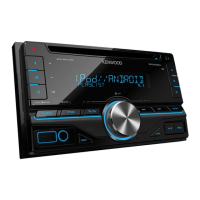
How to eject a disc from Kenwood DPX206U?
- MMelanie LewisSep 9, 2025
To forcibly eject the disc, press and hold M. Be careful not to drop the disc when it is ejected. If this does not solve the problem, reset the unit.

How to eject a disc from Kenwood DPX206U?
To forcibly eject the disc, press and hold M. Be careful not to drop the disc when it is ejected. If this does not solve the problem, reset the unit.
What does “NA DEVICE” mean on my Kenwood Receiver?
The “NA DEVICE” message indicates that a supported USB device is not connected or there is a connection issue. Connect a supported USB device, and check the connections.
Why does my Kenwood DPX206U say “MISWIRING CHECK WIRING THEN PWR ON”?
This message appears when there is a wiring issue. Turn the power off, then check to be sure the terminals of the speaker wires are insulated properly. Turn the power on again.
Why is there no sound coming from my Kenwood DPX206U?
If you cannot hear any sound, adjust the volume to the optimum level and check the cords and connections to ensure they are properly connected.
What to do if my Kenwood Receiver is not working?
If the Kenwood Receiver is not working, try resetting the unit.
How to fix poor radio reception on Kenwood Receiver?
To improve radio reception, connect the antenna firmly and pull the antenna out all the way.
Why is the elapsed playing time incorrect on my Kenwood Receiver?
The incorrect elapsed playing time is caused by how the tracks are recorded.
Why are correct characters not displayed on my Kenwood DPX206U Receiver?
This unit can only display uppercase letters, numbers, and a limited number of symbols. Uppercase Cyrillic letters can also be displayed if [???????] is selected.
How to fix “NO DEVICE” or “READING” flashing on Kenwood Receiver?
If “NO DEVICE” or “READING” keeps flashing, switch off the developer options on the Android device and reconnect the Android device. If this does not solve the problem, the connected Android device does not support [BROWSE MODE].
What does “NO MUSIC” mean on Kenwood DPX206U?
The “NO MUSIC” message indicates that the connected USB device does not contain playable audio files. Connect a USB device that contains playable audio files.
 General
| Tuner | AM/FM |
|---|---|
| Bluetooth | Yes |
| Display Type | LCD |
| Speaker Level Inputs | No |
| HD Radio | No |
| Satellite Radio Ready | No |
| Memory Card Slot | No |
| iPod Compatibility | Yes |
| Android Compatibility | Yes |
| Remote Control | Yes |
| Warranty | 1 year |
| Channels | 4 |
| Compatible Formats | MP3, WMA, AAC |
| RMS Power Bandwidth | 20Hz - 20kHz |
| Key Button Color | Red |
| DIN Size | Double DIN |