To Next Page

R
Richard JordanSep 15, 2025
Why is Alexa not responding on my Kenwood KMM-BT206?
- KKatelyn HatfieldSep 15, 2025
If there is no response from Alexa after the voice input, it means that the Amazon cloud was unable to analyze the voice input.

Why is Alexa not responding on my Kenwood KMM-BT206?
If there is no response from Alexa after the voice input, it means that the Amazon cloud was unable to analyze the voice input.
What does 'Unsupported Device' mean on my Kenwood KMM-BT206?
If the message “UNSUPPORTED DEVICE” appears on your Kenwood Receiver, verify that the connected USB device is compatible with the unit and that the file systems are in a supported format. You can also try reattaching the USB device.
What does 'No Device' mean on my Kenwood Receiver?
If the message “NO DEVICE” appears on your Kenwood Receiver, connect a device (USB/iPod/iPhone) and change the source to USB or iPod USB again.
What does 'Disconnected' mean on my Kenwood KMM-BT206?
If the message “DISCONNECTED” appears on your Kenwood Receiver, the USB is disconnected from the head unit. Please ensure that the device is properly connected through USB.
Why is Alexa giving the wrong response on my Kenwood KMM-BT206 Receiver?
If you're getting the wrong response from Alexa, it's possible that Alexa misunderstood what was said or didn't catch the entire request or sentence spoken. Please try again.
What does 'Switching NG' mean on my Kenwood Receiver?
If the message “SWITCHING NG” appears on your Kenwood Receiver, the connected phones might not support the phone switching feature.
What does 'USB Hub is not Supported' mean on Kenwood KMM-BT206?
If the message “USB HUB IS NOT SUPPORTED” appears on your Kenwood Receiver, this unit cannot support a USB device connected via a USB hub.
What does 'Copy Pro' mean on my Kenwood KMM-BT206 Receiver?
If the message “COPY PRO” appears on your Kenwood Receiver, a copy-protected file is being played from the USB device.
What does 'Unresponsive Device' mean on my Kenwood KMM-BT206?
If the message “UNRESPONSIVE DEVICE” appears on your Kenwood Receiver, ensure that the USB device is not malfunctioning and reattach it.
Why won't my Kenwood Receiver switch to USB source?
If the source doesn't change to “USB” when you connect a USB device while listening to another source, the USB port may be drawing more power than the design limit. Turn the power off and unplug the USB device. Then, turn the power back on and reattach the USB device. If the problem persists, turn the power off and on (or reset the unit) before trying a different USB device.
Steps to connect and use a USB storage device.
Instructions for connecting Apple devices via USB.
Steps to set up and connect Spotify.
Controls for playing music via Spotify.
Steps to install and configure the KENWOOD Remote app.
Configuration options for the remote application.
Lists of supported Bluetooth profiles and codecs.
 General
| DIN size | 1 DIN |
|---|---|
| Impedance | 40 Ω |
| Clock mode | 24h |
| Output power | 50 W |
| Product color | Black |
| Ready for iPod | Yes |
| Volume control | Buttons |
| Frequency range | 30 - 15000 Hz |
| Disc types supported | - |
| Audio output channels | 4.0 channels |
| Signal-to-Noise Ratio (SNR) | 40 dB |
| Audio formats supported | AAC, MP3, WAV, WMA |
| Display type | LCD |
| Display digits | 13 digits |
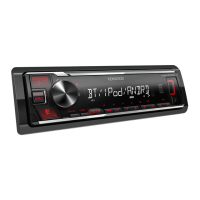
| Illumination color | Red |
| Display number of lines | 1 lines |
| On Screen Display (OSD) languages | DUT, ENG, ESP, FRE, RUS |
| USB version | 2.0 |
| Bluetooth range | 10 m |
| Bluetooth version | 4.2 |
| Bluetooth profiles | A2DP, AVRCP, PBAP |
| Line outputs (RCA) | 1 |
| Cables included | DC |
| Operating temperature (T-T) | -10 - 60 °C |
| FM band range | 87.5 - 108 MHz |
| LW band range | 153 - 279 kHz |
| Supported radio bands | FM, LW, MW |
| Preset stations quantity | 24 |
 Weight and Dimensions
| Depth | 100 mm |
|---|---|
| Width | 182 mm |
| Height | 53 mm |
| Weight | 600 g |