EasyManua.ls Logo

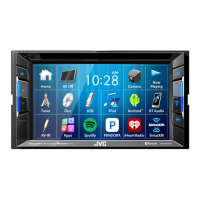
Kenwood KW-V230BT - User Manual

Kenwood KW-V230BT
76 pages
Print Icon
To Next Page IconTo Next Page
Loading...
B5A-1363-00 (KN)© 2016 JVC KENWOOD Corporation
MONITOR WITH DVD RECEIVER
INSTRUCTION MANUAL
KW-V230BT
KW-V130BT
2017KW-VEntryK.indb12017KW-VEntryK.indb1 2016/06/0221:222016/06/0221:22
Question and Answer IconNeed help?

Do you have a question about the Kenwood KW-V230BT and is the answer not in the manual?

Summary

Before Use Safety and Important Information

Warning: Prevent Accidents and Damage

Instructions to prevent accidents and damage, including installation and driving precautions.

Caution: Radiation Exposure

Caution regarding hazardous radiation exposure from controls or adjustments.

USB Device Connection and Playback

Android Device Integration and Setup

iPod;iPhone Device Connection and Setup

Using Connected Apps

Pandora Streaming Service Overview

Pandora App Preparation

Connecting device and selecting it for Pandora app usage.

Pandora Playback Controls and Information

Understanding Pandora playback buttons, information, and account requirements.

Pandora Station Selection and Requirements

iHeartRadio Streaming Service Overview

iHeartRadio App Preparation

Connecting device and selecting it for iHeartRadio app usage.

iHeartRadio Playback Controls and Information

Understanding iHeartRadio playback buttons, information, and remote operation.

iHeartRadio Station Customization and Search

Spotify Music Streaming Overview

Spotify App Preparation

Connecting device and selecting it for Spotify app usage.

Spotify Playback Controls and Information

Understanding Spotify playback buttons, information, and account requirements.

Spotify Station Creation and Track Selection

Radio Tuning and Preset Station Management

Tuner Operations and Controls

Understanding tuner buttons, reception info, and operation buttons.

Storing and Managing Preset Stations

Manually or automatically presetting radio stations for quick access.

Preset Station Selection and RBDS Features

SiriusXM Satellite Radio Activation and Reception

Activating SiriusXM Subscription

Steps to activate subscription by checking Radio ID and using online or phone methods.

SiriusXM Channel Management and Presets

Storing and Selecting Preset Channels

Presetting channels in memory and selecting them using preset numbers.

SiriusXM Channel Selection and Replay Functionality

SiriusXM Smart Features: Favorites, TuneStart, TuneScan

Understanding SmartFavorites Functionality

User-stored channels providing rewind/replay functionality.

Activating TuneStart and TuneScan Modes

Features to listen to songs from the beginning or scan channels for previews.

SiriusXM Parental Control Setup and Management

Setting Parental Control Code

Setting or changing the parental control code to limit access to mature content channels.

Activating;Deactivating Parental Control

Locking channels classified as 'mature' or selected channels.

SiriusXM Channel Locking, Skipping, and Settings Reset

Rear View Camera Integration and Operation

Connecting and Using the Rear View Camera

Connecting a rear view camera and enabling its display when shifting to reverse.

Displaying Rear Camera Feed Manually

Viewing the rear camera screen automatically or manually.

Camera Screen and Parking Guideline Features

External Component Connectivity and Settings

Bluetooth Device Connectivity and Pairing

Registering and Pairing Bluetooth Devices

Steps to pair devices via Bluetooth 2.1 (SSP) or 2.0 (PIN code).

Bluetooth PIN Code Pairing and Device Management

Pairing Bluetooth Devices via PIN Code

Detailed steps for pairing Bluetooth 2.0 devices using a PIN code.

Managing Paired Bluetooth Devices

Viewing and managing the list of paired devices.

Managing Bluetooth Device Connections

Connecting and Disconnecting Registered Devices

Connecting or disconnecting up to two Bluetooth devices simultaneously.

Bluetooth Mobile Phone Operations: Calls and Volume

Receiving and Ending Calls

Handling incoming calls, rejecting calls, and ending conversations.

Adjusting Call Volume and Noise Reduction

Adjusting call volume, earpiece volume, microphone level, and noise/echo cancellation.

Bluetooth Calling and Texting Features

Making Calls from Phone Control Screen

Making calls using call history, phone book, preset list, or direct number entry.

Bluetooth Phone Book and Voice Dialing

Activating Voice Dialing

Using voice recognition for hands-free calling, including Siri activation.

Bluetooth Audio Player and Phone Presets

Using the Bluetooth Audio Player

Controlling audio playback from connected Bluetooth devices, including track selection and modes.

Bluetooth Audio File Selection and Device Settings

Configuring Bluetooth Device Settings

Managing paired devices, PIN code, auto connect, audio output, auto response, and pairing.

Application Setup for Mobile Devices

Audio Sound Adjustment Features

Equalizer and Sound Mode Settings

Adjusting sound equalization, selecting preset modes, and storing custom settings.

Speaker and Crossover Frequency Setup

Configuring Speaker Settings

Setting car type, speaker location, size, and adjusting crossover frequencies.

Adjusting Crossover Frequencies

Fine-tuning crossover frequencies for tweeters, woofers, and subwoofers.

Digital Time Alignment (DTA) Adjustment

Configuring Speaker Delay Times

Adjusting speaker output delay times for optimal sound staging.

Determining DTA Adjustment Values

Measuring speaker distances and calculating delay time differences.

Video Playback Picture Adjustments

Adjusting Video Picture Quality

Adjusting brightness, contrast, blackness, color, tint, and sharpness.

Changing Aspect Ratio for Video Playback

Selecting aspect ratio (Full, Just, Normal, Auto) for video playback.

Display Customization Options

Home Screen Customization

System Settings and Software Updates

Memorizing and Recalling System Settings

Saving, recalling, or clearing system settings.

Updating System Software

Creating update files, copying to USB, and updating the system.

System Information and Touch Panel Calibration

Adjusting Touch Panel Position

Calibrating touch panel response if operations do not match touch points.

Menu and Audio Settings Configuration

Adjusting Sound Effect Settings

Adjusting loudness, bass boost, volume link EQ, sound space, and response.

Audio Settings Overview

Detailed settings for equalizer, fader/balance, and speaker/crossover.

Display and Input Settings

System Configuration Options

Remote Controller Usage and Maintenance

Remote Controller Battery Replacement

Instructions for changing the button battery (CR2025) and important cautions.

Remote Controller Operations and Controls

Pre-Installation Warnings and Safety Precautions

Installation Wire Connection Warnings

Crucial warnings about connecting ignition and battery wires to prevent short circuits.

Installation Procedure and Unit Mounting

Wiring Terminal Connections

Connecting Power, Speaker, and Control Wires

Diagram and details for connecting power, speaker, antenna, reverse, parking brake, and illumination wires.

Connecting External Devices: USB, Android, iPod;iPhone

Connecting Android and iPod;iPhone Devices

Connecting Android, Lightning, and 30-pin iPod/iPhone devices.

External Component and Microphone Connections

Connecting External Amplifiers and Sources

Connecting iPod/AV-IN, video output, speaker preouts, expansion ports, and rear camera.

Unit Maintenance and File Playback Support

Audio File and Disc Playback Specifications

Unplayable Media and USB;iPod;iPhone Notes

Troubleshooting: Error Message Guide

General Error Message Handling

Guide to resolving common error messages like 'No Signal', 'Connection Error', and 'USB Device Error'.

Troubleshooting Common Unit Issues

General Troubleshooting Tips

Basic troubleshooting for no sound, no picture, unit not working, and remote controller issues.
Troubleshooting Media Playback Issues

Troubleshooting Device-Specific Issues

Kenwood KW-V230BT Specifications

General IconGeneral
BrandKenwood
ModelKW-V230BT
CategoryReceiver
LanguageEnglish

Related product manuals