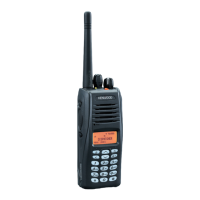
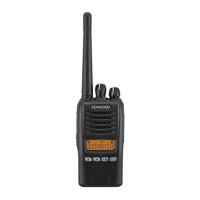
This document is an instruction manual for the KENWOOD NEXEDGE NX-200/NX-300, NX-200G/NX-300G, and NX-200S/NX-300S series of VHF/UHF digital transceivers.
Function Description
The KENWOOD NEXEDGE transceivers are designed for land mobile radio applications, offering both VHF and UHF digital communication capabilities. They support various operational modes including conventional, trunking, and digital signaling. The transceivers are equipped with a range of programmable functions and advanced operations to enhance communication efficiency and security.
Key Features:
- Digital Transceiver: Operates on both VHF and UHF digital frequencies.
- Programmable Functions: A wide array of customizable functions can be programmed by the dealer, including Auto Telephone, Battery Indicator, Broadcast, Call (1-6), CH/GID Down/Select/Recall/Up, CW Message, Direct CH/GID (1-5), Emergency, Fixed Volume, Forced Search, Function, High Transmit Power, Home CH/GID, Key Lock, Lone Worker, Low Transmit Power, Monitor, Monitor Momentary, Scan, Scan Delete/Add, Scrambler/Encryption, Send GPS data, Site Down/Lock/Select/Up/Up/Down, Speaker Attenuation, Squelch Off/Momentary/Level, Talk Around, Telephone Disconnect, Vibrator, VOX Function, Zone Delete/Add/Down/Select/Up.
- Menu Mode: Many functions are selected or configured through a menu system, providing versatility in operation.
- Signaling: Supports Quiet Talk (QT)/Digital Quiet Talk (DQT), Operator Selectable Tone (OST), 2-tone Signaling, DTMF Signaling, FleetSync Signaling, and NXDN ID Signaling.
- Voice Operated Transmission (VOX): Allows for hands-free transmission when an optional headset is connected. VOX gain level is adjustable.
- Battery Saver: Decreases power consumption when no signal is received and no operations are being performed (Conventional channels only).
- Time-out Timer (TOT): Prevents extended continuous transmission by stopping transmission and sounding an alert tone after a preset time.
- GPS Report: GPS data can be manually transmitted or automatically at preset intervals (requires VHF/GPS or UHF/GPS antenna for G models, or external GPS unit for S models).
- Voice Recorder (VGS-1 Optional): Allows recording of conversations and creation of voice memos. Features auto recording of transmitted/received signals (last 30 seconds) and voice memo recording.
- Auto Reply Message (VGS-1 Optional): Automatically responds to individual calls while using FleetSync/NXDN.
- Voice Guide: Announces new zone, channel, and function settings.
Important Technical Specifications
- Antenna Terminal: 50 Ω impedance.
- Battery Terminal: Uses a spring plate; negative terminal connects to chassis ground.
- Universal Connector:
- SSW (Ext/Int Speaker Switch Input): High Impedance, I/O.
- SP+ (BTL Output + for External Speaker): 8 Ω/ 16 Ω, Output.
- SP- (BTL Output - for External Speaker): 8 Ω/ 16 Ω, Output.
- MSW (Ext/Int MIC Switch Input): High Impedance, I/O.
- EMC (External MIC Input): 1.8 KΩ, I/O.
- ME (External MIC GND): GND.
- PTT (External PTT Input): High Impedance, I/O.
- PF (Programmable Function Key Input): High Impedance, I/O.
- OPT (Man Down Input): High Impedance, I/O.
- E (GND): GND.
- 5V (5V power supply output): 5V, Output.
- TXD (Serial Data Output): CMOS, Output.
- RXD (Serial Data Input): CMOS, I/O.
- NC (Not used).
Usage Features
Basic Operations:
- Power ON/OFF: Rotate the Power switch/Volume control clockwise to turn ON, counterclockwise fully to turn OFF.
- Volume Adjustment: Rotate the Power switch/Volume control.
- Zone and Channel/Group ID Selection: Use the Selector knob (default) or programmed keys (Zone Select, Zone Up/Down).
- Transmission: Select channel, check if free (Monitor/Squelch Off), press PTT, speak into microphone (1.5 to 4 cm away).
- Reception: Select channel; if signaling is programmed, calls are heard only if the signal matches transceiver settings.
- Group Calls (Digital): Select group ID using programmed Group or Group + Status key, then PTT.
- Individual Calls (Digital): Select unit ID using programmed Individual or Individual + Status key, then PTT.
- Transceiver Password: For password-protected models, enter a 6-digit password using the keypad or navigation keys.
Advanced Operations:
- DTMF Calls: Manual dialing via keypad (Keypad Auto PTT optional) or Autodial from a programmed list (up to 30 digits).
- Trunking Calls (Telephone Calls): Manual dialing or selecting from a list using Autodial.
- Emergency Calls: Press and hold the programmed Emergency key. Transceiver switches to Emergency channel and transmits.
- Scrambler/Encryption: Activates secure transmission via programmed key or Menu.
- Operator Selectable Tone (OST): Reprograms QT/DQT settings on channels (up to 40 tones/codes).
- Radio Access Number (RAN): Digital signaling system where squelch opens only for matching RANs.
- Key Lock: Locks/unlocks transceiver keys, with some exceptions (Emergency, Backlight, Monitor, Squelch Off, Function, PTT).
- Low Battery Warning: LED indicator (Green/Orange/Red/Blinking Red) or battery icon on display shows remaining power.
Maintenance Features
- Battery Pack Installation/Removal: Match guides, press firmly, lock safety catch. To remove, lift safety catch, press release latch, pull pack.
- Antenna Installation: Screw clockwise onto connector until secure.
- Belt Clip Installation: Attach with supplied M3 x 8 mm screws.
- Universal Connector Cap: Insert and secure with screw when not using external accessories.
- Speaker/Microphone/Headset Installation: Insert connector guide, secure with screw.
- Battery Charging: Refer to battery charger instruction manual. Ensure safety catch is closed if charging attached battery.
- Cleaning: Clean battery pack contacts and transceiver terminals before installing battery pack.
- Waterproof Efficiency: Do not remove the black sheet or place stickers on the orange seal on the reverse side of the transceiver/battery pack, as this impairs waterproof efficiency.
Safety Precautions:
- Do not charge/use transceiver and battery pack when wet.
- Ensure no metallic items between transceiver and battery pack.
- Use only KENWOOD specified options.
- Do not touch damaged chassis/parts.
- Reduce volume when headset/headphone is connected.
- Do not place microphone cable around neck near machinery.
- Do not place transceiver on unstable surfaces.
- Ensure antenna end does not touch eyes.
- Avoid touching hot radiator/chassis during prolonged transmission or battery pack replacement.
- Switch power OFF before installing optional accessories.
- AC plug should be readily accessible.
FCC Warning:
- Changes or modifications not expressly approved by KENWOOD could void user's authority to operate.
- Equipment generates radio frequency energy; may cause harmful interference if not installed/used per instructions.
- If interference occurs, reorient/relocate antenna, increase separation, connect to different circuit, consult dealer.
Li-ion Battery Pack Information:
- DANGER: Do not disassemble, reconstruct, short-circuit, incinerate, apply heat, leave near heat generators (>80°C/176°F), immerse in water, charge near fires/direct sunlight, use unspecified charger, pierce, jar, throw, use damaged packs, solder directly, or reverse polarity.
- WARNING: Do not charge longer than specified time, place in microwave/high pressure container, keep ruptured/leaking packs near fire, or use abnormal batteries.
- If electrolyte gets in eyes, wash with fresh water immediately and seek medical attention.
RBRC Recycle Seal:
- Indicates KENWOOD's voluntary participation in Li-ion battery recycling program.
- Call 1-800-8-BATTERY (1-800-822-8837) for recycling information.

 Need help?
 General





 To Next Page