EasyManua.ls Logo

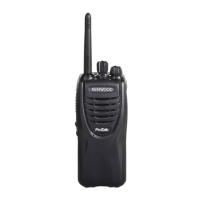
Kenwood ProTalk tk-3501 - User Manual

Kenwood ProTalk tk-3501
32 pages
Print Icon
To Next Page IconTo Next Page
Loading...
INSTRUCTION MANUAL
UHF FM TRANSCEIVER
TK-3501
B62-2606-10

Other manuals for Kenwood ProTalk tk-3501

Questions and Answers

  • T
    tommyfergusonJul 27, 2025
    How to fix a Kenwood ProTalk tk-3501 that will not turn on?
    • A
      allisonrobbinsJul 27, 2025
      If your Kenwood Transceiver fails to power on, the battery pack may be discharged. Recharge the battery pack or replace the batteries. Alternatively, the battery pack may not be correctly installed. Remove the battery pack and then reinstall it, ensuring it is properly connected.
  • E
    Emily WilliamsAug 4, 2025
    What to do if I can't hear other group members on my Kenwood ProTalk tk-3501?
    • S
      Sarah TerryAug 4, 2025
      If you cannot communicate with other members of your group, ensure that your Kenwood Transceiver is set to the same frequency and QT/DQT settings as the rest of the group. Also, verify that you are within the communication range of the other transceivers.
  • P
    Peter ParkAug 11, 2025
    How to stop hearing other voices on my Kenwood ProTalk tk-3501 channel?
    • R
      rjacksonAug 11, 2025
      To eliminate hearing voices from outside your group on the Kenwood Transceiver, change the QT/DQT settings. Ensure that all members of your group update their transceiver settings to match the new QT/DQT setting.
  • K
    Keith MahoneyAug 18, 2025
    Why is my Kenwood ProTalk tk-3501 Transceiver battery life getting shorter?
    • J
      Justin SanchezAug 18, 2025
      If you observe battery deterioration with repeated charging of your Kenwood Transceiver, it is likely that the battery pack has reached the end of its life. Replace the battery pack with a new one.

Summary

Precautions

Cautions

Battery Pack Dangers

Battery Pack Warnings

Preparation

Installing;Removing the Battery Pack

Step-by-step guide for attaching and detaching the battery pack.

Charging the Battery Pack

Orientation

Channel Selector

Control for changing the operating channel and related settings.

Basic Operations

Power ON;OFF and Volume Adjustment

How to turn the transceiver on/off and control audio volume.

Channel Selection

How to select a different operating channel.

Making a Call (Transmit)

Steps for transmitting a message using the PTT switch and microphone.

Receiving a Call

How to receive transmissions by releasing the PTT switch.

Voice Operated Transmission (VOX)

Channel Setup Mode

Channel Operating Frequencies

QT;DQT Settings

Programmable Functions

Scan

Feature to scan through programmed channels for activity, with options like Priority and Revert Channels.

Troubleshooting Guide

Kenwood ProTalk tk-3501 Specifications

General IconGeneral
BrandKenwood
ModelProTalk tk-3501
CategoryTransceiver
LanguageEnglish

Related product manuals