EasyManua.ls Logo

Kenwood X-E5 - Test 1 Operation, Key Assignments, and LED Indicators

Kenwood X-E5
54 pages
Print Icon
To Next Page IconTo Next Page
To Previous Page IconTo Previous Page
Loading...
X-E5
CIRCUIT
DESCRIPTION
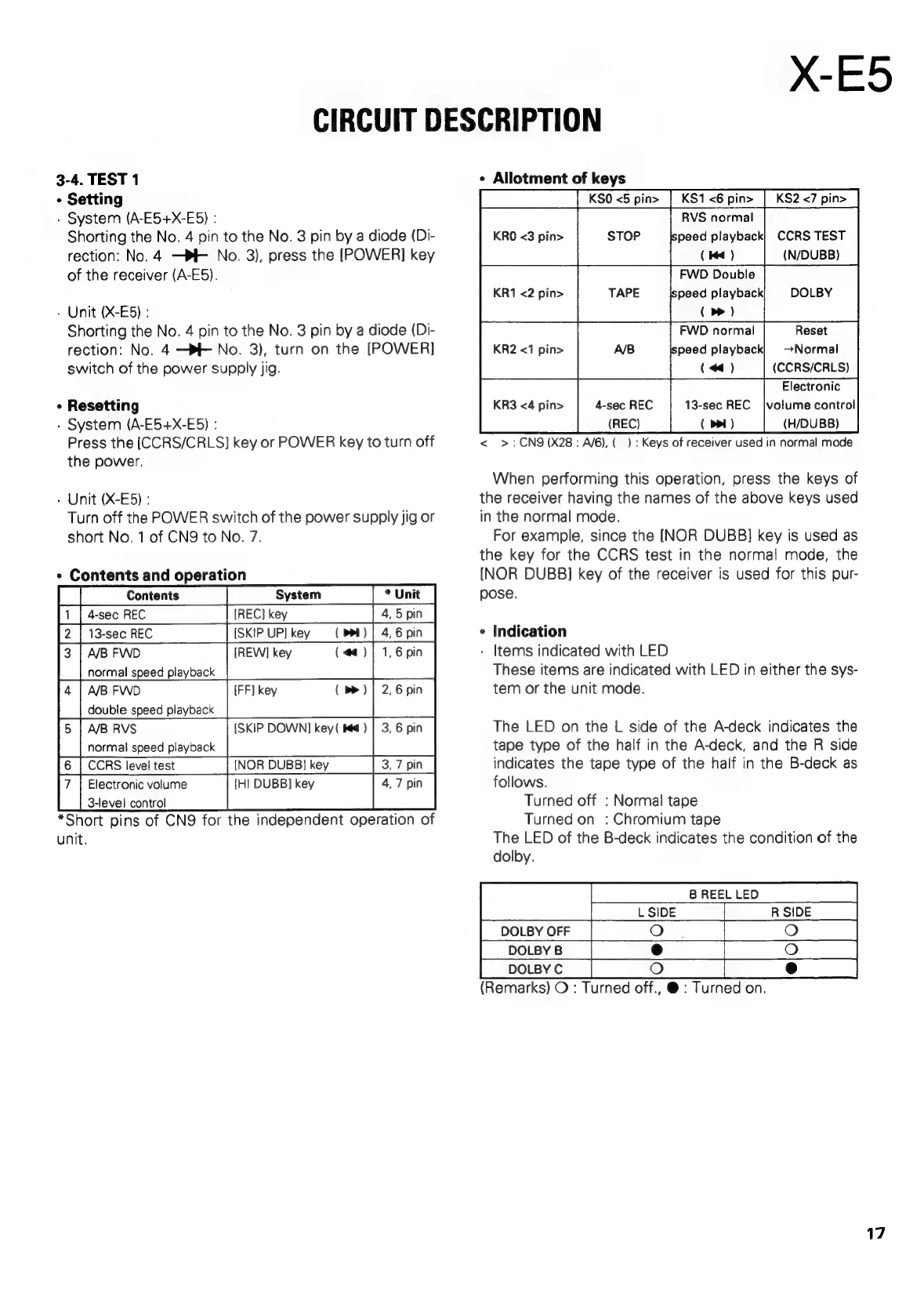
3-4.
TEST
1
»
Setting
-
System
(A-E5+X-E5)
:
Shorting
the
No.
4
pin
to
the
No.
3
pin
by
a
diode
(Di-
rection:
No.4
—PF
No.
3),
press
the
[POWER]
key
of
the
receiver
(A-E5).
-
Unit
(X-E6)
:
Shorting
the
No.
4
pin
to
the
No.
3
pin
by
a
diode
(Di-
rection:
No.
4
—PE
No.
3),
turn
on
the
[POWER]
switch
of
the
power
supply
jig.
*
Resetting
.
System
(A-E5+X-E5)
:
Press
the
[CCRS/CRLS]
key
or
POWER
key
to
turn
off
the
power.
»
Unit
(X-E5)
:
Turn
off
the
POWER
switch
of
the
power
supply
jig
or
short
No.
1
of
CN9
to
No.
7.
*
Contents
and
operation
[
[Contents
System
|
*
Unit
13-sec
REC
[SKIP
UP]
key
(DBL)
normal
speed
playback
double
speed
playback
5
|
ABRVS
{SKIP
DOWN]
key(
K€)
|
3,
6
pin
normal
speed
playback
'6
|
CCRS
level
test
[NOR
DUBB}
key
3,7
pin
Electronic
volume
3-level
control
*Short
pins
of
CN9
for
the
independent
operation
of
unit.
¢
Allotment
of
keys
|
|
KS0
<5
pin>
|
KS1<6
pin>
|
KS2<7
pin>
RVS
normal
KRO
<3
pin>
STOP
(
Kd
)
(N/DUBB)
FWD
Double
KR1
<2
pin>
TAPE
peed
playback
DOLBY
(
>)
FWD
normal
Reset
KR2
<1
pin>
A/B
peed
playback}
Normal
(«)
(CCRS/CRLS)
Electronic
(REC)
(
ppl)
(H/DUBB)
<
>:CN9
(X28:
A/6),(
):
Keys
of
receiver
used
in
normal
mode
When
performing
this
operation,
press
the
keys
of
the
receiver
having
the
names
of
the
above
keys
used
in
the
normal
mode.
For
example,
since
the
[NOR
DUBB]
key
is
used
as
the
key
for
the
CCRS
test
in
the
normal
mode,
the
[NOR
DUBB]
key
of
the
receiver
is
used
for
this
pur-
pose.
¢
Indication
-
Items
indicated
with
LED
These
items
are
indicated
with
LED
in
either
the
sys-
tem
or
the
unit
mode.
The
LED
on
the
L
side
of
the
A-deck
indicates
the
tape type
of
the
half
in
the
A-deck,
and
the
R
side
indicates
the
tape
type
of
the
half
in
the
B-deck
as
follows.
Turned
off
:
Norma!
tape
Turned
on
:
Chromium
tape
The
LED
of
the
B-deck
indicates
the
condition
of
the
dolby.
B
REEL
LED
DOLBY
OFF
;
DOLBY
B
DOLBY
C
(Remarks)
O
:
Turned
off.,
@
:
Turned
on.
17

Related product manuals