EasyManua.ls Logo

Kenwood X-E5 - Manual and Automatic Adjustment Modes

Kenwood X-E5
54 pages
Print Icon
To Next Page IconTo Next Page
To Previous Page IconTo Previous Page
Loading...
X-E5
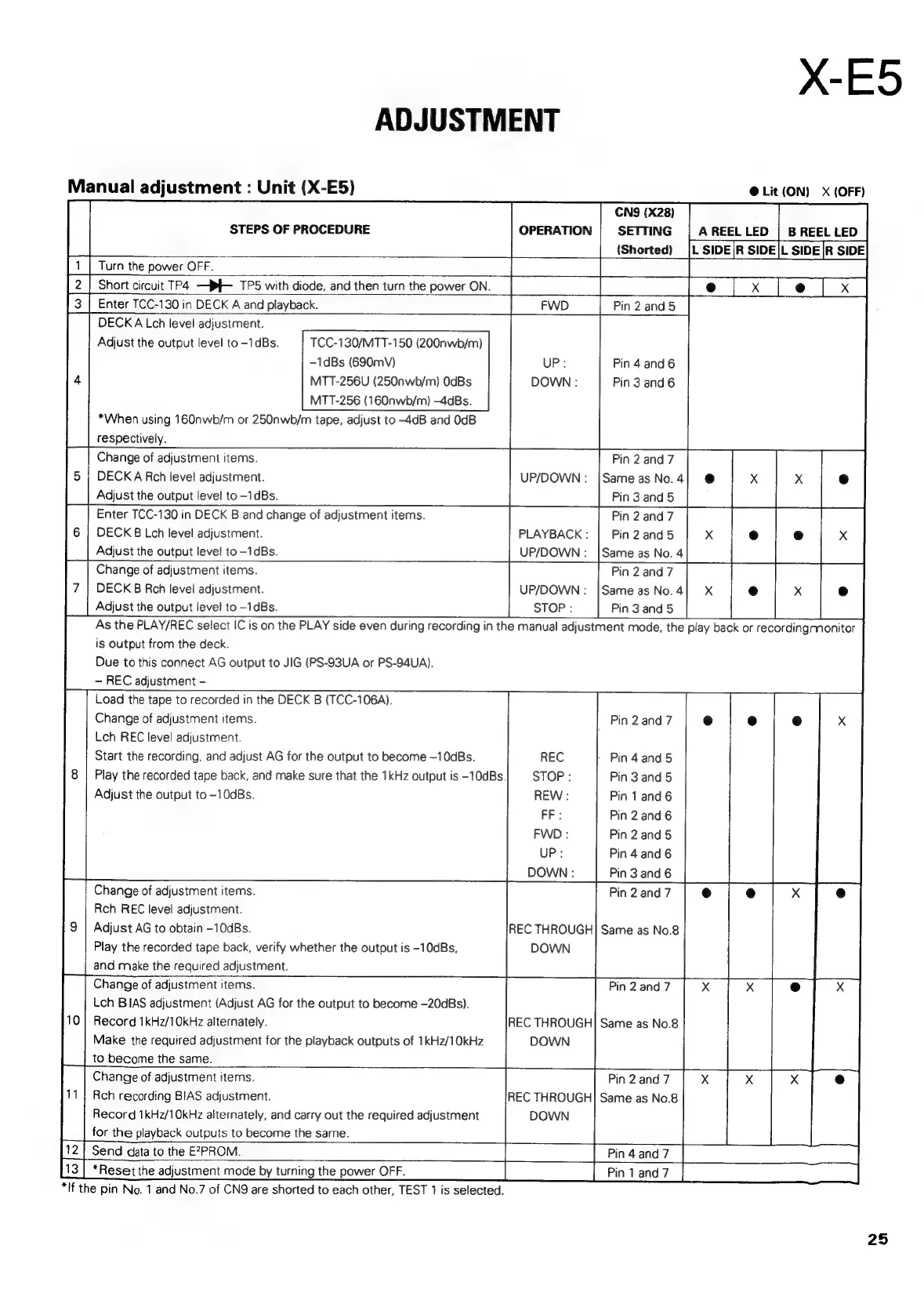
ADJUSTMENT
Manual
adjustment
:
Unit
(X-E5)
@
Lit
(ON)
X
(OFF)
CNS
(X28)
B
REEL
LED
SETTING
(Shorted)
OPERATION
A
REEL
LED
STEPS
OF
PROCEDURE
Turn
the
power
OFF.
Short
circuit
TP4.
—Pf-_TPS
with
diode,
and
then
turn
the
power
ON.
Enter
TCC-130
in
DECK
A
and
playback.
DECK
A
Lch
level
adjustment.
4
Pin
2
and
5
TCC-130/MTT-150
(200nwb/m)
-1dBs
(690mV)
MTT-256U
(250nwb/m)
OdBs
MTT-256
(160nwb/m)
—-4aBs.
*When
using
16O0nwb/m
or
250nwb/m
tape,
adjust
to
-4dB
and
0dB
respectively.
Change
of
adjustment
items.
DECK
A
Rch
level
adjustment.
Adjust
the
output
level
to
-1dBs.
Enter
TCC-130
in
DECK
B
and
change
of
adjustment
items.
DECK
B
Lch
level
adjustment.
Adjust
the
output
level
to
-1dBs.
Change
of
adjustment
items.
Adjust
the
output
level
to
-1dBs.
UP:
Pin
4
and
6
Pin
3
and
6
Pin
2
and
7
UP/DOWN
:
|Same
as
No.
4
Pin
3
and
5
Pin
2
cae
PLAYBACK
:
Pin
2
and
5
X
UP/DOWN:
|Same
as
No.
4
Pin
2
and
7
DECK
B
Rch
level
adjustment.
UP/DOWN
:
|Sameas
No.4]
X
Adjust
the
output
level
to
-1dBs.
STOP
:
Pin
3
and
5
As
the
PLAY/REC
select
IC
is
on
the
PLAY
side
even
during
recording
in
the
manual
adjustment
mode,
the
play
back
or
recordingmonitor
iS
Output
from
the
deck.
Due
to
this
connect
AG
output
to
JIG
(PS-93UA
or
PS-94UA).
REC
adjustment
-
Load
the
tape
to
recorded
in
the
DECK
B
(TCC-106A).
Change
of
adjustment
items.
Lch
REC
level
adjustment.
Pin
2
and
7
Start
the
recording,
and
adjust
AG
for
the
output
to
become
—10dBs.
REC
Pin
4
and
5
8
|
Play
the
recorded
tape
back,
and
make
sure
that
the
1kHz
output
is
-10dBs.
STOP
:
Pin
3
and
5
Adjust
the
output
to
-10dBs.
REW
:
Pin
1
and
6
FF
:
Pin
2
and
6
Pin
2
and
5
Pin
4
and
6
Pin
3
and
6
Pin
2
and
7
Change
of
adjustment
items.
Rch
REC
level
adjustment.
Adjust
AG
to
obtain
-10dBs.
Play
the
recorded
tape
back,
verify
whether
the
output
is
-10dBs,
and
make
the
required
adjustment.
Change
of
adjustment
items.
Lch
BIAS
adjustment
(Adjust
AG
for
the
output
to
become
-20dBs).
Record
1kHz/10kHz
alternately.
Make
the
required
adjustment
for
the
playback
outputs
of
1kHz/10kHz
to
become
the
same.
Change
of
adjustment
items.
Pin
2
and
7
Rch
recording
BIAS
adjustment.
REC
THROUGH]
Same
as
No.8
Record
1kHz/10kHz
alternately,
and
carry
out
the
required
adjustment
DOWN
for
the
playback
outputs
to
become
the
same.
an
and
7
Pin
1
and
7
Same
as
No.8
Same
as
No.8
Send
data
to
the
E27PROM.
*Reset
the
adjustment
mode
by
turning
the
power
OFF.
“If
the
pin
No.
1
and
No.7
of
CNQ
are
shorted
to
each
other,
TEST
1
is
selected.
25

Related product manuals