EasyManua.ls Logo

Kenwood X-E5 - Remote Control Unit Key Functions

Kenwood X-E5
54 pages
Print Icon
To Next Page IconTo Next Page
To Previous Page IconTo Previous Page
Loading...
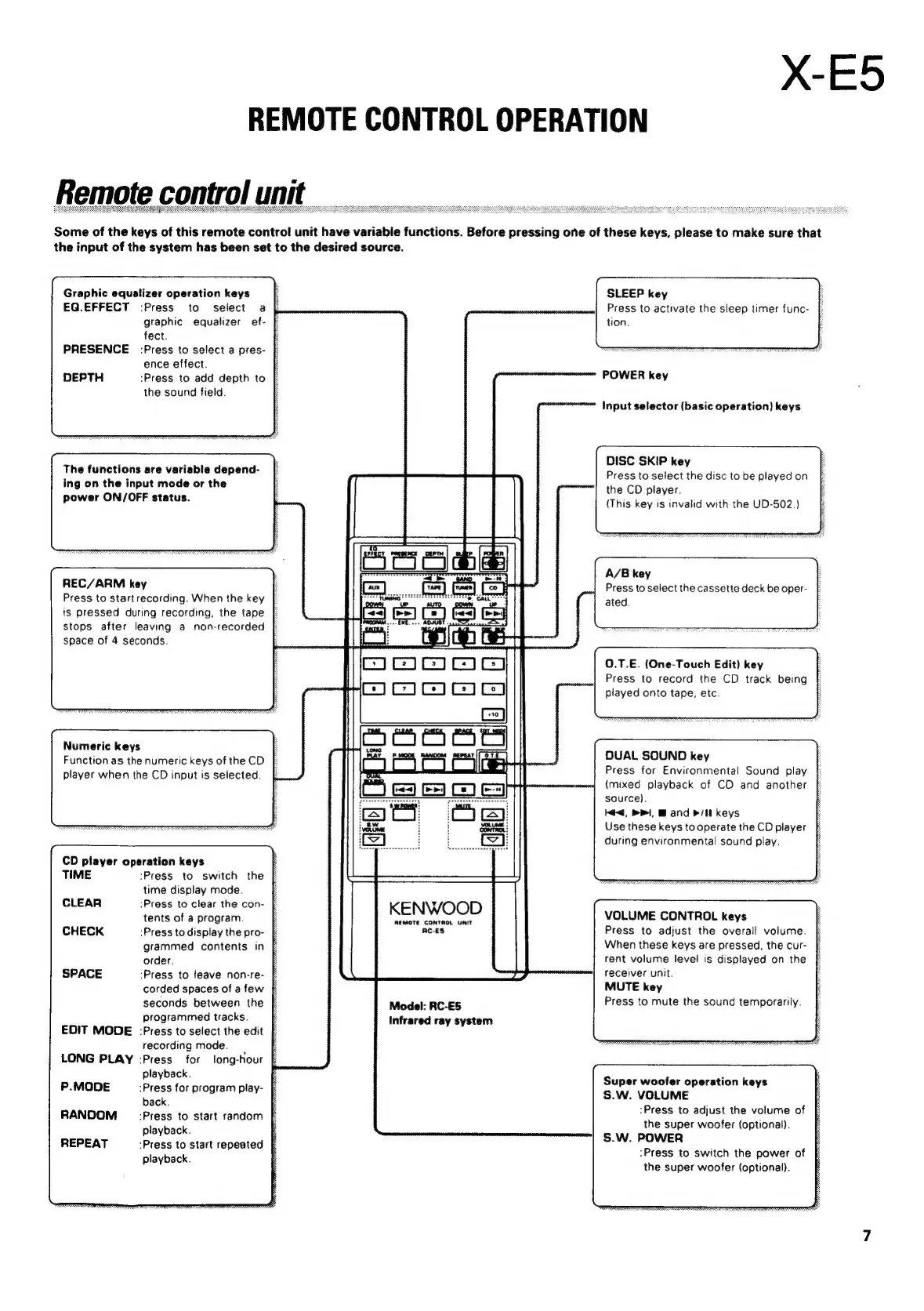
X-E5
REMOTE
CONTROL
OPERATION
Remote
control
unit
Some
of
the
keys
of
this
remote
control
unit
have
variable
functions.
Before
pressing
one
of
these
keys,
please
to
make
sure
that
the
input
of
the
system
has
been
set
to
the
desired
source.
SLEEP
key
Press
to
activate
the
sleep
timer
func-
tion.
Graphic
equalizer
operation
keys
EG.EFFECT
-:Press
to
select
a
graphic
equalizer
ef-
fect.
PRESENCE
Press
to
select
a
pres-
ence
effect.
DEPTH
:Press
to
add
depth
to
the
sound
field.
POWER
key
Input
selector
(basic
operation)
keys
DISC SKIP
key
Press
to
select
the
disc
to
be
played
on
the
CD
player.
The
functions
are
variable
depend-
ing
on
the
input
mode
or
the
power
ON/OFF
status.
(This
key
is
invalid
with
the
UD-502.)
A/B
key
REC/ARM
key
'
Press
to
select
the
cassette
deck
be
oper-
Press
to
start
recording.
When
the
key
|
ated.
is
pressed
during
recording,
the
tape
stops
after
leaving
a
non-recorded
f
space
of
4
seconds.
:
0.T.E.
(One-Touch
Edit)
key
Press
to
record
the
CD
track
being
played
onto
tape,
etc.
Numeric
keys
bE
Function
as
the
numeric
keys
of
the
CD
player
when
the
CD
input
is
selected.
DUAL
SOUND
key
Press
for
Environmental
Sound
play
(mixed
playback
of
CD
and
another
source).
K€,
PP,
Band
pi
keys
Use
these
keys
to
operate
the
CD
player
during
environmental
sound
play.
CD
player
operation
keys
E
TIME
‘Press
to
switch
the
time
display
mode.
CLEAR
:Press
to
clear
the
con-
tents
of
a
program.
KENWOOD
REMOTE
CONTROL
UNIT
VOLUME
CONTROL
keys
CHECK
-Press
to
display
the
pro-
AC-ES
Press
to
adjust
the
overall
volume.
grammed
contents
in
When
these
keys
are
pressed,
the
cur-
order.
:
rent
volume
level
is
displayed
on
the
SPACE
‘Press
to
leave
non-re-
§
receiver
unit.
corded
spaces
of
a
few
§
MUTE
key
seconds
between
the
:
Model:
RC-E5
Press
to
mute
the
sound
temporarily.
programmed
tracks.
:
Infrared
ray
system
EDIT
MODE
-Press
to
select
the
edit
§
recording
mode.
:
LONG
PLAY
-Press
for
long-hour
playback.
:
P.MODE
:Press
for
program
play-
back.
E
RANDOM
_:Press
to
start
random
§
playback.
REPEAT
:Press
to
start
repeated
playback.
Super
woofer
operation
keys
S.W.
VOLUME
:Press
to
adjust
the
volume
of
the
super
woofer
(optional).
S.W.
POWER
:Press
to
switch
the
power
of
the
super
woofer
(optional).

Related product manuals