The Ethernet cable is not provided and must consist of two RJ45 T 568A (or 568B) plugs on each
side.
KERLINK recommends using a cable with the following characteriscs:
• Category: 6A
• Shielding: STP (U/FTP) or SSTP (S/FTP)
• Secon conductors: AWG26
• External jacket: LSZH or PUR
• Maximum length: 100 meters
The power supply jack connector supply is not provided.
Please check accessories preconized by Kerlink
Operang temperature range: -20°C to +55°C
Humidity: 5% to 95%
Altude max. < 2000m
6.3 First connecon
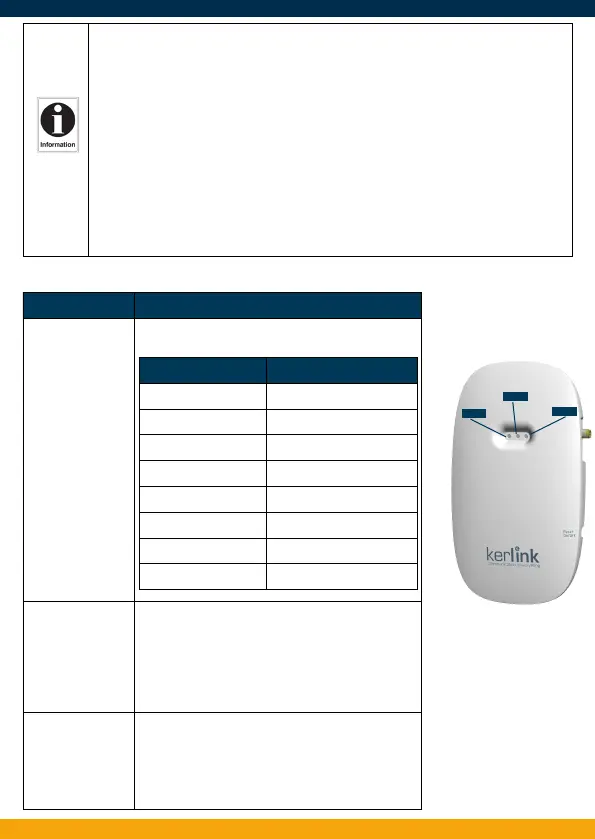
LED Specicaon
LED 1: Power/
Status
A solid Green for Power LED
A Status Red LED
LED 2: Backhaul RED during boot
If the installed « applicave soware » has been
provided by Kerlink :
• RED if applicave soware is disconnected
• GREEN blinking during applicave soware connecon
• GREEN x if applicave soware is connected
LED 3: LoRa Data RED during boot
If the installed « applicave soware » has been
provided by Kerlink is installed:
• Applicave soware management
• Rx: GREEN blinking
• Tx: RED blinking
Gateway Status “Status LED” Behaviour
Boot part 1 Fix on
Boot part 2 Heartbeat
Boot part 3 Blink every second
Run me O
Power down sequence Heartbeat
Update Blink / 0.4 second
Restore backup Blink / 2 seconds
Restore stock Blink / 4 seconds
LED1
LED2
LED3
V3.0 | 01.06.2020 | Page 6



 To Next Page