EasyManua.ls Logo

Keylite KL/RX2 - User Manual

Keylite KL/RX2
8 pages
Print Icon
To Next Page IconTo Next Page
Loading...
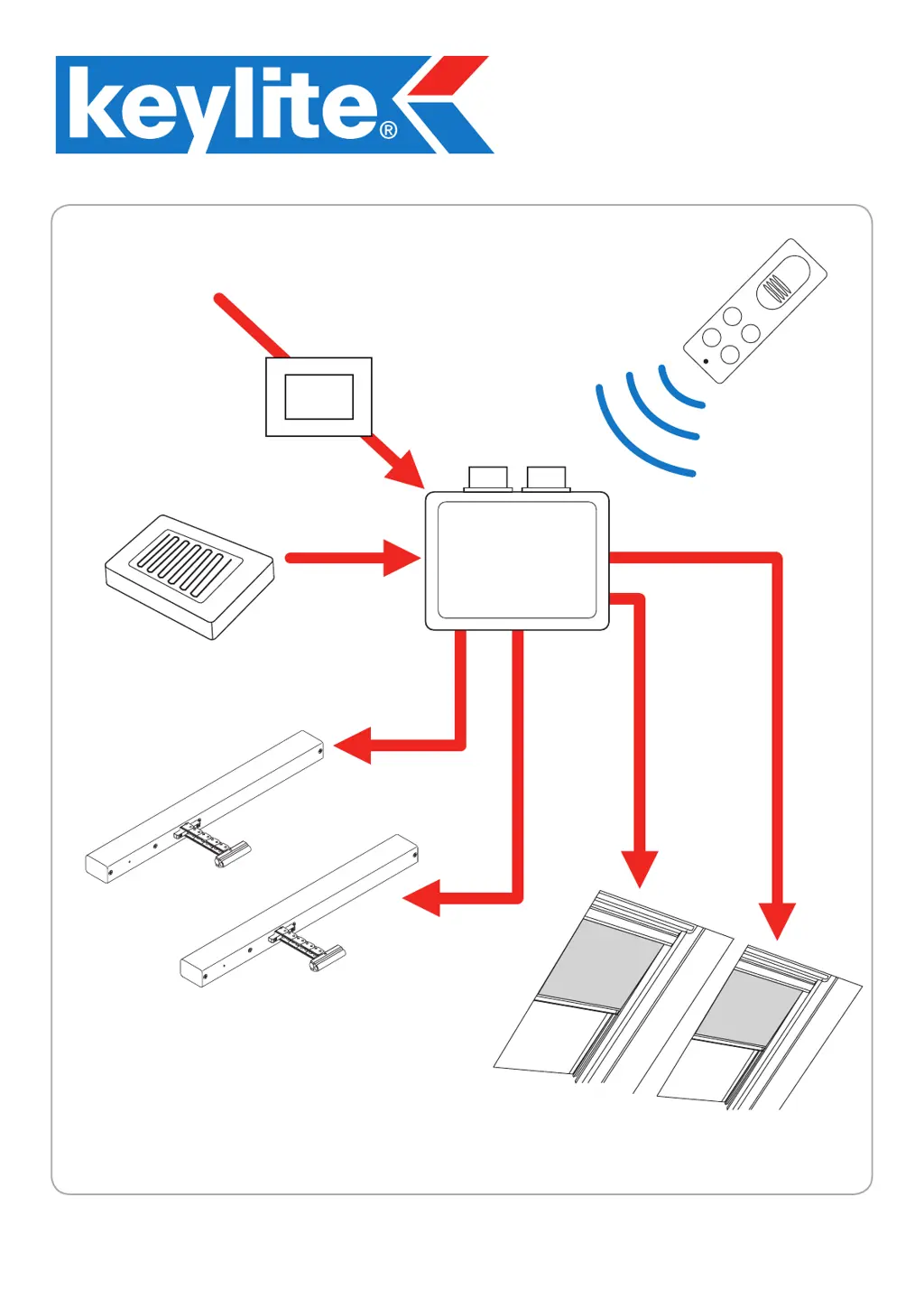
KL/RX2
Master Control Panel
230v
Remote
Control
Rain Sensor
MASTER
CONTROL
PANEL
KL/Rx2
Motor 2
Motor 1
Blind 1
Blind 2
24v
24v
KL/RX2 MAXIMUM OPERATIONAL
CAPACITY IS 2 MOTORS & 2 BLINDS
*NOT AVAILABLE FOR 4 MOTORS*
24v
24v
Transformer
24v
MAINS
SUPPLY
KL/RX2-2012G
Kit Contents: KL/RX2 Master Control Panel, 24v 2.7A Power Supply,
Rain Sensor, Remote Control

Questions and Answers

  • M
    Michael RogersAug 2, 2025
    What to do if receive LED does not come on when a button is pressed on the Keylite KL/RX2 Control Panel?
    • S
      smithangelaAug 2, 2025
      If the receive LED on your Keylite Control Panel doesn't light up when you press a button on the remote control, here are a few things to check: * Make sure the control panel is getting 24V DC. * Ensure the remote control is properly programmed to the control panel. * Inspect the aerial connection for any signs of damage. * Try reversing the wires on the W+ and W- connections. * Also, try reversing the wires on the B+ and B- connections.
  • P
    Paul NewtonAug 17, 2025
    What to do if the rain sensor does not operate on Keylite?
    • J
      Justin SantosAug 17, 2025
      To address a non-operating rain sensor on your Keylite system, verify that the wires connected to the rain sensor connector are correctly placed and securely connected.

Summary

WIRING OF THE MASTER CONTROL

Windows & Blind Connections

Details wiring for windows and blinds to the control panel.

Transformer & Rain Sensor Wiring

Explains connections for the transformer and rain sensor.

REMOTE CONTROL AND DIP SWITCH CONFIGURATION

Remote Control Programming Steps

Instructions for programming the remote control to the master panel.

Remote Control Operation Modes

Explains how each remote button controls windows and blinds.

DIP Switch Settings Explained

Guides on setting DIP switches for motor and sensor behavior.

TROUBLESHOOTING AND TECHNICAL DATA

Remote Control Troubleshooting

Addresses issues with the remote control's functionality.

Master Control Panel Troubleshooting

Covers common problems with the control panel itself.

Motor and Sensor Troubleshooting

Details issues related to motors and the rain sensor.

Technical Specifications

Lists technical data, nominal voltage, and rated power of the system.

MOTOR INSTALLATION GUIDELINES

Motor Installation Safety Precautions

Crucial safety steps to follow before and during motor installation.

Motor Cable Routing Procedures

Instructions on how to route the motor cables through the window frame.

MOTOR INSTALLATION: BRACKET AND CONNECTION

Mounting Bracket Attachment

Steps for attaching the motor mounting bracket to the latch keep timber.

Motor Connection and Cable Management

How to connect the motor cable and manage excess wire.

MOTOR INSTALLATION: CHAIN AND VENT FLAP

Chain Connector to Vent Flap

Guides on extending the chain and attaching the connector bar to the vent flap.

Vent Flap Bracket Fixing

Details drilling and securing the vent flap bracket with a bolt and nut.

Securing the Connector Bar

Final step to feed and secure the connector bar with a cotter pin.

Keylite KL/RX2 Specifications

General IconGeneral
CategoryControl Panel
ModelKL/RX2
BrandKeylite
CompatibilityKeylite
FunctionsControl of roof windows, blinds and shutters