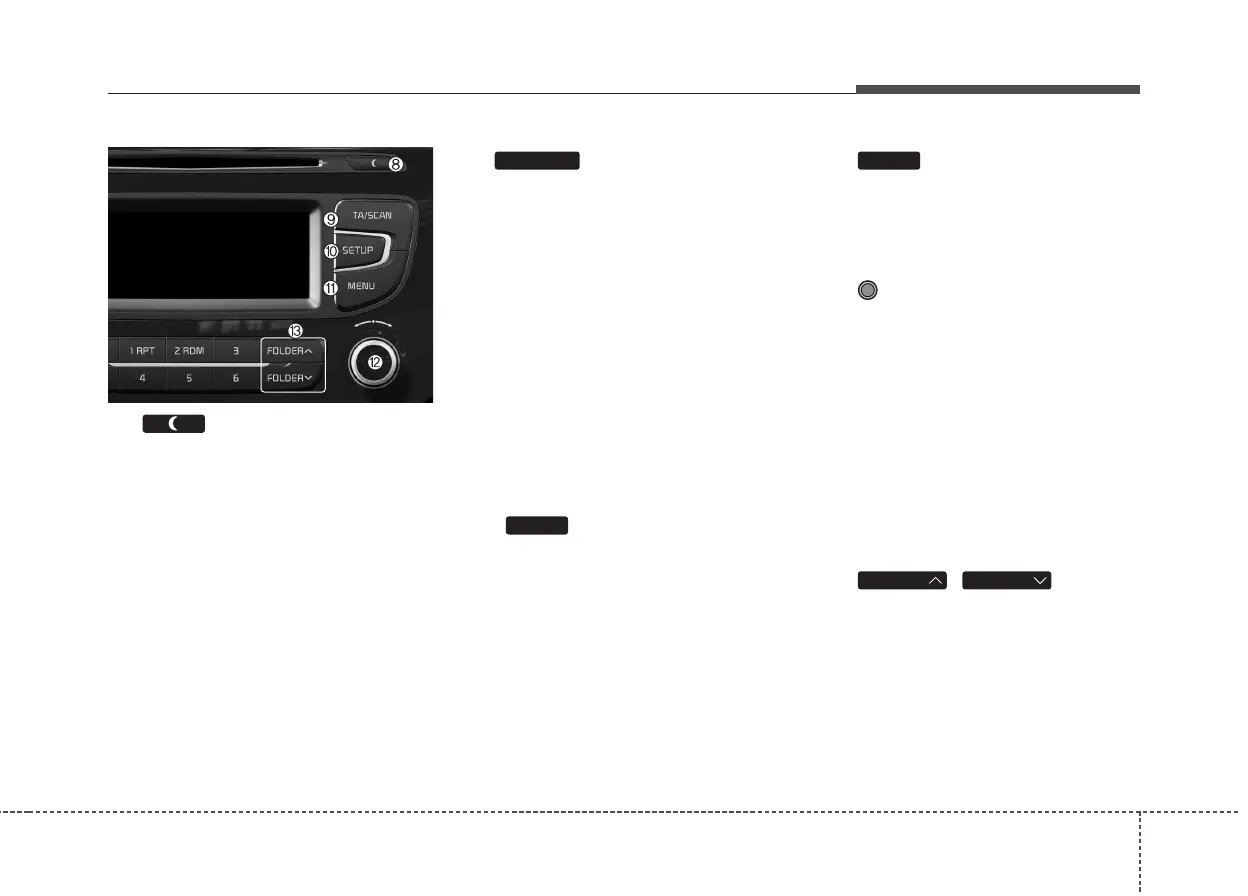
Features of your vehicle
4 201
(8)
• Each time the button is shortly
pressed (under 0.8 seconds), sets
Screen Off ➟ Screen On ➟ Screen
Off
❈ Audio operation is maintained and
only the screen will be turned Off.
In the Screen Off state, press any
key to turn the Screen On again.
(9)
• Radio Mode
- Shortly press the key (under 0.8
seconds): TA On/Off
- Press and hold the key (over 0.8
seconds): Previews each broad-
cast for 5 seconds each.
• Media mode
- Press and hold the key (over 0.8
seconds): Previews each song
(file) for 10 seconds each.
❈ Press and holding the key again to
continue listening to the current
song (file).
(10)
Moves to the Display, Sound, Phone,
System setting modes
(11)
Displays menus for the current m
ode.
❈ iPod
®
List : Move to parent category
(12) TUNE knob
• Radio mode : Changes frequency
by turning the knob left/right
• CD, USB, iPod®, My Music mode:
Searches .songs (files) by turning
the knob left/right.
❈ When the desired song is dis-
played, press the knob to play the
song.
Moves focus in all selection menus
and selects menus
(13) ,
MP3 CD / USB mode : Folder Search
FOLDERFOLDER
MEMU
SETUP
TA/SCAN



 To Next Page