8
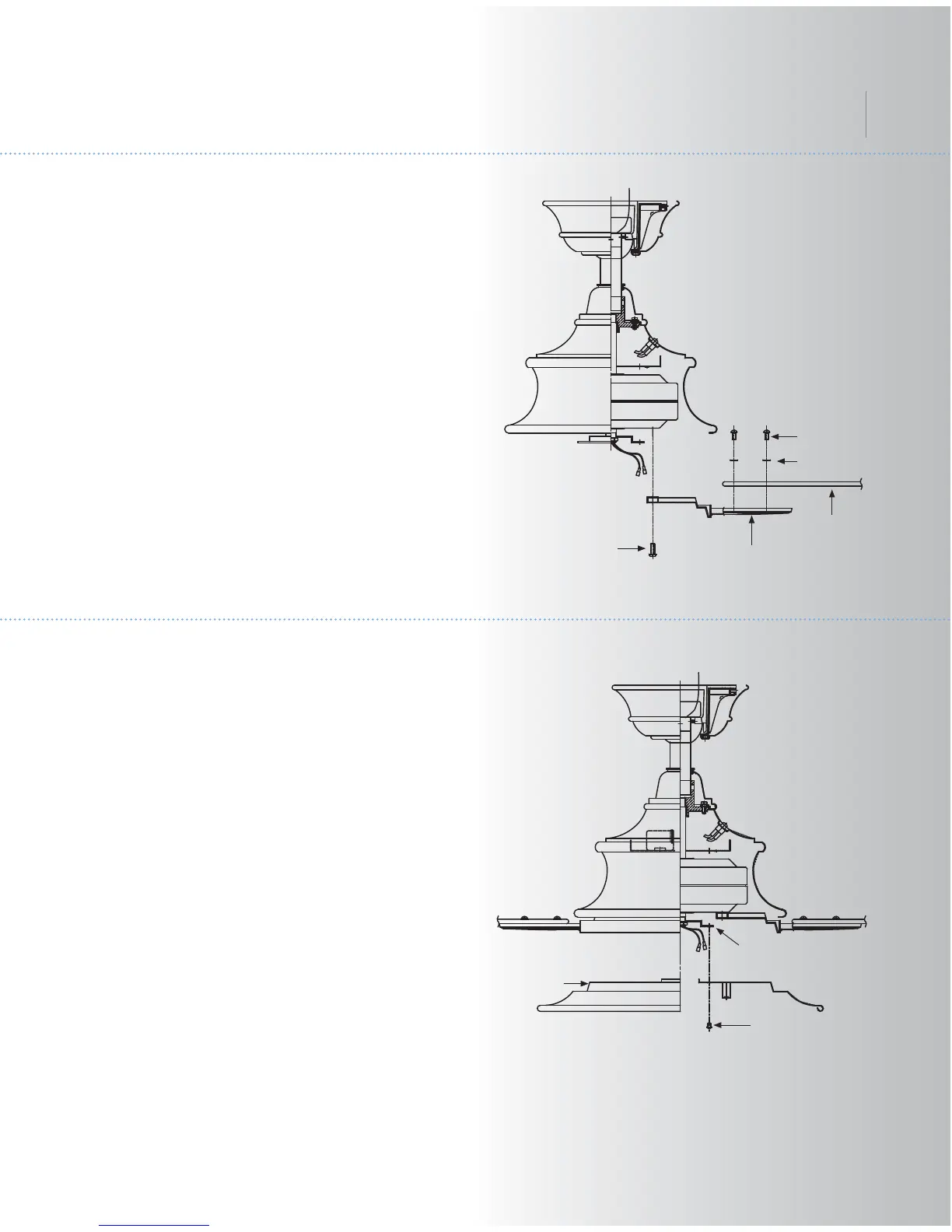
Fig. 16
10. INSTALLING THE LIGHT PLATE
Step 1. Loosen the two screws on the
mounting ring attached to the motor shaft and
"remove" and save the third screw. (Fig. 17)
Step 2. Place the key hole slots on the light
plate over the two screws previously loosened
on the mounting ring.
Turn the light plate until is locks in place at the
narrow section of the key hole slots.
Tighten both key hole screws and replace the
third screw previously removed and tighten
securely.
Fig. 17
Light plate
Screws
Mounting ring
Blades
Screws
Blade brackets
Rubber
washers
Screws
9. ATTACHING THE FAN BLADES
Step 1. Attach a blade to a blade bracket using
the screws and rubber washers provided.
(Fig.16)
Make sure the blade is straight when set on
the blade bracket. Tighten each mounting
screw and then repeat this procedure for each
blade.
Step 2. Attach each blade assembly to the
motor using the "Pre-Installed" mounting
screws in the blade bracket. (Fig 16)
Cameron
TM



 To Next Page