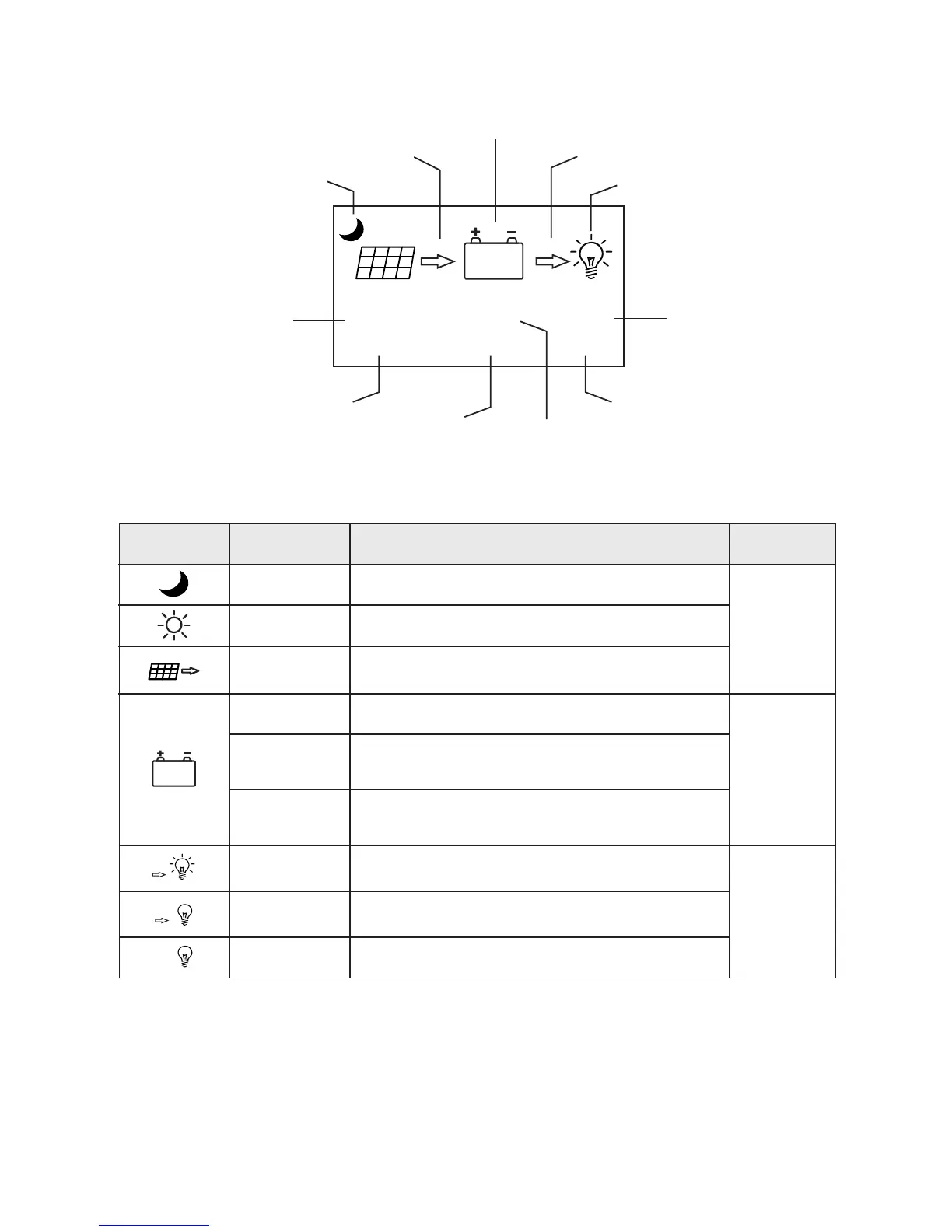
Definitions of "main menu" icons
Icon or value
State
Description
Remarks
Steady on
"0~100%"
"0%"in slow
flashing
"100%"in quick
flashing
Nighttime
Daytime
A dynamic arrow indicates charging is in process,
while a static one indicates otherwise.
Current battery capacity
Battery over-discharged
Battery over-voltage
A bulb shown as left and a dynamic arrow indicate the
load is switched on.
A bulb shown as left and a static arrow indicate
the load is switched off.
Overload or short-circuit protection
Day or night indicating icon
Charging current icon
Battery icon and SOC
Load current icon
Load icon and state indication
charging power
load current
Battery voltage
37%
26.8V 11.6V
0W 0A
OFF
0A
37%
Related to
charging
Related to
battery
Related to
load
10.2 Main menu
Solar panel voltage
charging current
Load state
Steady on
Steady on
Steady on
Steady on
Quick flashing


 To Next Page