5-10 Application Operation PLZ-U
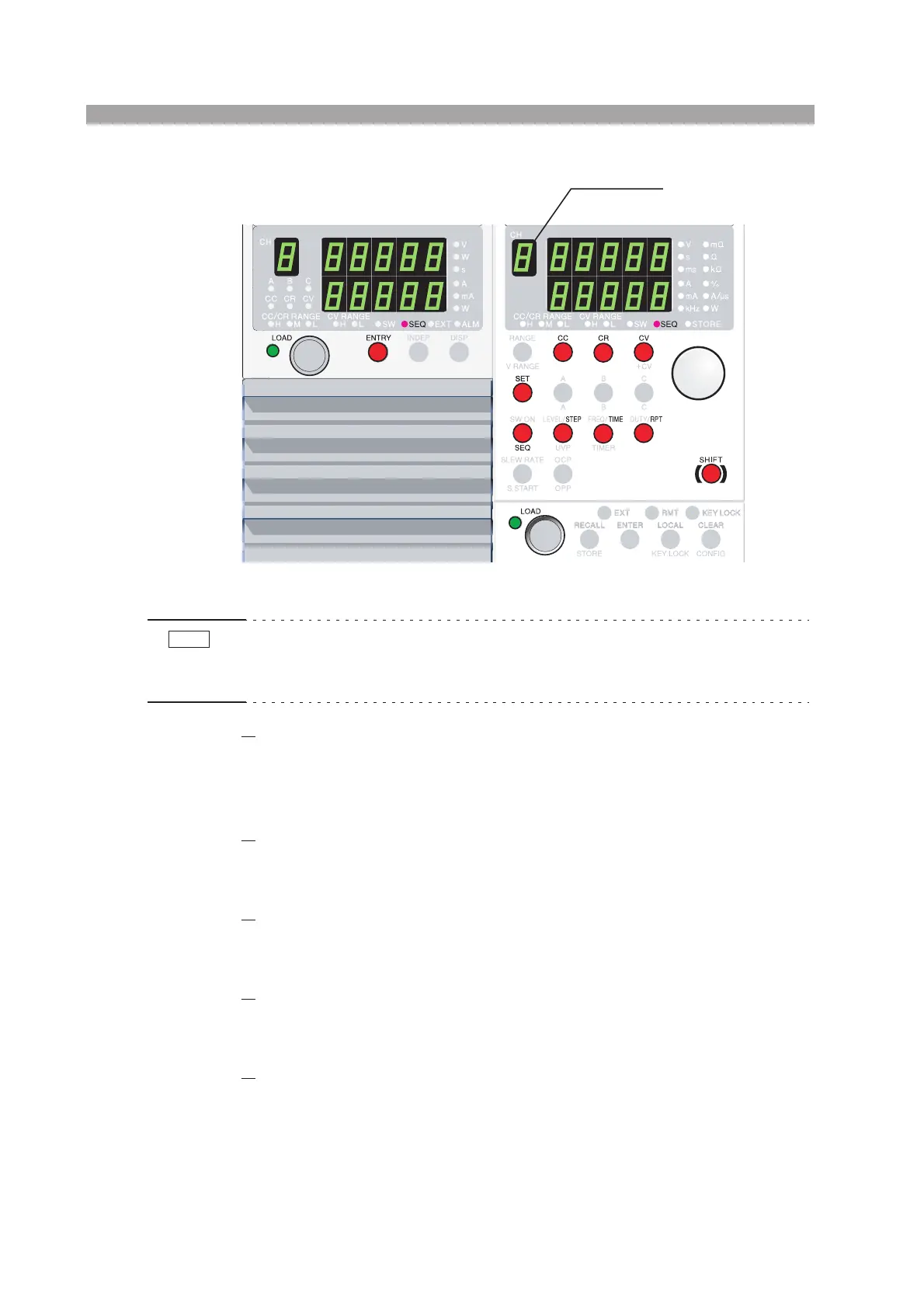
Fig. 5-8 Editing the sequence
• If you change the operation mode or range while editing a sequence, the sequence
settings will be cleared. If you plan to use the sequence settings again, save the
sequence to the setup memory and recall it when you need it.
4.
Switch to sequence mode.
Press the SEQ key while holding down the SHIFT key (SHIFT + SW ON).
The SEQ key and SEQ indicator illuminate.
The selected channel number appears on the channel display.
5.
Select the step number.
Press the STEP key and turn the rotary knob to show the desired step number.
The step number appears at the upper section of the setting display.
6.
Enter the setting.
Press the SET key and turn the rotary knob to enter the setting.
The setting display of the selected operation mode appears.
7.
Set the execution time.
Press the TIME key and turn the rotary knob to set the execution time.
The execution time display appears.
8.
Repeat steps 5 to 7 as necessary.
Up to 255 steps can be entered.
To specify the end a sequence, set the TIME (execution time) of the last step to
0.
Load unit Frame
Channel display
NOTE


 To Next Page