Dock
™
3
Proper product installation, in accordance with these instructions, is the responsibility of the installing agent.
If you have any questions concerning these instructions, please call Kimball Office Customer Care.
Part 2700494 Revision -
Assembly Instructions
Removable Resin Modesty
Panel to Worksurface Assembly
Cordless driver with magnetic post
4mm hex drive
#3 Phillips head bit drive
Tools Required
Hardware Required (Included)
Modesty Sizes 24”
48”
60”
72”
84”
96”
L Bracket 2 3 4
Modesty Cover Plate 2 3 4
Removable Bracket 2 3 4
1/4-20 THM SCR 2 3 4
1/4-20 X 1/2” BHMS 4 6 8
#10 X 1” FBSCR 4 6 8
Installation
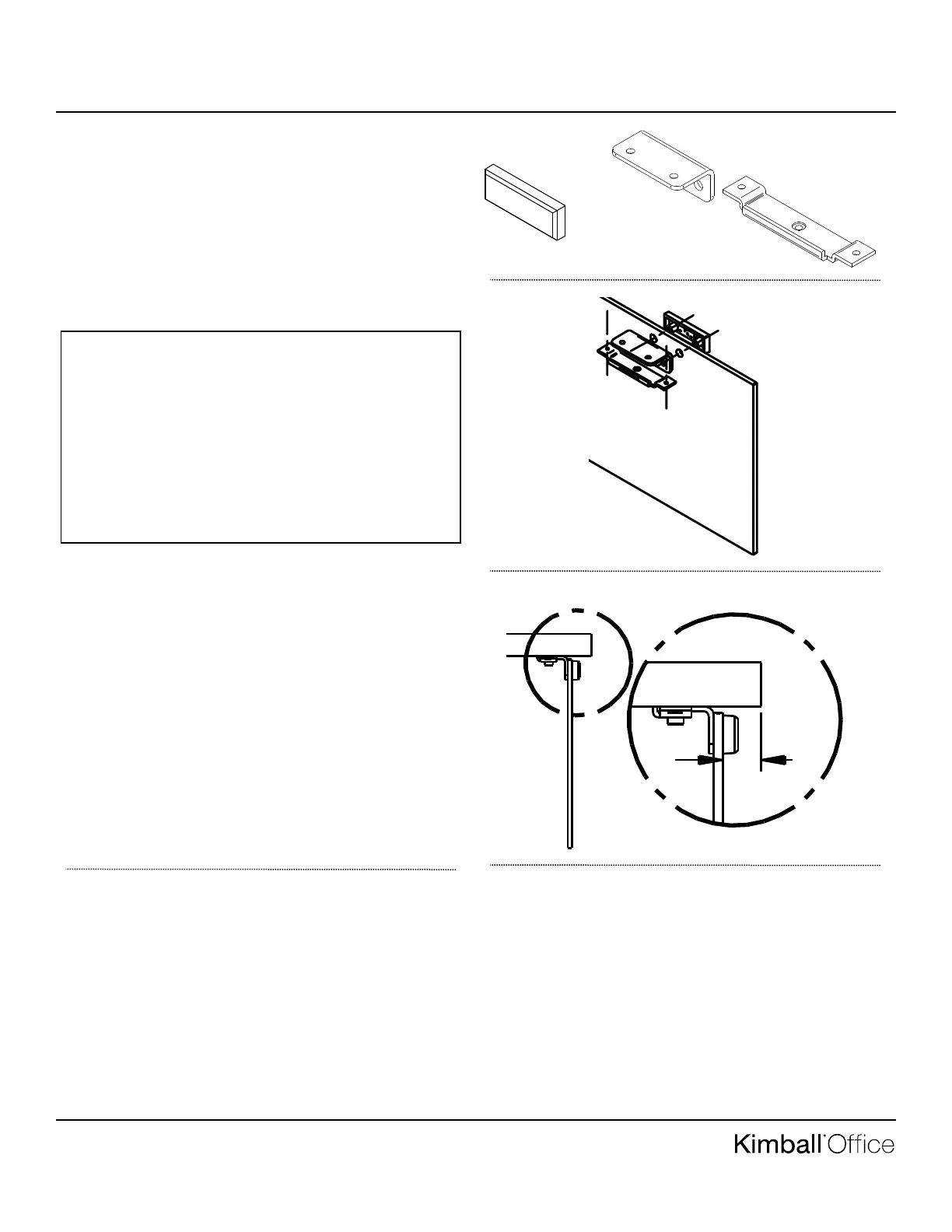
1. Unpack modesty panel, L bracket, modesty cover plate,
removable bracket, and hardware. See Figure A for pack-
age contents.
2. Place modesty cover plate over outside pre-drilled holes of
modesty panel and L bracket over inside holes of the mod-
esty panel as shown in Figure B. Assemble with 1/4-20 X
1/2” BHMS using 4mm hex drive.
3. Place the worksurface up side down on a non-marring sur-
face.
4. Using a tape measure, position the modesty panel on the
approach side (non user side) of the worksurface 1” in and
pre-drill holes as shown in figure C.
5. Place removable bracket over the L bracket and assemble
worksurface with #10 X 1” FBSCR using #3 Phillips head
bit drive as referenced in figure B. Flip the worksurface
back over onto the bases.
Figure A
Figure B
Figure C



 To Next Page