___
Kingdom One Touch
4. Copy + Compare
This function will to do copy task first and execute comparison automatically when copy
process has been finished.
Note**
In
Copy,
Test,
Compare
and
Copy+Compare
functions
If
there
is
no
source
and
target
discs
inside
the
duplicator,
there
will
be
nothing
show
on
LCD.
The information display of these 4 functions will be different based on the display mode you
selected.
(Please refer to 8-2.Display mode, page 18)
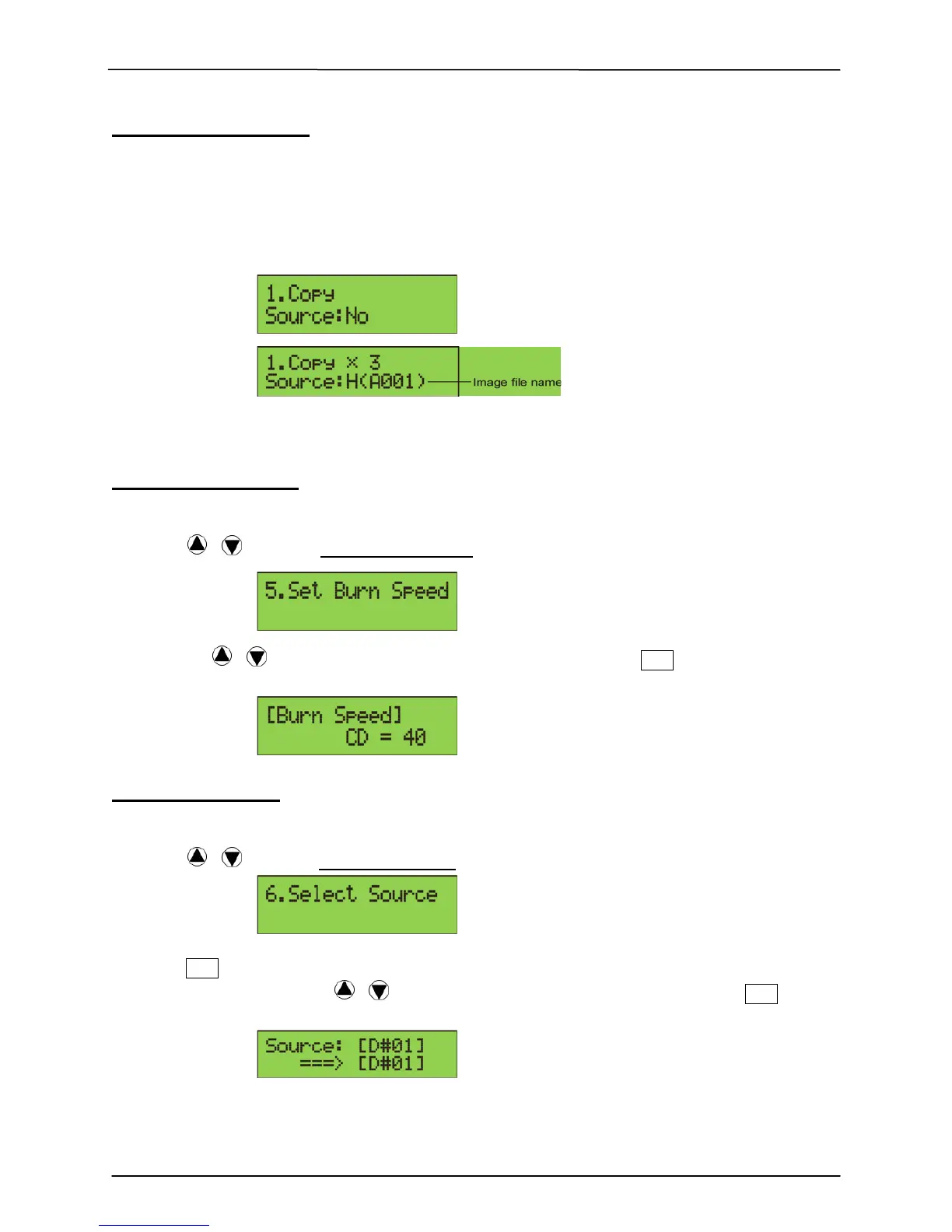
5. Set Burn Speed
You can adjust the burning speed of CD/Audio CD/DVD/DVD DL/Blu-ray by this setting.
The default setting of CD is 40X, Audio CD 24X, DVD 8X, DVD DL 2X and Blu-ray 2X.
1. Using / to select 5. Set Burn Speed and press.
2. Pressing
/ to adjust the burning speed of CD and press ENT to confirm it, or
press OK to select Audio CD,DVD, DVD DL or Blu-ray to adjust the burning speed.
6. Select Source
You can set any drive in the duplicator to be your source reader.
1. Using / to select 6. Select Source
2. Press ENT to check the current source reader, or select the proper tray to be the
source reader by pressing / , once the source reader is selected, press ENT
to confirm the setting and back to the menu list.
**Note:
The default setting of source reader is the first drive.


 To Next Page