Format
Every time you insert a new microSD card, please format the card in the dash cam
to ensure better compatibility with the camera.
Select “Format” and press “ ”, choose “Confirm” and press “ ”.
Default
Select “Default” and press “ ”, choose “Confirm” and press “ ”, and then dash
cam will be restored to factory settings.
Version
Select “Default” and press “ ” to check the camera’s version. Press “ ” to exit.
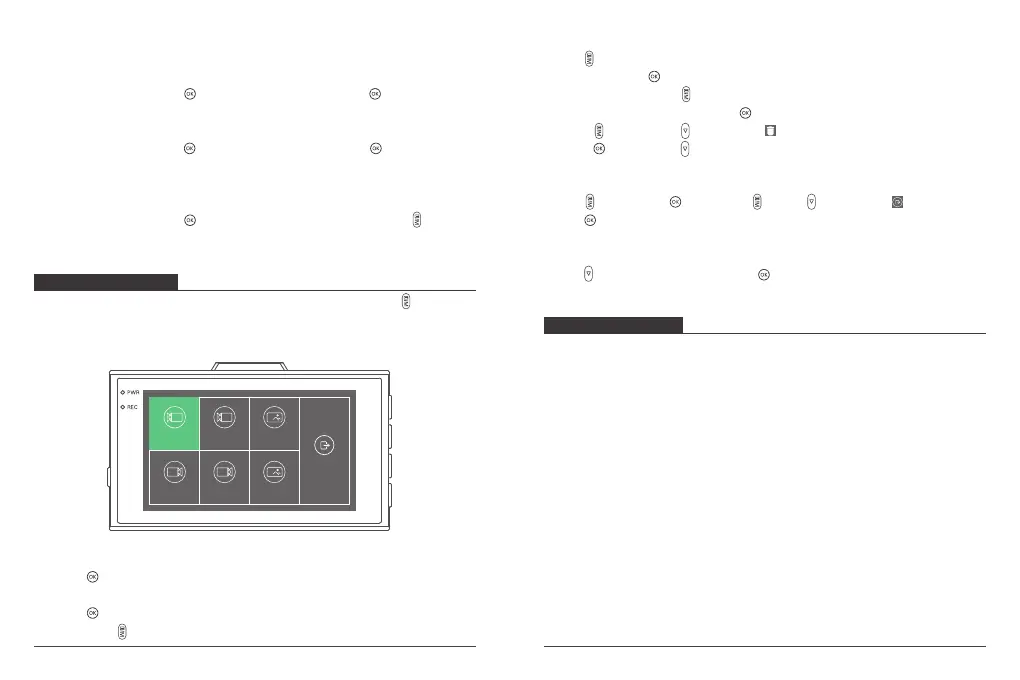
PLAYBACK MENU
Use this mode to view and manage photos and videos. Long press “ ” to enter
the playback menu. Use the Up and Down buttons to scroll through the recorded
video/photo files. The device is not recording when it is in the Playback menu.
Fa
R Ra
R
F
Front emr Front photo
Back norm Back emr Back photo
Back
F
Front norm
Delete the videos/photos
Press “ ” to switch from “Folder Name”, “Select All”, “Delete”, and “Return”.
1. Select All: Press “ ” to select all videos/photos. If you want to choose a few
videos/ photos, press “ ” and use the Up and Down buttons to scroll through
the recorded video/photo, press “ ” to deselect.
2 Press “ ” and press “ ” to choose “ ”.
3 Press “ ” and press “ ” to choose “Confirm”.
Return to the playback menu
Press “ ” and press “ ”. Or press “ ”, use “ ” to choose “ “ and
press “ ”.
Return to the recording menu
Press “ ” to choose “Back” and press “ ” to exit.
View the videos/photos
1. Press “ ” to enter the files.
2. Use the Up and Down buttons to choose which video/photo you want to view.
3. Press “ ” to play the video/photo.
4. Long press “ ” to exit
SPECIFICATIONS
1. Front Camera: 5MP, f/1.6, 170° FOV
2. Rear Camera: 2MP, f/2.0, 170° FOV
3. Video: 2.5K@25fps + 1080P@30fps
4. Screen: 3-inch IPS Display
5. Video Coding: H.264/H.265
6. Input: 5V DC
7. Size: 85mm*48mm*17mm
8. Weight: 104.9g
9. Working Temperature: -20°C~60°C
13 14



 To Next Page