
 Need help?
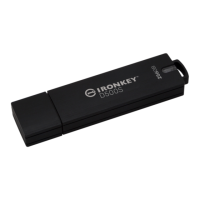
Do you have a question about the Kingston Technology IRONKEY D300SM and is the answer not in the manual?
Steps to connect and begin the setup process on Windows and macOS.
Highlights FIPS certification, hardware encryption, password protection, and device reset.
Lists supported OS, capacity, speed, dimensions, and compliance.
Essential guidelines for secure and optimal device operation.
How Windows detects the device and starts the initialization process.
Steps for accessing and initializing the device on macOS via Finder.
Introduction to the device management interface and its components.
Steps to register and configure the device using SafeConsole.
Steps to activate and configure the device using IronKey EMS.
How to open, save, and manage files on the encrypted drive.
Using the device in a read-only state to prevent malware infection.
Setting custom text to display when unlocking the device.
Manual and automatic methods for securing the device when not in use.
Using the on-screen keyboard to protect against keyloggers.
Procedures for changing your device password.
Explains the choices for formatting the secure volume.
Accessing information like model, serial number, and firmware version.
Managing application shortcuts within the Control Panel.
Procedure to securely wipe the device and restore factory settings.
Steps to reset a forgotten password with administrator privileges.
How the built-in scanner protects against malware threats.
Creating trusted computer zones for restricted device access.
Guidance for using the device with Linux operating systems and its unlocker.
Information on contacting support and accessing online resources.
 General
| Interface | USB 3.0 |
|---|---|
| Encryption | AES 256-bit hardware encryption |
| Operating Temperature | 0°C to 60°C |
| Storage Temperature | -20°C to 85°C |
| Compatibility | Windows, macOS, Linux |
| TAA Compliant | Yes |
| Password Protection | Yes |
| Brute Force Attack Protection | Yes |
| Capacity | 4GB, 8GB, 16GB, 32GB, 64GB, 128GB |
| Certifications | FIPS 140-2 Level 3 |
| Waterproof | Yes |

 To Next Page