13
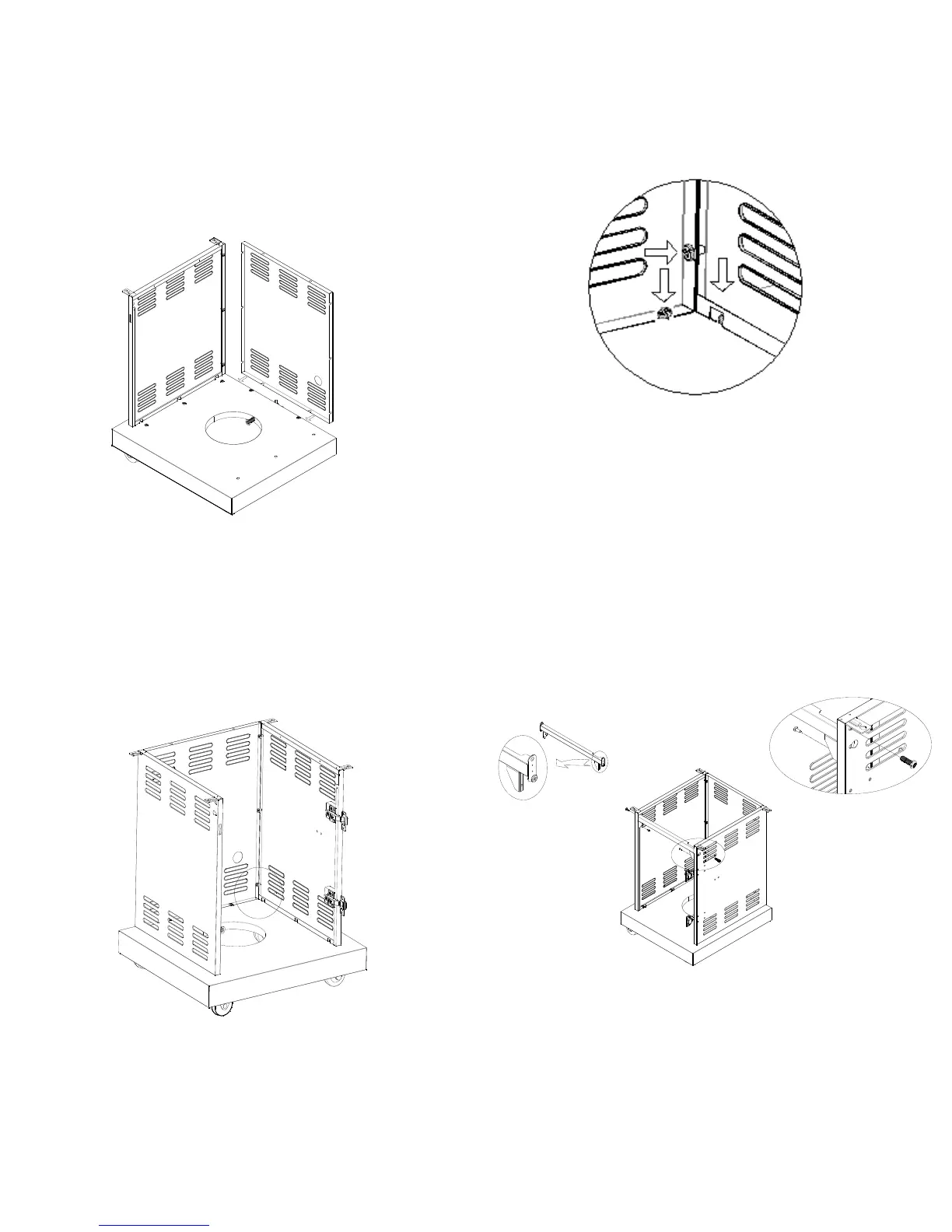
3. Secure the rear panel by clipping the open hole onto the
screws which is pre-assembled to the bottom panel and the left
side panel. Tighten the 3 screws to the side panel.
4. Secure the right side panel by clipping the open hole onto the
screws which are pre-assembled to the bottom panel and rear
panel and tighten the remaining 8 screws.
5. Place the cart frame in position with notch facing up and to
the right. Remove the top screw and loosen the bottom screw
for the left and right side of the frame. Remove the screws on
the inside front of the side panels. Align the notches in the side
panels with the screws in the cart frame. Screw the 2 top screws
into the cart frame and the 2 screws in to the inside of the side
panels that were previously removed. Tighten all 6 screws.
Remove the top
screw and loosen
the bottom screw
Screw the top screw
and the screw
removed on inside
side panel.
Notch facing up
on the right side
Ti
hten all screws to secure panels.




 To Next Page