ENGLISH
9
PRODUCT USAGE
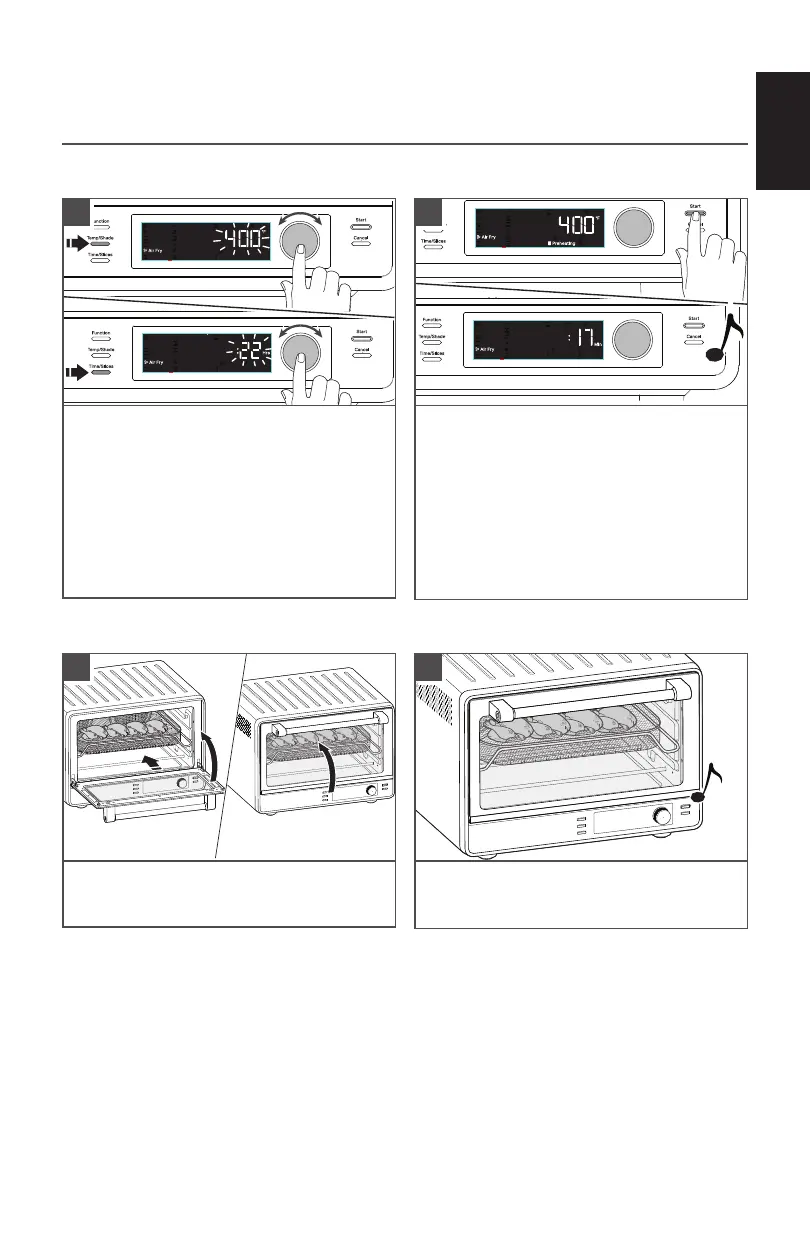
Press Start to preheat the Oven. To skip
preheat and start the timer directly, press
Start button again.
You can add or reduce time and/or
temperature as you cook by pressing the
time or temperature buttons and rotate
the knob to change as desired.
A chime sounds when preheat is complete.
The display will change to show the time
counting down.
2
Press Temp/Slices button or Knob to select
preset temperature. If desired, rotate
Knob to adjust. Press Time/Slices button
or Knob to show preset time. If desired,
rotate Knob to adjust the cooking time.
1
USING THE COOKING FUNCTIONS
The Air Fry function uses a combination of hot air and heating elements to prepare crispy foods.
When the cycle is complete, a chime
will sound. and the Air Fryer will shut off
automatically.
4
Open and place the food on the rack.
Close the door.
3
IMPORTANT: Always use oven mitts when removing pans or racks.
(See “Cooking Functions”chart for temperature ranges.)



 To Next Page