16
OPERATING THE COUNTERTOP OVEN
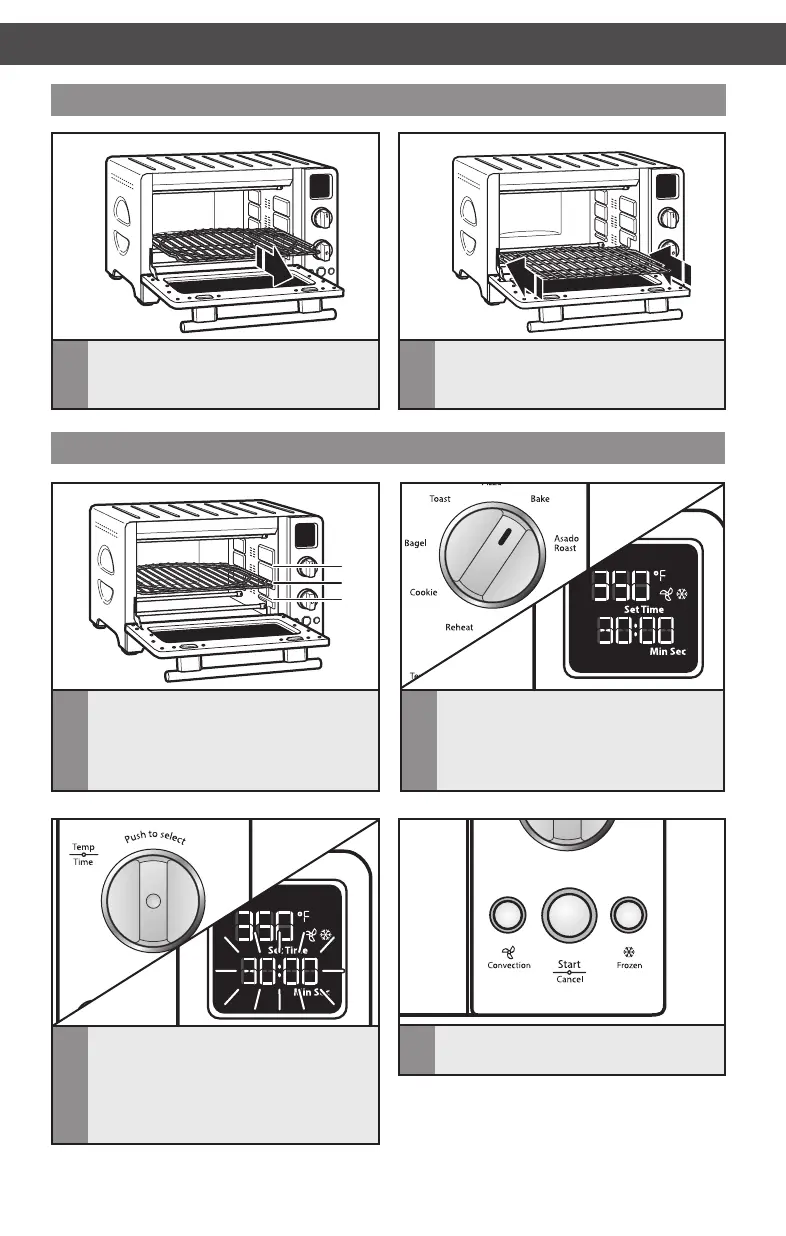
Adjusting the rack position
2
Align the sides of the oven rack with
the grooves for the desired position and
slide straight in.
1
To adjust oven rack position, slide the
oven rack out completely.
Setting a cooking mode
1
2
3
2
Rotate the Mode knob to select the
desired cooking mode. The preset
temperature and time (shade and
number of slices for Bagel and Toast
mode) will be displayed.
1
Make sure there will be enough
clearance between the top of the
food item to be cooked and the top
elements. If necessary, adjust oven rack
position. Close the door.
3
Adjust the Temperature/Time control
knob, if desired (See “Cooking Modes”
and “Toast and Bagel Modes” charts
for options). Press the knob to change
between temperature and time. The
selected field will blink in the display.
OPERATING THE COUNTERTOP OVEN
4
Select CONVECTION or FROZEN
options, if desired.
NOTE: Options not available with all Cooking
Modes. See “Cooking Modes” chart and “Toast
and Bagel Modes” chart for more information.
W10760897C_ENv02.indd 16 5/12/15 11:32 AM



 To Next Page