EasyManua.ls Logo

KitchenAid KEBS207D - Page 18

KitchenAid KEBS207D
50 pages
Print Icon
To Next Page IconTo Next Page
To Previous Page IconTo Previous Page
Loading...
S&LZsing
Your
Oven
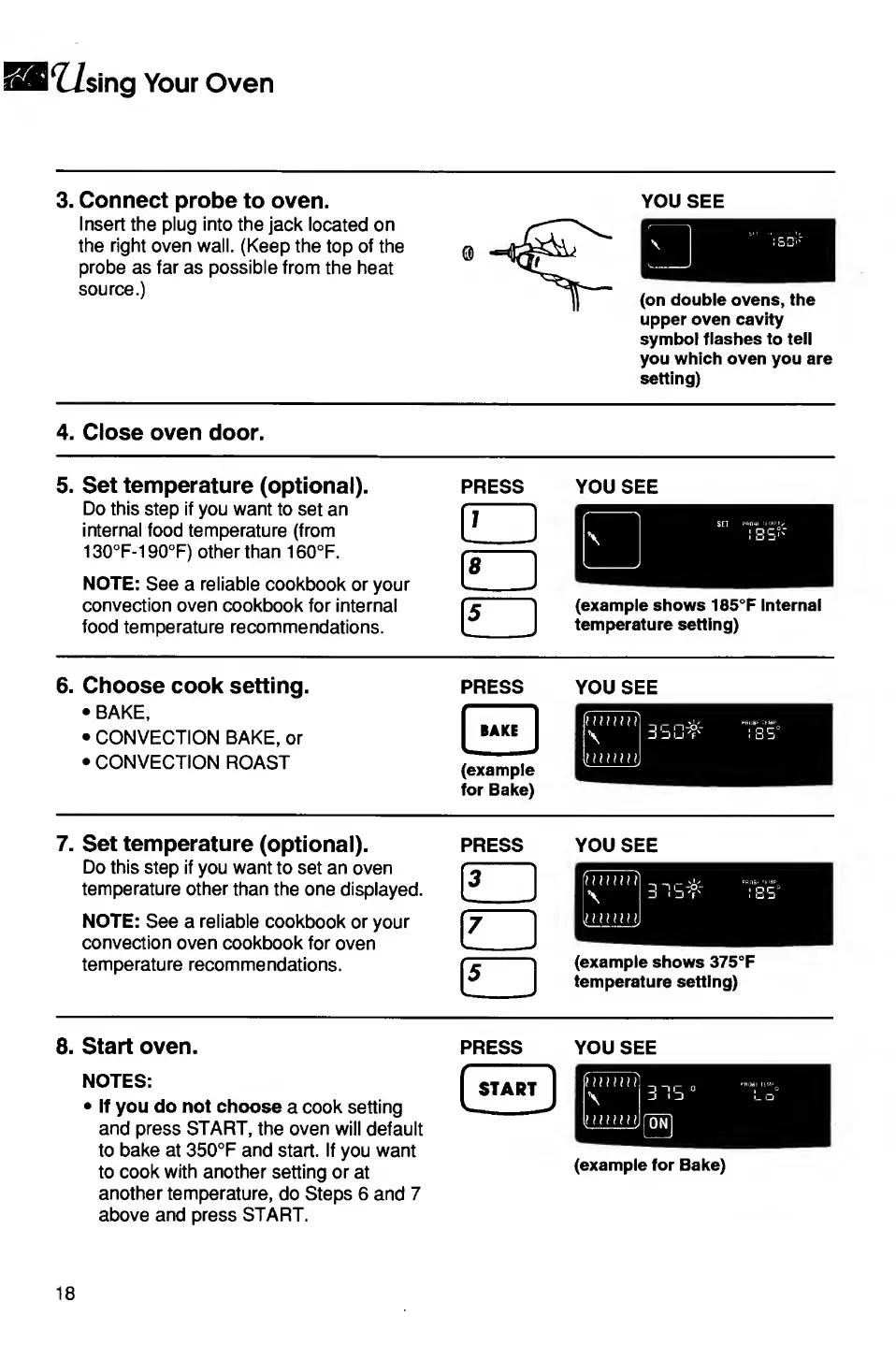
3.
C
onnect
probe
to
oven.
Insert
the
plug
into
the
jack
located
on
the
right
oven
wall.
(Keep
the
top
of
the
probe
as
far
as
possible
from
the
heat
source.)
YOU
SEE
(on
double
ovens,
the
upper
oven
cavity
symbol
flashes
to
tell
you
which
oven
you
are
setting)
4.
C
lose
oven
door.
5.
S
et
temperature
(optional).
press
you
see
Do
this
step
if
you
want
to
set
an
internal
food
temperature
(from
130°F-190°F)
other
than
160°F.
NOTE:
See
a
reliable
cookbook
or
your
convection
oven
cookbook
for
internal
food
temperature
recommendations.
6.
C
h
o
ose
cook
setting.
BAKE,
CONVECTION
BAKE,
or
CONVECTION
ROAST
PRESS
(example
for
Bake)
YOU
SEE
7.
S
et
temperature
(optional).
Do
this
step
if
you
want
to
set
an
oven
temperature
other
than
the
one
displayed.
NOTE:
See
a
reliable
cookbook
or
your
convection
oven
cookbook
for
oven
temperature
recommendations.
PRESS
YOU
SEE
8.
S
tart
oven.
NOTES:
If
you
do
not
choose
a
cook
setting
and
press
START,
the
oven
will
default
to
bake
at
350°F
and
start.
If
you
want
to
cook
with
another
setting
or
at
another
temperature,
do
Steps
6
and
7
above
and
press
START.
PRESS
START
YOU
SEE
(example
for
Bake)
18

Related product manuals