3-4
WARNING
Electrical Shock Hazard
Disconnect from electrical supply before ser-
vicing unit.
Failure to do so could result in death or
electrical shock.
CAUTION: When you work on the cooktop, be
careful when handling the sheet metal parts.
Sharp edges may be present, and you can cut
yourself if you are not careful.
REMOVING THE FAN
1. Turn off the electrical power to the cooktop.
2. Remove the cooktop from the cabinet and
set it on a padded surface to protect the
countertop.
3. Remove the maintop from the burner box
(see page 3-2 for the procedure).
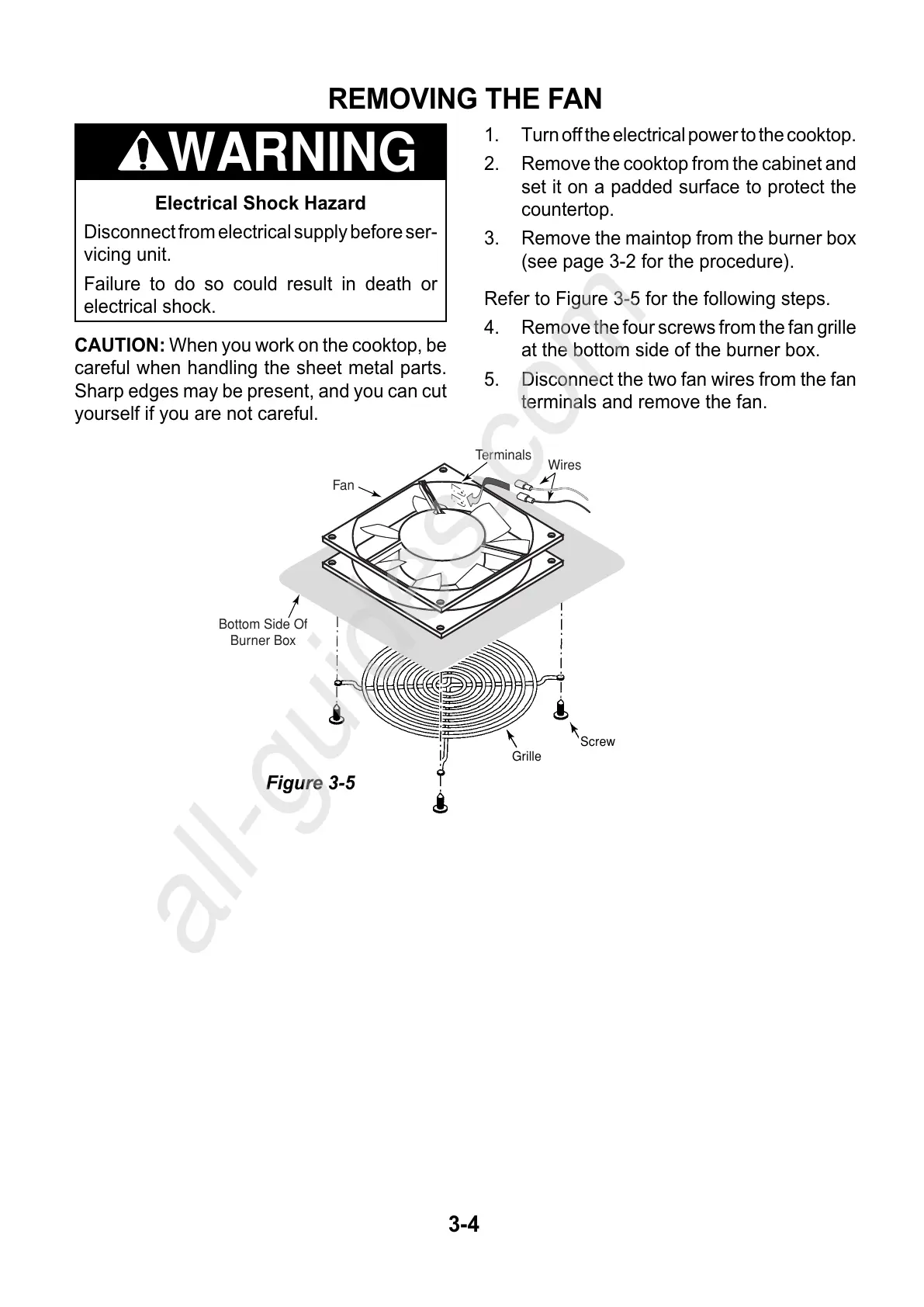
Refer to Figure 3-5 for the following steps.
4. Remove the four screws from the fan grille
at the bottom side of the burner box.
5. Disconnect the two fan wires from the fan
terminals and remove the fan.
Figure 3-5
Wires
Terminals
Fan
Bottom Side Of
Burner Box
Screw
Grille



 To Next Page