11
Steam Bake
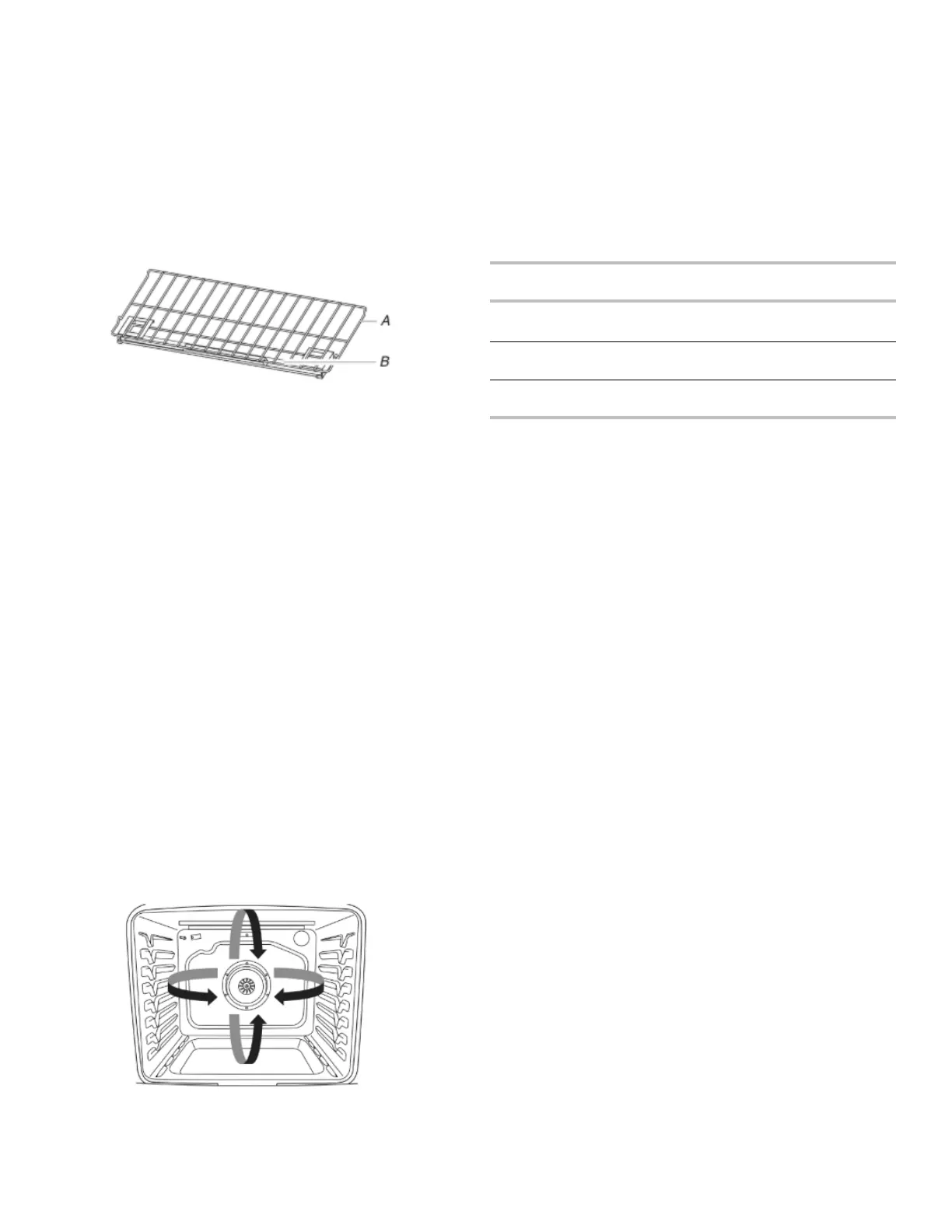
The Steam Bake function works in conjunction with the steam
rack to provide additional moisture during baking. The steam rack
contains a water reservoir which heats up and releases steam into
the oven cavity during the Steam Bake cycle. There are 3
preprogrammed food options to choose from: Breads, Desserts,
and Fish as well as a Refresh/Reheat option.
For best performance, place the steam rack in the lowest
available rack position in the cavity and pour 1
1
/
2
cups (350 mL)
of water into the reservoir. Do not fill past the MAX level indicated
on the reservoir.
After the Steam Bake cycle is complete, some water may remain
in the reservoir. This is normal. Wait for the oven to cool and
discard the water.
A. Steam rack
B. Water reservoir
Broiling
When broiling, preheat the oven for 2 minutes before putting food
in, unless recommended otherwise in the recipe. Position food on
grid in a broiler pan, and then place it in the center of the oven
rack.
IMPORTANT: Close the door to ensure proper broiling
temperature.
Changing the temperature when broiling allows more precise
control when cooking. The lower the broil setting is, the slower the
cooking. Thicker cuts and unevenly shaped pieces of meat, fish,
and poultry may cook better at lower broil settings. Use rack 6 or 7
for broiling. Refer to the “Positioning Racks and Bakeware”
section for more information.
On lower settings, the broil element will cycle on and off to
maintain the proper temperature.
■ For best results, use a broiler pan and grid. It is designed to
drain juices and help avoid spatter and smoke.
If you would like to purchase a broiler pan, one may be
ordered. See the Quick Start Guide for ordering information.
Convection Cooking
In a convection oven, the fan-circulated hot air continually
distributes heat more evenly than the natural movement of air in a
standard thermal oven. This movement of hot air helps maintain a
consistent temperature throughout the oven, cooking foods more
evenly, crisping surfaces while sealing in moisture, and yielding
crustier breads.
During convection baking or roasting, the bake, broil, and
convection elements cycle on and off in intervals while the fan
circulates the hot air. During convection broiling, the broil and
convection elements cycle on and off.
If the oven door is opened during convection cooking, the fan will
turn off immediately. It will come back on when the oven door is
closed.
With convection cooking, most foods can be cooked at a lower
temperature and/or a shorter cooking time than in a standard
thermal oven. Depending upon the selected cooking mode,
EasyConvect
™ conversion can automatically reduce the standard
recipe temperature and/or time you input for convection cooking. If
you choose not to use the EasyConvect
™ conversion, use the
following table as a guide.
Convection
Mode
Time/Temp. Guidelines
Convection
Bake
25°F (15°C) lower temperature, possible
shortened cooking time
Convection
Roast
Cooking time shortened by up to 30%
Convection
Broil
Shortened cooking time
Convect Options
Convect Bake - multiple-rack baking or cookies, biscuits, breads,
casseroles, tarts, tortes, cakes
Convect Roast - whole chicken or turkey, vegetables, pork roasts,
beef roasts
Convect Broil - thicker cuts or unevenly shaped pieces of meat,
fish, or poultry
Proofing Bread
Proofing bread prepares the dough for baking by activating the
yeast. Follow the recipe directions as a guide. Proof should be
used for fresh dough, thawed dough, and for the first and second
rise.
To Proof:
Before first proofing, place the dough in a lightly greased bowl and
cover loosely with wax paper, coated with shortening. Place on
rack guide 2 and close the oven door.
NOTE: If the temperature of the oven is greater than 120°F (49°
C), “Oven Cooling” will be displayed until the temperature is less
than 120°F (49°C).
1. Press PROOF.
2. Press START.
Let the dough rise until nearly doubled in size. Proofing time
may vary depending on dough type and quantity.
3. Press CANCEL UPPER when finished proofing.
Before second proofing, shape the dough, place it in baking pan
(s), and cover loosely. Follow the same placement and control
steps above. Before baking, remove the cover.
NOTE: If the oven temperature is greater than 120°F (49°C),
the display will indicate “Oven Cooling” until the temperature
is below 120°F (49°C).
Cook Time
To Set a Timed Cook:
1. Press BAKE or BROIL or press an Easy Convect function.
2. Press the number keypads to set the desired temperature. If
the temperature entered is not in the range of the
temperatures allowed, the minimum or maximum allowed
temperature will be displayed. Enter a temperature in the
allowable range.




 To Next Page