6 7
Wired use
1. Ensure that the headphones are switched o during wired use
2. Connect the 3.5 mm jack plug into the 3.5 mm port (7)
3. Connect the other 3.5 mm jack plug into your device
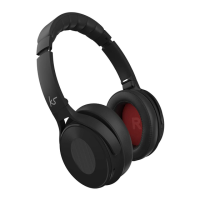
Care for your Arena
Please DON’T:
• Get the Arena wet
• Drop the Arena as this will invalidate your warranty
• Open up the Arena. There are no user serviceable parts inside
• Expose the Arena to extreme temperatures or rapid changes of hot to cold or vice versa
Please DO:
• Clean the Arena with a soft dry cloth and no detergents
Call-handling
Answer a call
When a call comes through, the headphones will play a ringtone. Press Talk (10) to
answer. During the call you can increase the volume by using the Volume + (5) and
Volume – (6) buttons on the headset
End call
During a call, press Talk (10) to end call
Re-dial
Whilst not in a call, press Talk (10) twice in quick succession to redial the last phone
number you called on your device
Playing music
Play/Pause Press (don’t hold) Play/Pause (1) to switch between play and pause status
Adjusting the volume Press the Volume + (5) and Volume – (6) buttons to control the volume (you can hold
for a continuous adjustment). The volume can also be adjusted on your device
Music selection Press the Previous track (3) or Next track (2) buttons to switch songs


 To Next Page