
 To Next Page
L
Lori FordAug 4, 2025
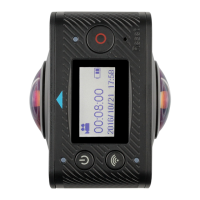
What to do if my Kitvision Immerse 360 Duo won’t turn on?
- TTravis LeeAug 4, 2025
If your Kitvision Digital Camera won’t turn on, charge it for one hour using a mains power adapter, and then try turning it on again.

What to do if my Kitvision Immerse 360 Duo won’t turn on?
If your Kitvision Digital Camera won’t turn on, charge it for one hour using a mains power adapter, and then try turning it on again.
What to do if I get an SD card error on my Kitvision Digital Camera?
If your Kitvision Digital Camera displays an SD card error, save any files you wish to keep onto your PC and then format the SD card.
How to fix no power on Kitvision Immerse 360 Duo Digital Camera?
If your Kitvision Digital Camera shows no power, turn off the camera, remove the SD card, and wait five minutes. Charge the camera for one hour, then turn it on while it is still connected to the power source.
What to do if my Kitvision Digital Camera says no SD card?
Ensure that your Kitvision Digital Camera has a compatible and formatted SD card inserted.
The camera has a built-in rechargeable Lithium-Ion battery. Please fully charge the camera before use.
The Immerse 360 Duo doesn't have internal memory. You must insert a micro SD card to record video or capture photos.
Instructions on how to turn the camera on and off using the Power/Mode button.
Configures the camera to enter Power Save mode after a period of inactivity to conserve battery.
Details on how to start and stop recording video, including operational indicators.
Instructions for taking photos, including camera beeps and LED indicators.
Utilize Wi-Fi features by downloading and installing the 'SYVR360' app for control and file management.
Step-by-step guide to connect the camera to your smartphone/tablet via Wi-Fi.
Explains various viewing effects like Planet, Dome axis, Globe, VR, Lens flip, and their impact on footage.
Configuration options including Power Save, Date & Time, Language, Factory Reset, System, and Format.
Procedure to access and navigate the camera settings menu using buttons.
Methods for connecting the camera to a computer to transfer files, either via SD card or USB cable.
Detailed technical specifications of the Immerse 360 Duo camera, including display, lens, resolution, and dimensions.
Important DOs and DON'Ts for maintaining the camera and preserving its warranty.
Solutions for common problems such as no power, SD card errors, and blurry photos.
 General
| Brand | Kitvision |
|---|---|
| Model | Immerse 360 Duo |
| Category | Digital Camera |
| Language | English |