6 7
Using video mode
1. Turn on the camera, and it will start in Video Mode. If in another mode, press Power/Mode (2) until you reach
Video Mode.
2. To start recording, press Shutter/OK (7) and the camera will begin lming. The camera will beep and the
Operation LED (6) will ash red.
3. To stop recording, press Shutter/OK (7). The video will automatically be saved on to your memory storage card.
Note: The camera will stop recording and save automatically when the memory capacity is full or it has run out of
battery power.
Using photo mode
1. Turn on the camera and press Power/Mode (2) to change to Photo Mode.
2. To take a photo, press Shutter/OK (7). The camera will beep and the Operation LED (6) will ash to
indicate a photo has been taken.
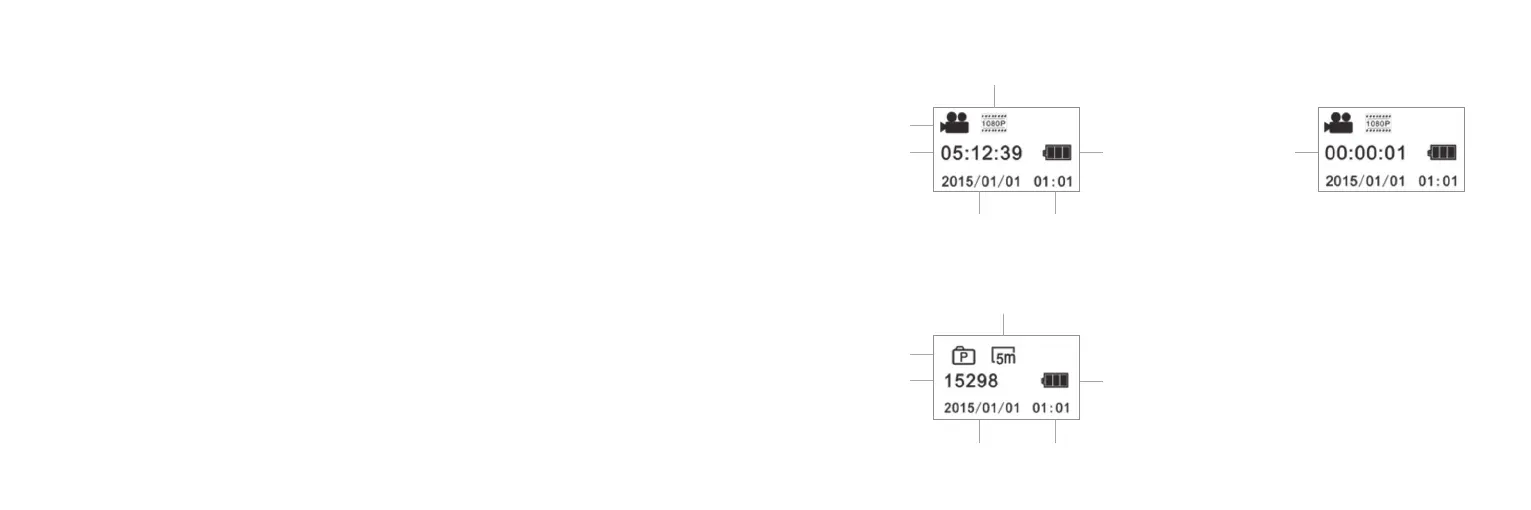
Length of
recording
Video mode icon
Recording time
left on SD card
Battery
level
Video resolution
Date Time
Photo mode icon
Remaining photo
space on SD card
Battery
level
Photo resolution
Date Time
Mode display Recording display
Photo display


 To Next Page