12
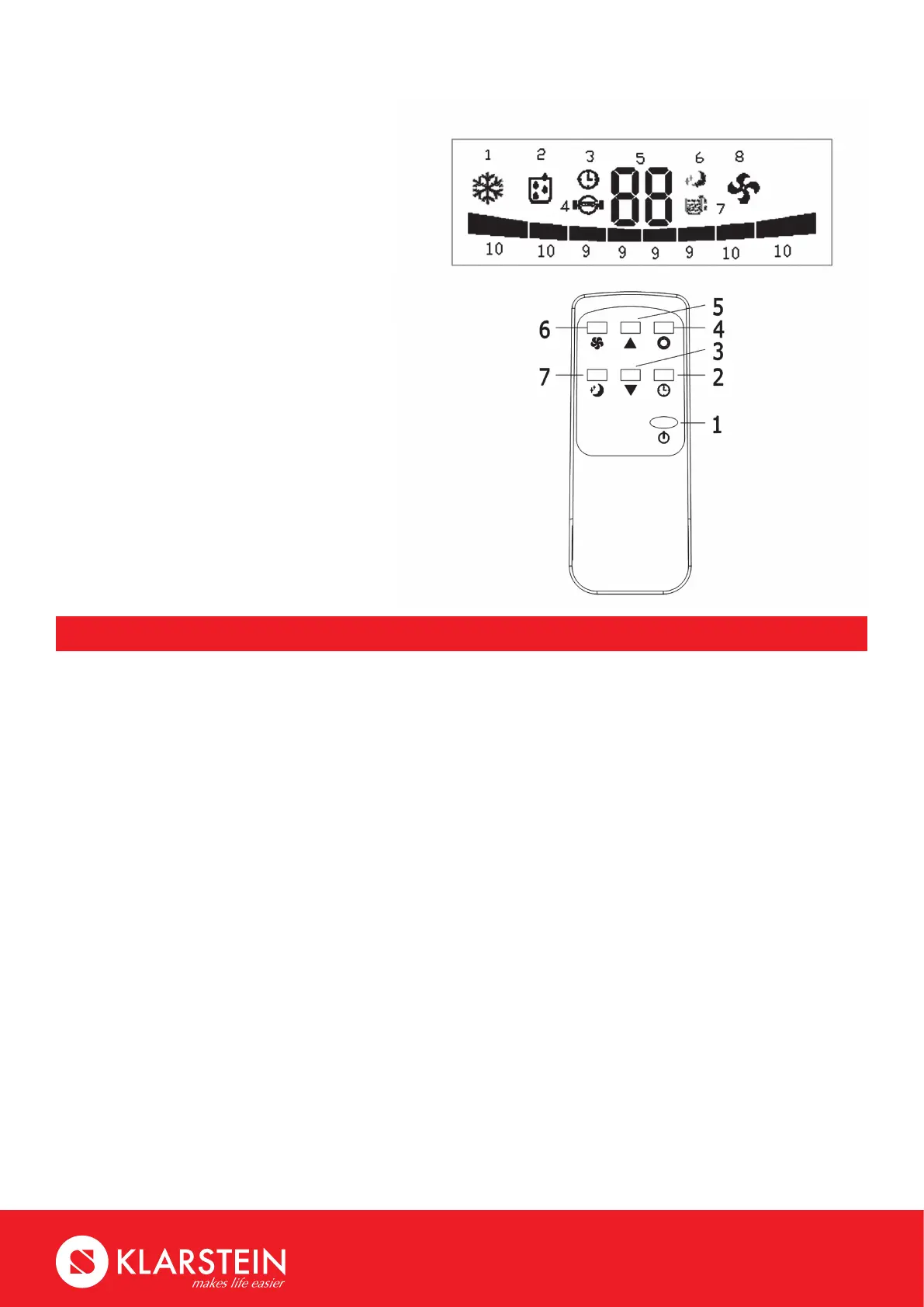
Screen
1. Cooling mode indicator
2. Dehumidifying mode indicator
3.Timermodeindicator
4. Compressor running indicator
5. Temperature display
6. Sleeping mode indicator
7. Water full indicator
8. Fan mode indicator
9. Low fan speed
10. High fan speed
Remote Control
1. Power
2. Timer
3.Down
4. Mode
5. Up
6. Fan
7. Sleep
Operation Methods
Cooling mode
• After machine turns on, default value is cooling mode with 22℃ and low fan speed.
• Press“MODE”toselectcoolingmode,coolingmodeindictorturnson.
• Press“UP”or“DOWN”toadjusttemperature(from16℃to31℃).
• Press“FAN”toselecthighorlowfanspeed.
Fan mode
• Press“MODE”toselectfanmode,fanmodeindicatorturnson.
• Press“FAN”toselecthighspeedorlowspeed.
• Temperature and sleeping function cannot be setup.
Timer mode
• Understandbymode,press“TIMER”tosetupthepower-ontime.Timerindicatorturnson.
• Underpower-onmode,press“TIMER”tosetuppower-otimer.Timerindicatorturnson.
Dehumidifying mode
• Press“MODE”toselectdehumidifyingmode,dehumidifyingmodeindicatorturnson.
• Under dehumidifying mode, sleeping function cannot be setup, and fan speed is low.
Sleeping mode
• Presskey“SLEEP”enterintosleepingmode,defaultvalueoffanspeedislow.
• Whensleepingmodeturnson,undercoolingmode,therstonehourlater,settingtemperature
will go up 1℃, the second one hour later, setting temperature will go up another 1℃, and then keep
the same .
• Sleeping mode is invalid under dehumidifying and fan mode. Under water full, machine standby
and mode conversion, sleeping mode will be cancelled.



 To Next Page