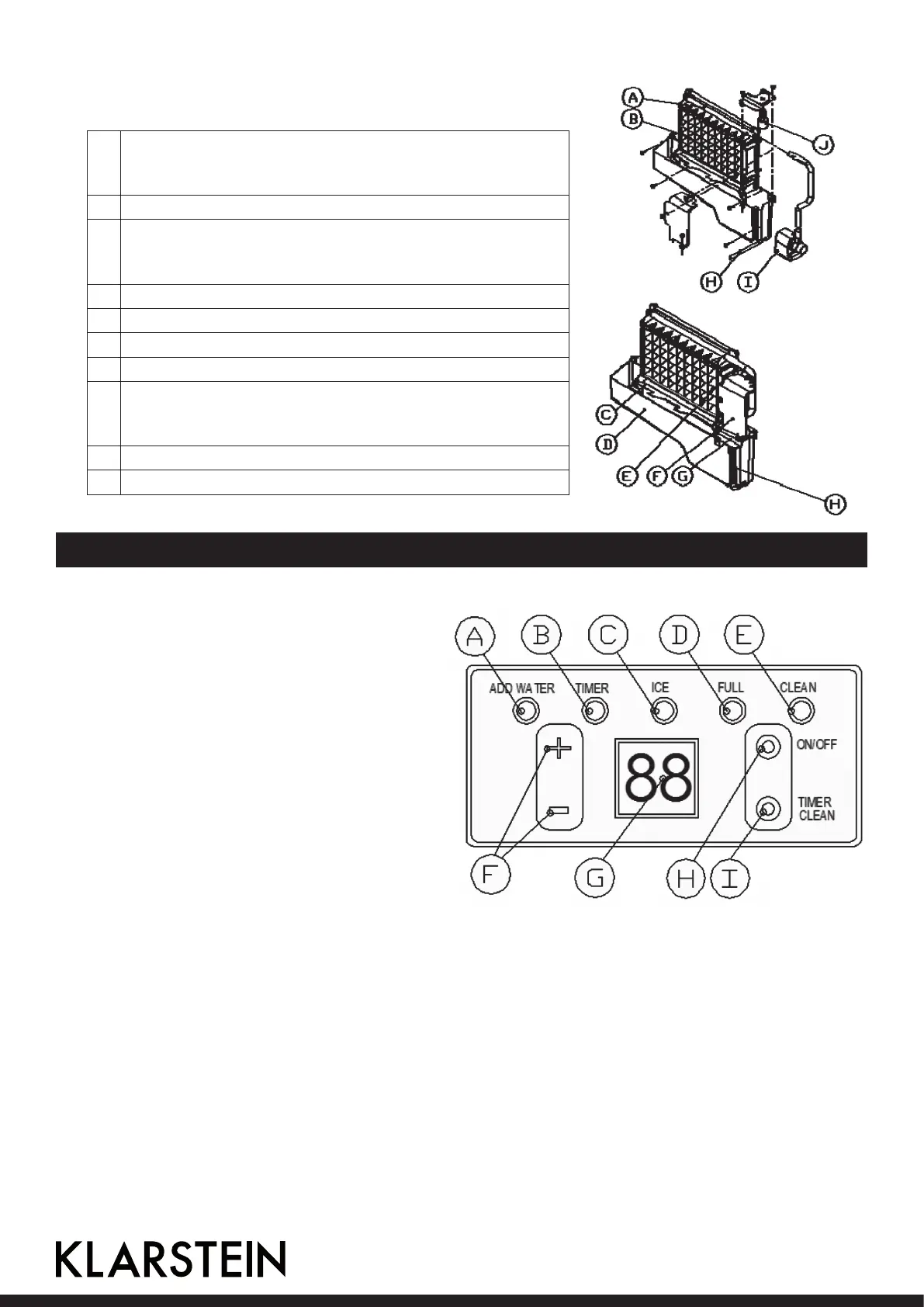
Ice-making and its water tank parts
A Water dividing pipe with nine little holes, water will ow
out from these little holes. And if no water ows out, can
be disassembled and cleaned.
B Evaporator (ice-making module)
C Ice full detecting board: Use to detect the inner cabinet
is full of ice or not, and to check the the ice-harvest pro-
cess is over or not.
D Water tank
E Water supplying pipe
F Cover board on the right side of the evaporator
G Water level switch installing plate
H Water drain pipe of the water tank when ice-making,
this pipe should be clamped in the slot of the water tank
wall; And when draining, this pipe should be pulled out.
I Water pump
J Water level detecting switch
Control Panel
A ADD
WATER
When the light ashes,
it means the water sup-
plying now; and when
the light is on always, it
means absence of water
in unit.
B TIMER When this light is on, it
means setting with the
TIMER. When the unit is
turned off, can set with
the ON-TIMER; and when
the unit is on, can set with
OFF-Timer.
C ICE If the light is on, means the unit is making ice; And if the light ashes, means the
unit is during the ice-harvest process.
D FULL When the unit is full of the ice cube, the light will be on.
E CLEAN When this light is on, water pump cleaning start. When the light ashes, water pump
cleaning stop.
F +/-
Taste
Use to adjust the ice-making process duration period length, the default setting is
zero, 1 minute adding or decreasing per each pressing of “+” or “-” button. Also to
adjust the delay time of the timer, the default setting is zero, 1 hour adding or de-
creasing per each pressing of “+” or “-” button
14





 To Next Page